
SOME OF THE WORLD’S MOST RESPECTED BRANDS TRUST MAGIC TOOLBOX

    | |
Your WP site is a gold mine. Just reveal it!
Pioneering image zoom for 8 years.
- Use lazy loading for customers with slow connection.
- Save data with on-hover initialisation.
The most powerful WordPress image zoom available
Supported Versions
- Wordpress 6.x
- Wordpress 5.x
- Wordpress 4.x
- Wordpress 3.x
- Wordpress 2.x
Works on these pages
Relied upon by WordPress store owners, Magic Zoom has been the professional choice since 2006 for gorgeous on-hover image zooming effects.
This official WordPress addon makes it easy to apply these effects to your pages. Even better - the addon gives you auto-caching, image resizing and SEO optimization as part of the dedicated WordPress features.
With free new versions regularly released, your products will always look gorgeous with Magic Zoom.
Increase conversions
Reveal the high-quality of your products, so customers know why your goods are the best. A beautiful zoom into big product images can increase your conversions (and get you more Google traffic too, with SEO-friendly URLs).
Refined for all screens and browsers
Magic Zoom is refined for all types of screens and browsers. Images are responsive and support touch-gestures on mobile phones and tablets, so every user will be satisfied, regardless of their device.Helpful support
Your success is important to us. If you encounter any issues with our Image Zoom for WordPress plugin - we're always there to help. Contact us and we'll swiftly solve any issue you might have.
Easily customised
Use internal zoom, external zoom, quick-preview and image magnifier to create the perfect style for your site. It is a simple way to raise yor profile and boost conversions. Adjust the plugin options easily and quickly from its very own settings page.



- 1 site
- Unlimited usage on 1 website
- Perfect for webstore owners
£29
One-off payment- 5 sites
- Unlimited usage on 5 sites
- Perfect for freelancers
£95
One-off payment- 10 sites
- Unlimited usage on 10 sites
- Perfect for small agencies
£175
One-off payment- Unlimited
- Unlimited use on unlimited sites
- For big agencies and enterprise
£399
One-off payment "I've been using magictoolbox code almost from the beginning. It is well done, imaginative, and compact. I've tried plenty of other image handlers but none are as good a value as these and I highly recommend them."
Wayne Eskridge, lightingshowroom.com
We've got you covered
Money back guarantee
30-day money back guarantee if you are not 100% satisfied.
Free Support
30 minutes free technical support for all customers. You can buy extra support if you need.
Instant Download
Download your product immediately after payment. Pay by credit card, PayPal or bank transfer.
Free updates
Enjoy 12 months of free updates. After that, new versions are available at 80% discount.
Customer reviews
I highly recommend but mostly I recommend the Team behind it. Superb product, superb support and all of this in a best for value money!!!
THANK YOU! (6 stars!)
Thanos Antonelos, airwargreece.com
Mick Page, loveisincyprus.com
Help and response very fast !! Very responsive on problem solving.
Top support !! Many thanks to Igor :)
Aymeric
Vipin
Jens
Submit your review
Your review has been received and will be posted soon.
Other WordPress plugins
Try our other great image effects!
 Magic Zoom Plus
 Magic Thumb
 Magic Slideshow
 Magic Scroll
 Magic 360
Screenshots
Installation
- Download the Magic Zoom plugin for WordPress (free and fully functional demo version).
-
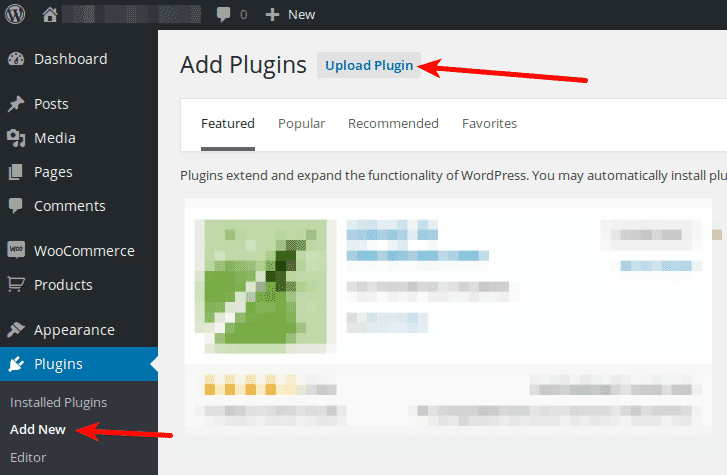
 Either upload it via your WordPress admin area. Or unzip the file on your computer and upload the magiczoom folder via FTP to /wp-content/plugins/, keeping the file and folder structure intact.
 - Activate the plugin in the 'Plugins' menu of WordPress.
The demo version is now installed! To add zooming to any image, create a shortcode. See detailed steps below.
- Buy Magic Zoom To upgrade your free and fully functional trial version of Magic Zoom (which removes the "Trial version" text), buy Magic Zoom and overwrite following file with the same one from your licensed version:
wp-content/plugins/*magiczoom/core/magiczoom.js
Video guide
Thanks to Magic Zoom's shortcode, adding image zooms to your WordPress website is effortless:
Create a zoom
Thanks to Magic Zoom's shortcode functionality, image zooms can be inserted easily on any page or post of your WordPress website. To add Magic Zoom with no coding whatsoever, simply choose where you want your zoom effect to go.
-
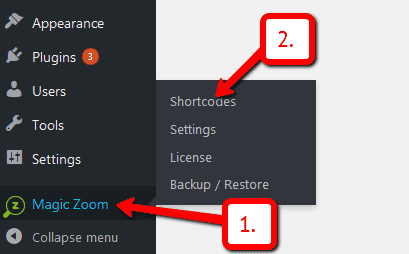
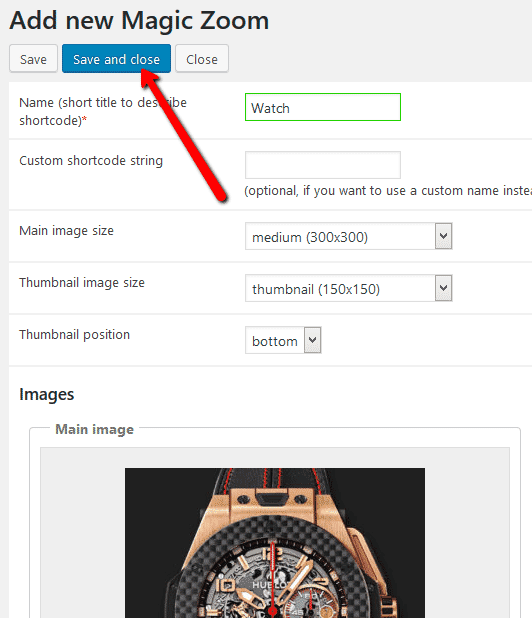
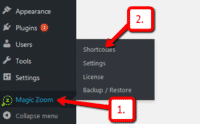 Click Magic Zoom > Shortcodes.
 -
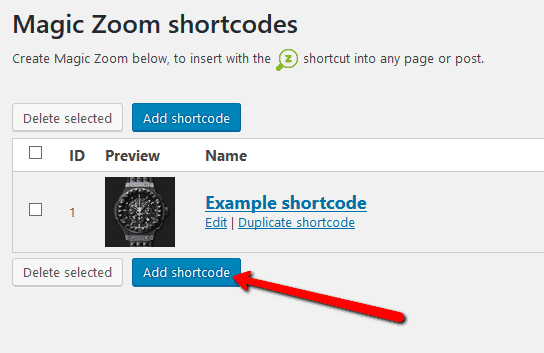
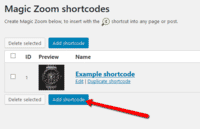 Click Add shortcode.
 -
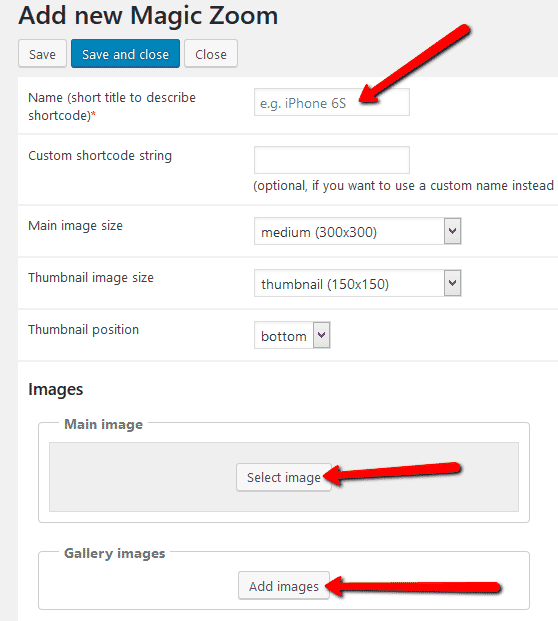
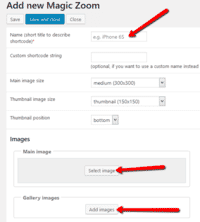 Enter Name > Go to: Main image and/or Gallery images sections > Upload your main image and gallery images. (If you only want to show gallery images, ignore 'Main image' section).
 -
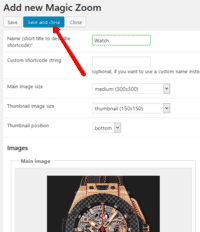 Click Save and close.
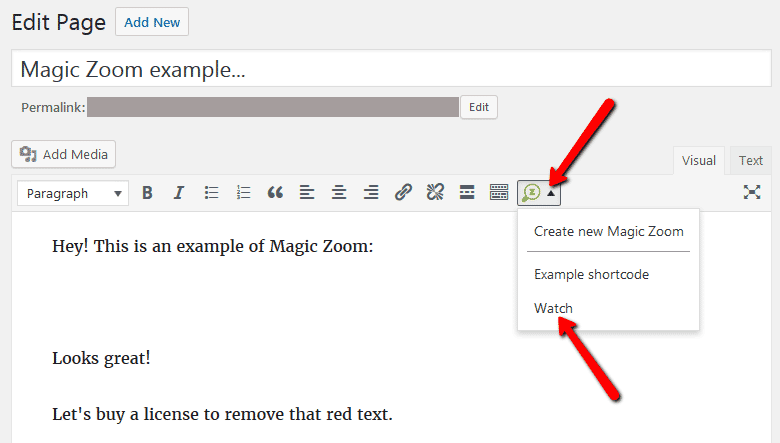
 - Open a post or page in WordPress > Place cursor where you want to insert image zoom.
-
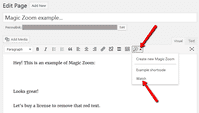 Click Magic Zoom icon > Select name of image zoom you want to insert.
 -
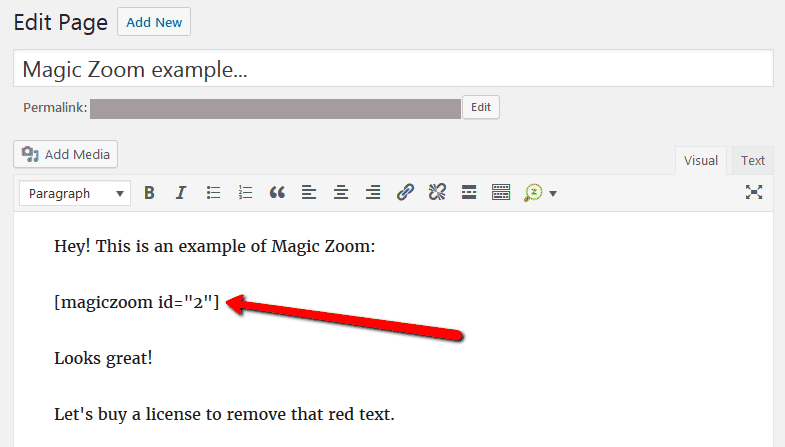
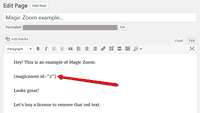 Magic Zoom shortcode will appear on your page.
 -
 Preview page to see zoom working on web page.
 - Create and add as many image zooms to your WordPress site. Enjoy!

Customize
Customize all zooms together or separately. The choice is yours!
-
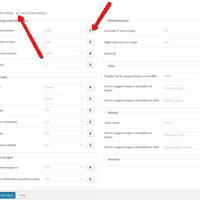
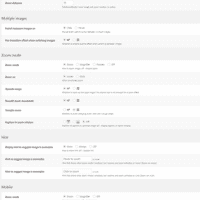 Customize all zooms throughout your WordPress website in a couple of clicks:
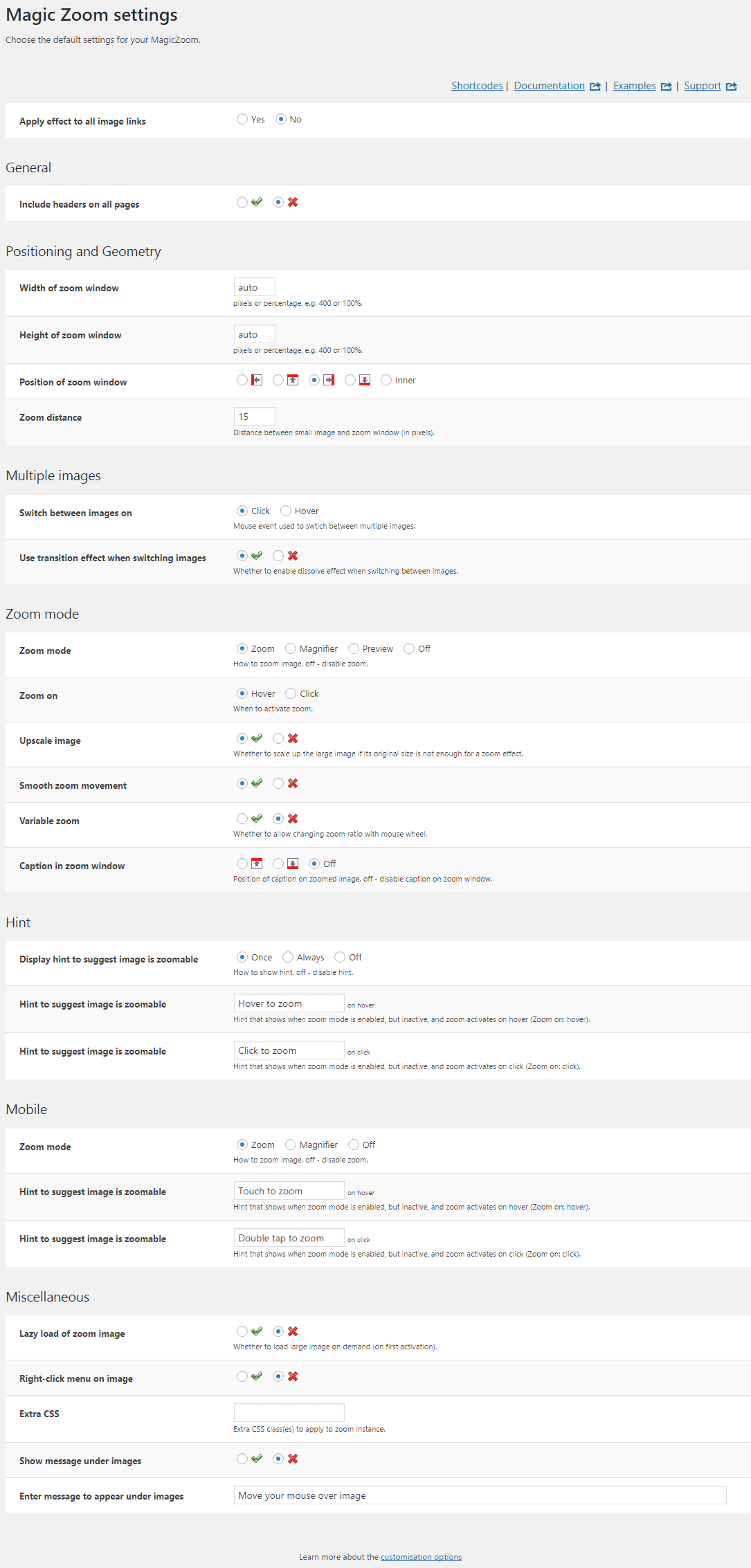
Go to: Plugins > Magic Zoom > Settings. -
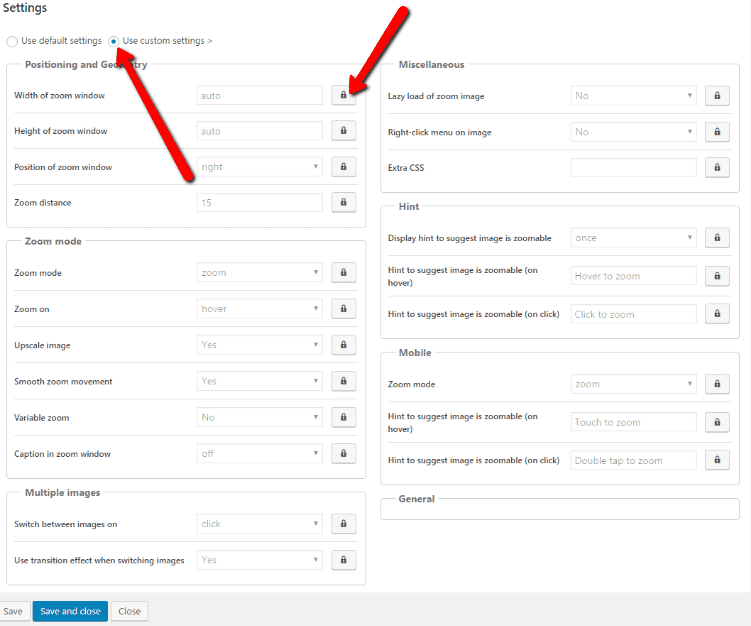
 Each zoom can be customized individually directly in the shortcode:
Go to: Magic Zoom > Shortcodes > [your shortcode] > Click 'Use custom settings' > Click 'locked icon' > Select new setting > Save changes.
Combine zoom & video
WordPress users now receive 2 tools in 1: image zoom & video!
Including videos as part of your image gallery has never been easier!




- Make sure Magic Zoom is installed on your WordPress site.
- Open existing shortcode or create a new one.
 Go to 'Gallery images' section > Click 'Add video' button.
 Enter YouTube or Vimeo video url > Click 'Add' > Save change.
 Refresh web page or insert shortcode into page/post > Video(s) appear as thumbnails on WordPress page.
- That's it!
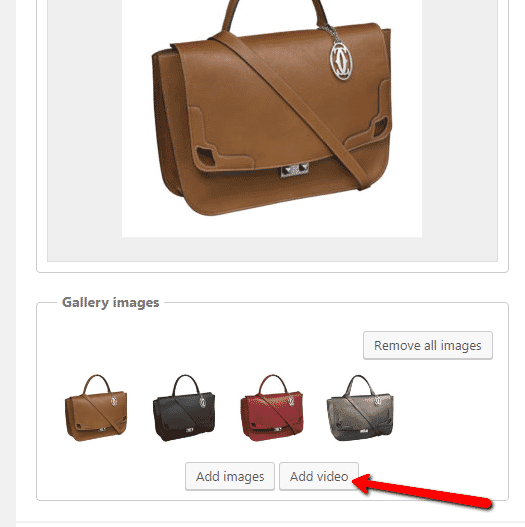
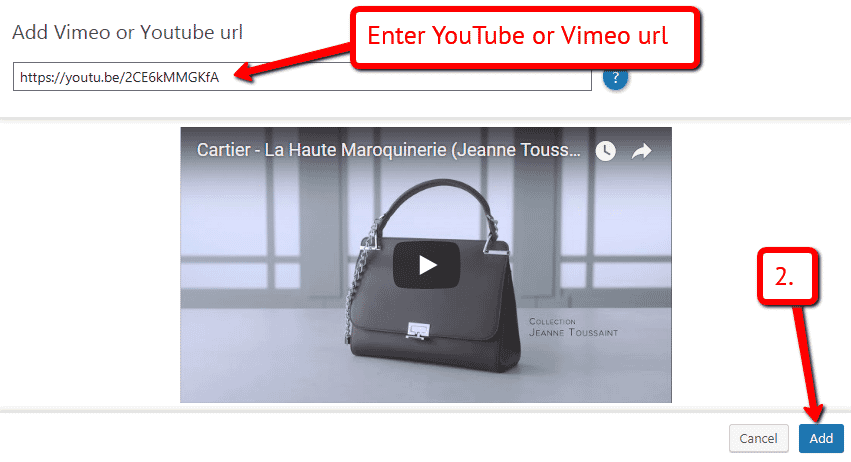

Image zoom plugin benefits
If you're looking to create a free website or blog, chances are you're using the WordPress platform. With millions of users, WordPress strives on its ease of use. That's why our WordPress image zoom plugin is easy too.
Since 2009, our Magic Zoom WordPress plugin has gone from strength to strength. Showing the tiniest details of an image in a zoom window is only the beginning. Its current top features allow any visitor using any device, to experience gorgeous zooms. Its responsive nature means your images will be viewed as you intended & fit perfectly with any WordPress responsive theme.
What's more, Magic Zoom works effortlessly on computers & handheld devices. If a screen size is smaller than the zoom window, your visitor will automatically be shown an internal zoom so they don't miss out on any intricate detail.
How an image zoom works
Magic Zoom works by linking a small image on your web page to a large image which creates the detailed zoom effect. Add a MagicZoom class to the mix & you're good to go. Don't worry if coding's not your thing. All you need to know is how to copy & paste.
Thanks to the simple interface of WordPress, uploading this image plugin takes just a few clicks using the 'Plugins' section on your Dashboard. Our Development dudes have designed Magic Zoom to look stunning immediately, so no need for customizations.
Customize your image zoom
But what if you what to change how Magic Zoom looks? You can. The Magic Zoom Settings page offers over 20 options. Since our faithful Magic Magnify tool was merged with Magic Zoom, a popluar choice is to change from a zoom window appearing when you hover an image to a magnify effect. Easy enough to do. Again, just takes a few clicks and all your images will be instantly updated.
Use large images
Speaking of images, make sure your large images are large. There's nothing worse for a visitor than hovering an image for more insight only to be shown exactly the same image, or something only slightly bigger. They want in-depth detail, so use big images. Any large image that is 1200+ pixels width will look amazing. And your visitors will thank you for it.
Download the free trial
So, whether you're a WordPress beginner or are an experienced web developer creating amazing looking WordPress sites, Magic Zoom can be as easy or as advanced as you like. Download the free trial from this page and see how Magic Zoom can instantly enhance the look & feel of your website.
Uninstallation
Thanks for trying Magic Zoom on your WordPress site! What did you hope Magic Zoom could do? How can we improve it? Let us know, we're always improving our tools based on customer feedback.
- Delete Magic Zoom code from your content.
- Go to the Plugins menu of WordPress > 'Magic Zoom for WordPress' plugin > Click 'Deactivate'.
- Once page has refreshed, go back to 'Magic Zoom for WordPress' plugin > Click 'Delete' > Click 'Yes, delete these files'.
- Magic Zoom is now uninstalled.