
Works on these pages:
Relied upon by WP e-Commerce store owners, has been the professional choice since 2009 for pioneering deep zoom effects.
This official WP e-Commerce plugin makes it easy to apply these effects to your pages. Even better - the plugin gives you auto-caching, image resizing and SEO optimization as part of the dedicated WP e-Commerce features.
With free new versions regularly released, your products will always look gorgeous with .
Features you'll love...
Installation
- Download the plugin for use with WordPress e-Commerce (no longer available to new customers)
(If you don't use the WP e-Commerce plugin, please use our standard WordPress plugin for content). -
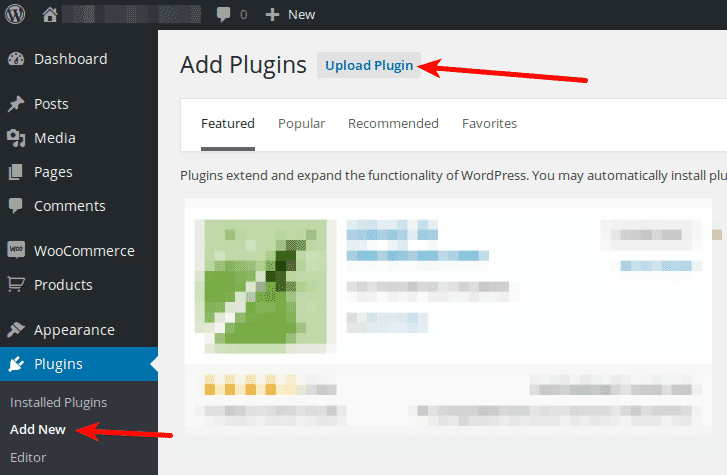
 Either upload it via your WordPress admin area. Or unzip the file on your computer and upload the -wpecommerce folder via FTP to /wp-content/plugins/, keeping the file and folder structure intact.
 - Activate plugin in the Plugins menu of WordPress.
- Go to Magic Touch plugin settings page and enter your Magic Touch™ key. To get your ID, login to your Magic Touch™ account.
- It's ready to use!
- Buy To upgrade your free and fully functional trial version of (which removes the "Trial version" text), buy and overwrite following file with the same one from your licensed version:
wp-content/plugins/mod_wpecommerce_/-wpecommerce/core/.js
Multiple images
Swapping between many images is already a standard feature in . But if you have lots of images, the page can look complicated.
Make your thumbnails look slick and organised with Magic Scroll for WP e-Commerce. It neatly contains the images adds arrows to slide between them. Example:









- Simply activate Magic Scroll on the options page.
- To remove the "Please upgrade" text, buy a license and overwrite the wp-content/plugins/mod_wpecommerce_magiczoomplus/magiczoomplus-wpecommerce/core/magicscroll.js file with that from your licensed version.
Uninstallation
Thanks for trying on your WP e-Commerce site! What did you hope could do? How can we improve it? Let us know, we're always improving our tools based on customer feedback.
- Go to the Plugins menu of WordPress > ' for WP e-Commerce' plugin > Click 'Deactivate'.
- Once page has refreshed, go back to ' for WP e-Commerce' plugin > Click 'Delete' > Click 'Yes, delete these files'.
- is now uninstalled.
Customer reviews
Submit your review
Your review has been received and will be posted soon.
Other WP e-Commerce plugins
Try our other great image effects!
 Magic Zoom
 Magic Zoom Plus
 Magic Thumb
 Magic 360
This plugin was built for use with Dan Milward's popular WordPress e-Commerce plugin, which turns WordPress into an ecommerce platform. For help, please contact us.