
 Zara 2014
 Zara 2014
 Zara 2014
 Zara 2014
 Zara 2014
 Zara 2014
 Zara 2014
 Zara 2014
 Zara 2015
 Zara 2015
 Zara 2015
 Zara 2015
 Zara 2015
 Zara 2015
 Zara 2015
 Zara 2015
 Zara 2015
 Zara 2015
- Product details page
- Home page
- New products block
- Specials block
- Featured block
- Manual install elsewhere
Use it anywhere!
Features you'll love...
- Responsive
- Fast
- Built with SEO in mind
- Image caching
- Easily customisable
- Auto image resizing
- Scrollable thumbnails
- Supports all templates
- Watermarked images
- On-demand loading
- Regularly updated
- jQuery compatible
- One-off payment
- Zen-Cart 1.5.x series
- Zen-Cart 1.3.x series
Show customers your whole product range in a beautiful scrolling slider.
Magic Scroll is a Zen Cart home page slider and Zen Cart featured products slider. That's not all. This Zen Cart image slider can also be used on your Product page, Specials block and New Products section.
Keep every section of your online store fresh with a choice of scrolling effects. Choose from 3D carousel; Classic scroll; Animated scroll and Cover-flow (popular with Apple products).
Download the free trial today and be amazed how quickly this image slider transforms your website.
Installation
- Download Magic Scroll for Zen Cart (free and fully functional demo version).
- Unzip the file on your computer and FTP the magicscroll folder to your Zen Cart directory (on your server), keeping the file and folder structure intact.
-
 Go to http://www.yoursite.url/magicscroll/ in your browser > click 'Install' > click 'Continue' (replace yoursite.url with your domain name).
 -
 The demo version is now installed!
  Go to [Admin panel > Magic Toolbox > Magic Scroll] and configure Magic Scroll how you want it.
- Buy Magic Scroll To upgrade your free and fully functional trial version of Magic Scroll (which removes the "Trial version" text), buy Magic Scroll and overwrite following file with the same one from your licensed version:
includes/templates/YOUR-TEMPLATE-FOLDER/jscript/magicscroll.js


Multiple images
Swapping between the main product image and thumbnail images is a standard feature of our Zen Cart image zoom tools (Magic Zoom Plus, Magic Zoom & Magic Thumb). But what happens when you have lots of images for the same product? An easy way to keep thumbnail images contained is to use Magic Scroll.
Magic Scroll allows customers to scroll through each product image using arrows. It's the perfect way to keep any product page layout looking slick.
The example below shows Magic Zoom Plus combined with Magic Scroll:









To achieve this look, simply:
- Install and buy Magic Zoom Plus for Zen Cart.
- Activate Magic Scroll option on the Magic Zoom Plus settings page in Zen Cart.
- To remove the Magic Scroll trial version message, buy discounted license from Magic Zoom Plus order page:
a) Log in to your Magic Toolbox Account.
b) Click 'Download/View' button next to your Magic Zoom Plus order.
c) Click orange button: Purchase Magic Scroll 35% discount (pay £18.85 instead of £29).
d) Follow payment process. - Download magicscroll.js file from your license and upload to /includes/templates/YOUR-TEMPLATE-NAME/jscript/magicscroll.js on your server.
- Clear browser cache. The 'Trial version' message will disappear.
Setup a scroll
Add a carousel/scroll to anywhere on your Zen Cart site. It is particularly easy to add scrolls in these places:
- Product pages
- "Featured" blocks
- "Specials" blocks
- "What's new" blocks
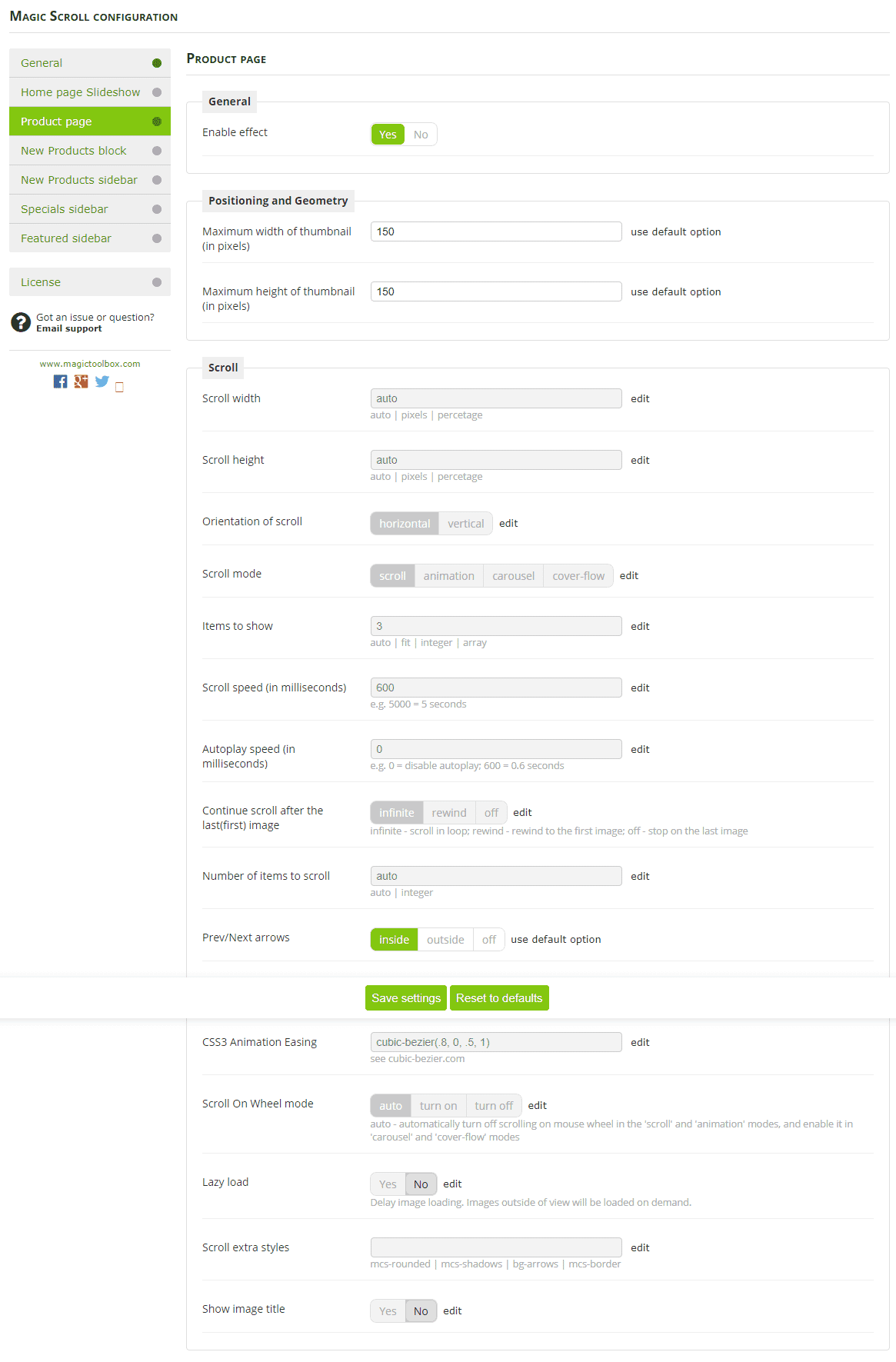
To create a scroll, go to [Admin panel → Magic Toolbox → Magic Scroll].
Then choose one of these options:
- Use effect for 'Featured products' block
- Use effect for 'Specials' block
- Use effect for 'Whats new' block
- Use effect for product page
Then choose your settings.
Home page carousel
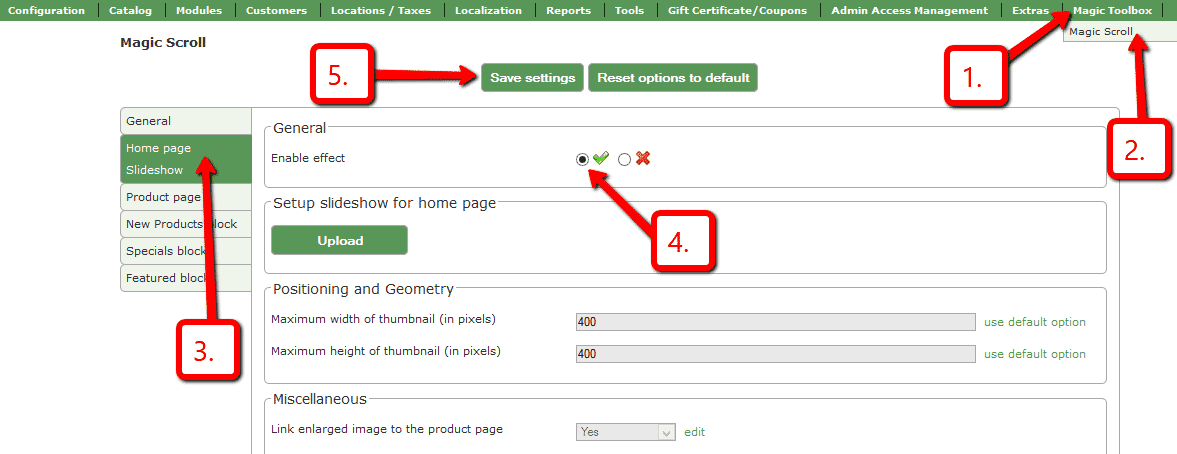
Add an amazing carousel to your homepage in just a couple of clicks:
-
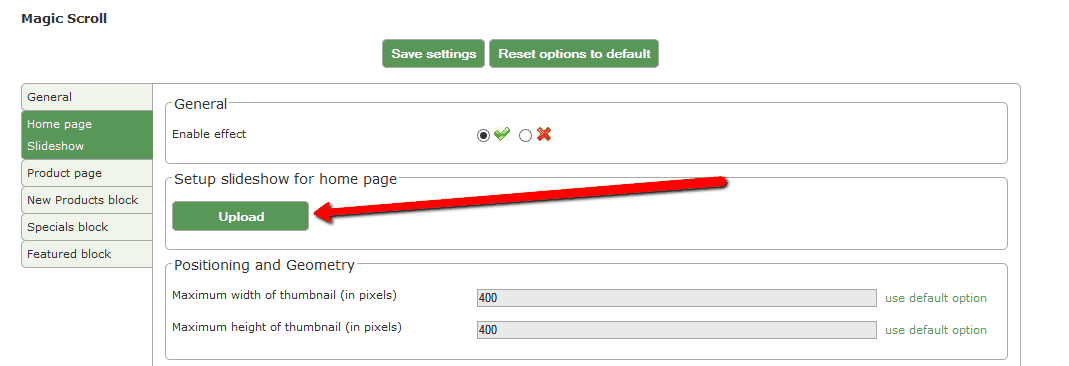
 Enable Home page Slideshow section.
 -
 Select Upload images and browse your computer for your set of carousel images.
 - Your slideshow is now working!
- Enjoy over 30 carousel customizations. Try them all and see which works best for your site.
Uninstallation
Thanks for trying Magic Scroll on your Zen Cart site! What did you hope Magic Scroll could do? How can we improve it? Let us know, we're always improving our tools based on customer feedback.
- Go to http://yoursite.url/magicscroll/ in your browser and click 'Uninstall' (replace yoursite.url with your domain name).
- Delete the magicscroll folder from your Zen Cart directory (on your server).
- Magic Scroll is now uninstalled.
FAQ
Can I change background colour of carousel?
Yes! By default, the Carousel & Cover-Flow modes use a grey/black background colour. You can change the Hex Colour to anything you want. With over 16,000 hex colours available, you'll be spoilt for choice. Simply add the CSS code you need to the Magic Scroll CSS file.
Carousel background
.MagicScroll[data-mode="carousel"] {
    background-color: <your-colour>;
}
Cover-flow background
.MagicScroll[data-mode="cover-flow"] {
    background-color: <your-colour>;
}
Customer reviews
Wallis, newnaturalsonline.com
Submit your review
Your review has been received and will be posted soon.
Other Zen Cart plugins
Try our other great image effects!
 Magic Zoom
 Magic Zoom Plus
 Magic Thumb
 Magic Slideshow
 Magic 360
The Magic Scroll addon uses JavaScript (it does not use Flash) so it works in all major browsers including Internet Explorer, Firefox, Chrome, Safari and Opera. It also works on mobile devices including iPhone and iPad.
If you have questions on installing/configuring this Zen Cart carousel, please contact us and we will help you.