





- Product details page
- Category page (xcart 4.x)
- Search page (xcart 4.x)
- Featured products block (xcart 4.x)
- New Arrivals block (xcart 4.x)
- Bestsellers block (xcart 4.x)
- Recently Viewed block (xcart 4.x)
- Manual install elsewhere
Supported pages & blocks
Features you'll love...
- Responsive
- Fast
- Built with SEO in mind
- Image caching
- Easily customisable
- Auto image resizing
- Scrollable thumbnails
- Supports all templates
- Watermarked images
- On-demand loading
- Regularly updated
- jQuery compatible
- One-off payment
- X-Cart 4.0 - 4.7.x
- X-Cart 5 (Mobile, Business, Premium)
What image effects do your customers like best? According to our research, there are 2 - either hover zoom or fullscreen enlarge. That's what shoppers like best.
Use this advantage in your X-Cart store. The magnificent Magic Zoom Plus has both effects in a single tool. Simply hover to zoom or click to enlarge images to fullscreen.
Simple to use and highly customisable (32 easy options), this is the best X-Cart image zoom tool to instantly raise your conversions. We guarantee you'll love it, or request a full refund within 30 days.
Designed for both X-Cart 4 and 5, install the free trial version of this X-Cart image plugin. Get it now and join over 20,000 happy customers!
Verified by X-Cart:
Read reviews of Magic Zoom Plus on the official marketplace for X-Cart 5 addons.
Live demos

Installation
X-Cart 4.x installation
- Download Magic Zoom Plus for X-Cart 4.x (free and fully functional demo version).
- Unzip the file on your computer and FTP the magiczoomplus folder to your X-Cart directory (on your server), keeping the file and folder structure intact.
- Go to http://www.yoursite.url/magiczoomplus/ in your browser > click 'Install' (replace yoursite.url with your domain name).
- Go to http://your.site.url/admin/magiczoomplus.php and configure Magic Zoom Plus as you wish.
- That's all

- Buy Magic Zoom Plus To upgrade your free and fully functional trial version of Magic Zoom Plus (which removes the "Trial version" text), buy Magic Zoom Plus and overwrite following file with the same one from your licensed version:
modules/MagicToolbox/magiczoomplus/magiczoomplus.js
X-Cart 5 installation
Automatic installation
Buy Magic Zoom Plus directly from X-Cart 5 Marketplace!

- Go to Magic Zoom Plus on the X-Cart market to buy this X-Cart 5 addon.
- Click 'Add to cart' > Follow payment process.
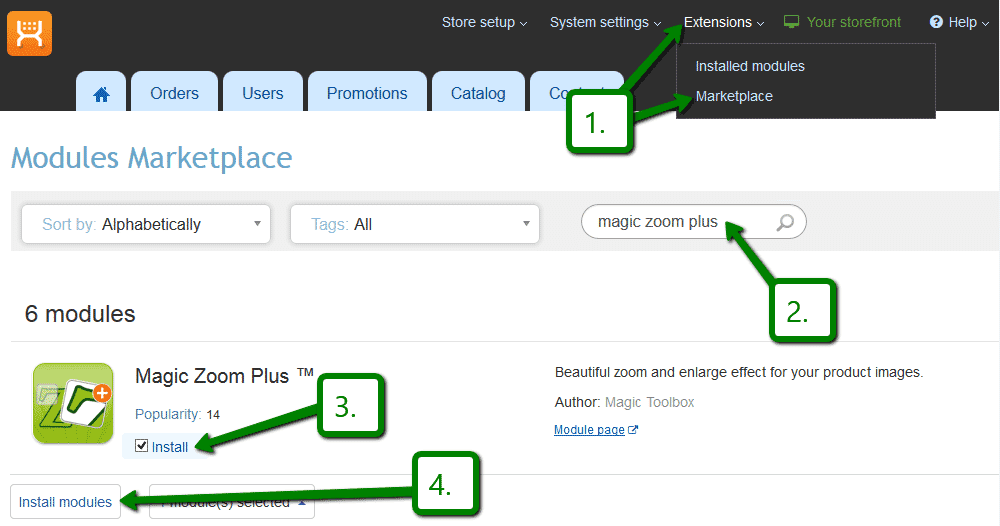
 Go to: the Admin area of your store > Extensions > Marketplace.
- Enter 'Magic Zoom Plus' in the search field.
- Tick checkbox 'Install' next to Magic Zoom Plus module name.
- Click 'Install modules' button
- Magic Zoom Plus is now installed.
- To customize Magic Zoom Plus, go to: Extensions > Installed modules > Magic Zoom Plus module > Click 'Settings'. Configure how you would like Magic Zoom Plus to look on your website.
Manual integration
Alternatively, you can follow these instructions to install Magic Zoom Plus manually on your X-Cart 5 website.
- If a previous version of the module is installed, uninstall it.
- Download Magic Zoom Plus for X-Cart 5 (free and fully functional demo version).
- Unzip the contents of the ZIP file and upload the classes and skin folders to your X-Cart 5 directory.
- Login to your X-Cart 5 admin area and re-build the cache: System settings -> Re-build cache link in the menu.
- Enable the Magic Zoom Plus module on the 'Installed Modules' page and press 'Save changes' button via Extensions > Installed modules.
- Go to the Magic Zoom Plus module settings page via Extensions > Installed modules > Magic Zoom Plus settings and configure Magic Zoom Plus how you want it.
- Magic Zoom Plus is ready to use!
- Buy Magic Zoom Plus To upgrade your free and fully functional trial version of Magic Zoom Plus (which removes the "Trial version" text), buy Magic Zoom Plus and overwrite following file with the same one from your licensed version:
skins/customer/modules/MagicToolbox/MagicZoomPlus/js/magiczoomplus.js
Multiple images
Swapping between many images is already a standard feature in Magic Zoom Plus. But if you have lots of images, the page can look complicated.
Make your thumbnails look slick and organised with Magic Scroll for X-Cart. It neatly contains the images adds arrows to slide between them. Example:









- Simply activate Magic Scroll on the Magic Zoom Plus options page.
- To remove the "Please upgrade" text, buy a license and overwrite the /[current skin directory]/magictoolbox/core/magicscroll.js file with that from your licensed version.
Spin + Zoom (X-Cart 4.x)




Combine an image zoom + 360 JavaScript spin on your product page (like the example above).
- Install the X-Cart extension for Magic Zoom Plus.
- Install the X-Cart extension for Magic 360.
- Create a new product or open an existing one.
-
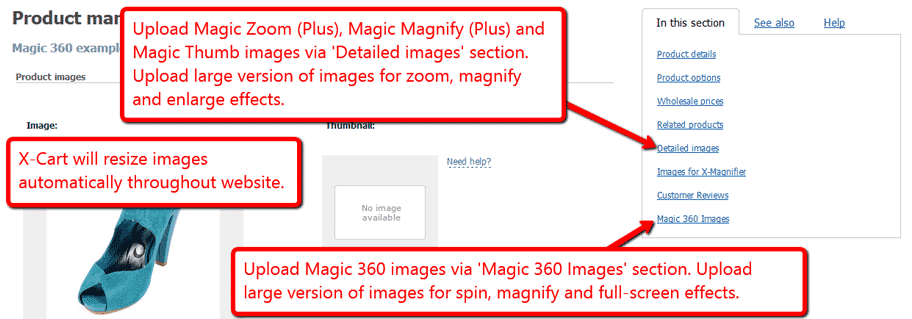
 Upload your zoom and enlarge images via the 'Detailed images' section. Upload your 360 spin images via the 'Magic 360 Images' section.
Product variants (X-Cart 5)






Do your products come in different colours or styles?
Magic Zoom Plus supports X-Cart 5 product variants out of the box.
Configure products so each variant has its own zoomable image.
Using variants keeps your page clutter free, at the same time displaying all your wares.
Uninstallation
Thanks for trying Magic Zoom Plus on your X-Cart site! What did you hope Magic Zoom Plus could do? How can we improve it? Let us know, we're always improving our tools based on customer feedback.
- Go to http://www.yoursite.url/magiczoomplus/ in your browser > click 'Uninstall' (replace yoursite.url with your domain name).
- Delete the magiczoomplus folder from the root of your X-Cart directory (on your server).
- Magic Zoom Plus is now uninstalled.
- Login to your X-Cart 5 admin area.
- Go to: Extensions > Installed modules > Find Magic Zoom Plus > Click 'basket' icon to uninstall Magic Zoom Plus.
- Magic Zoom Plus is now uninstalled.
Customer reviews
Gary Milne, ecommweb.co.uk
Josh Cook, atkinsrotary.com
Sabin
Evyater Rabbani, jewelrynest.com
Submit your review
Your review has been received and will be posted soon.
Other X-Cart modules
Try our other great image effects!
 Magic Zoom
 Magic Thumb
 Magic 360
 Magic Slideshow
 Magic Scroll