




Works on these pages:
- Product details page
- Category page
- Latest block
- Featured block
- Popular block
- Manual install elsewhere
Customers shopping online pay more attention to products than if they were visiting a high street shop. So how do you satisfy customer wants and needs?
Install a product image zoom and let your images do the talking!
Use large product images and CubeCart will automatically resize them throughout your store. This CubeCart image zoom extension uses the large image versions to create a detailed view of every product.
Transform any product image into a zoomable image on Product & Category pages. You can also enable Magic Zoom on the Latest, Featured & Popular blocks of your store. All controlled by a central Settings page, this image zoom extension is flexible and easy to customize. Simply point & click.
Download the free trial of Magic Zoom and try it today. If you need a lightbox effect too, try Magic Zoom Plus. Whichever image zoom tool you choose, buyers will appreciate close-up details of your products.
Verified by CubeCart:
Read reviews of Magic Zoom on the official marketplace for CubeCart 5/6 extensions.
Features you'll love...- Responsive
- Fast
- Built with SEO in mind
- Image caching
- Easily customisable
- Automatically resizes images
- Scrollable thumbnails
- All templates supported
- Instant watermarks for images
- On-demand loading
- Regularly updated
- jQuery compatible
- One-off payment
- Responsive
- Fast
- Built with SEO in mind
- Image caching
- Easily customisable
- Automatically resizes images
- Scrollable thumbnails
- All templates supported
- Instant watermarks for images
- On-demand loading
- Regularly updated
- jQuery compatible
- One-off payment
Installation
- Download the module for Magic Zoom CubeCart 5/6 or CubeCart 3/4 (free and fully functional demo version).
- Unzip the file on your computer and FTP the magiczoom folder to the root of your CubeCart website (on your server), keeping the file and folder structure intact.
-
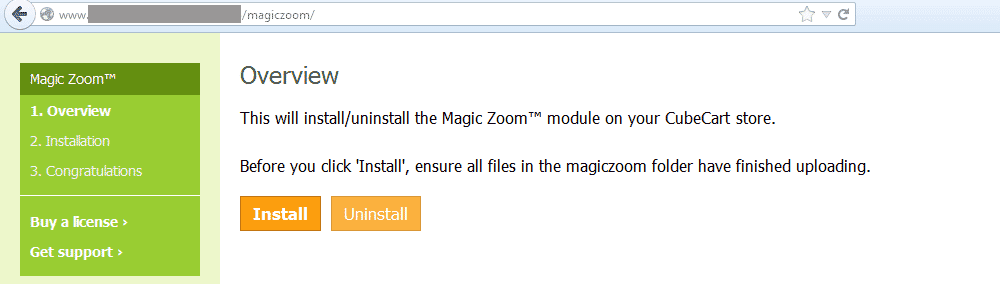
 Go to http://www.yoursite.url/magiczoom/ in your browser and click 'Install' (replace yoursite.url with your domain name).
 -
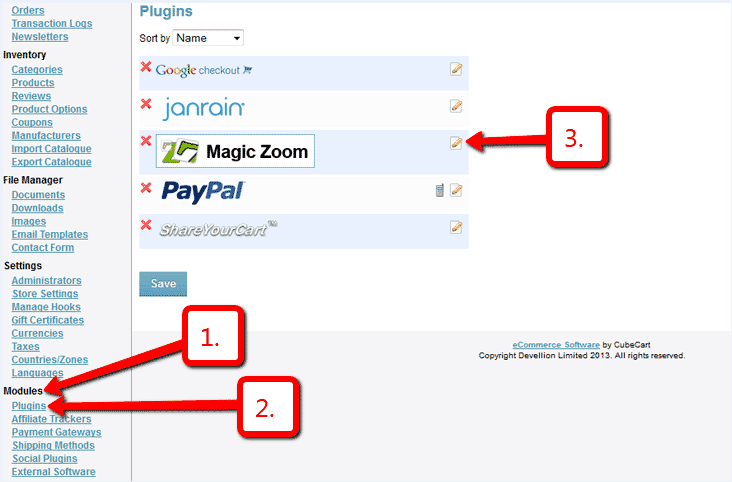
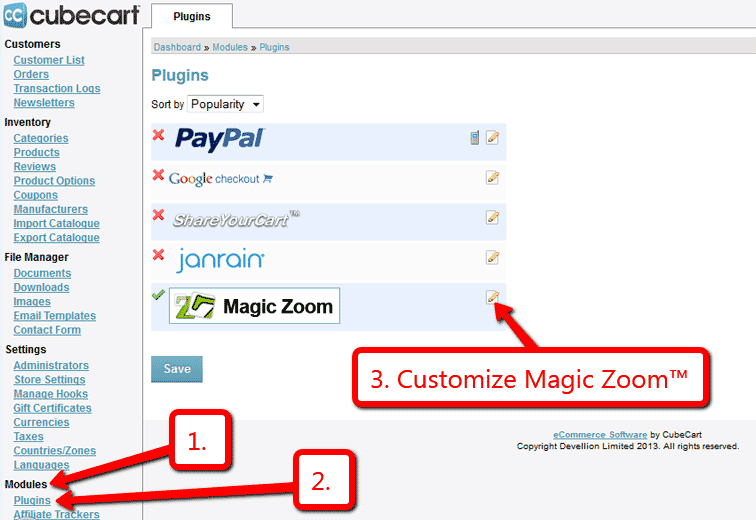
 Go to Admin panel > Modules > Plugins > Magic Zoom > Edit.
 -
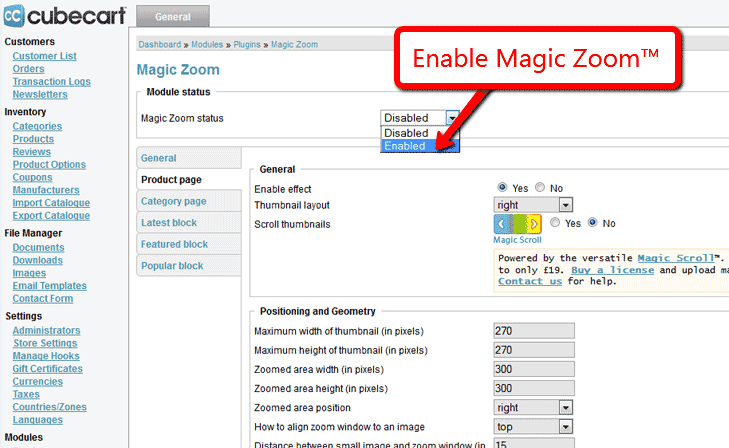
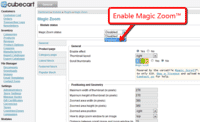 Remain on Magic Zoom settings page and enable module.
 - The demo version is now installed!
-
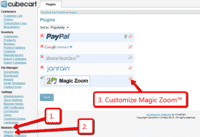 Customize the Magic Zoom plugin through Modules > Plugins > Magic Zoom > Edit menu in your CubeCart admin panel.
 -
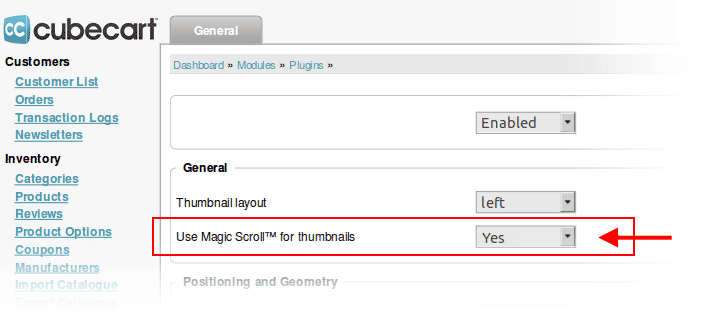
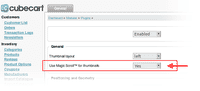 Activate Magic Scroll to enjoy organised thumbnails on your product page: Modules > Plugins > Magic Zoom > Edit > Use Magic Scroll™ for thumbnails > Select 'Yes' > Save changes.
 - Buy Magic Zoom
To upgrade your free and fully functional trial version of Magic Zoom (which removes the "Trial version" text), buy Magic Zoom and overwrite following file with the same one from your licensed version:
CubeCart 5/6:
modules/plugins/MagicZoom/core/magiczoom.js
CubeCart 3/4:
modules/magictoolbox/MagicZoom/core/magiczoom.js
Multiple images
Swapping between many images is already a standard feature in Magic Zoom. But if you have lots of images, the page can look complicated.
Make your thumbnails look slick and organised with Magic Scroll for CubeCart. It neatly contains the images adds arrows to slide between them. Example:









- Simply activate Magic Scroll on the Magic Zoom options page.
- To remove the "Please upgrade" text, buy a license and overwrite the /modules/magictoolbox/core/magicscroll.js file with that from your licensed version.
Uninstallation
Thanks for trying Magic Zoom on your CubeCart site! What did you hope Magic Zoom could do? How can we improve it? Let us know, we're always improving our tools based on customer feedback.
- Go to: Admin panel > Modules > Plugins > Magic Zoom > Edit > 'Magic Zoom status' option > Select 'Disabled' to disable module.
- Go to http://www.yoursite.url/magiczoom/ in your browser and click 'Uninstall' (replace yoursite.url with your domain name).
- Delete the magiczoom folder from the root of your CubeCart website (on your server).
- Magic Zoom is now uninstalled.
Customer reviews
Submit your review
Your review has been received and will be posted soon.
Other CubeCart plugins
Try our other great image effects!
 Magic Zoom Plus
 Magic Thumb
 Magic Slideshow
 Magic Scroll
 Magic 360
This module uses your original product images. You don't need to upload new images, just ensure that your large product images are at least 500px width and as much as 1000px to create a really high-resolution zoom. The module automatically resizes your large images to create thumbnails. You can set the size of the thumbnails in the module settings file.
For help installing this or any of our other 6 CubeCart modules, contact us.
Magic Zoom for CubeCart will zoom into your images on hover / rollover / mouseover. This zoom software is built with JavaScript and CSS and works on all major browsers (Internet Explorer, Firefox, Safari, Opera, Chrome). For the best compatibility with iPhone / iPad, choose the CubeCart module for Magic Zoom Plus which will enlarge the image when you tap it.
This module was created specially for CubeCart shopping cart software. It is updated regularly and always supports the latest version of CubeCart.