

Works on these pages:
- Product details page
- Manual install elsewhere
- CubeCart v6
- CubeCart v5
- CubeCart v4
- CubeCart v3
Want to increase conversions? We have the answer - Magic 360!
This 360 product spin provides customers with a 360 degree view of your products. Every detail can be seen thanks to this 3-in-1 tool: Spin, Magnify and Full-screen view. This is real life, online.
Customers love it and all you need is a set of 360 degree images to create the perfect viewing experience.
Make your store more attractive today - try Magic 360 with a 30-day moneyback guarantee.
Verified by CubeCart:
Read reviews of Magic 360 on the official marketplace for CubeCart 5/6 extension.
Features you'll love...- Responsive
- Fast
- Built with SEO in mind
- Image caching
- Easily customisable
- Automatically resizes images
- Scrollable thumbnails
- All templates supported
- Instant watermarks for images
- On-demand loading
- Constantly updated
- no jQuery required
- One-off payment
- Responsive
- Fast
- Built with SEO in mind
- Image caching
- Easily customisable
- Automatically resizes images
- Scrollable thumbnails
- All templates supported
- Instant watermarks for images
- On-demand loading
- Constantly updated
- no jQuery required
- One-off payment
Installation
Important: Magic 360 replaces the CubeCart image gallery. When Magic 360 is installed, only the 360 spin will display on product page (static images will not show).
- Download the module for Magic 360 CubeCart 5/6 (free and fully functional demo version).
- Unzip the file on your computer and FTP the magic360 folder to the root of your CubeCart website (on your server), keeping the file and folder structure intact.
-
 Go to http://www.yoursite.url/magic360/ in your browser and click 'Install' (replace yoursite.url with your domain name).
 -
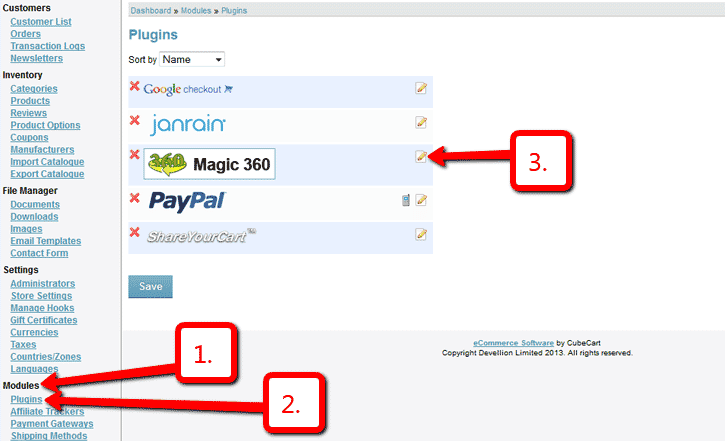
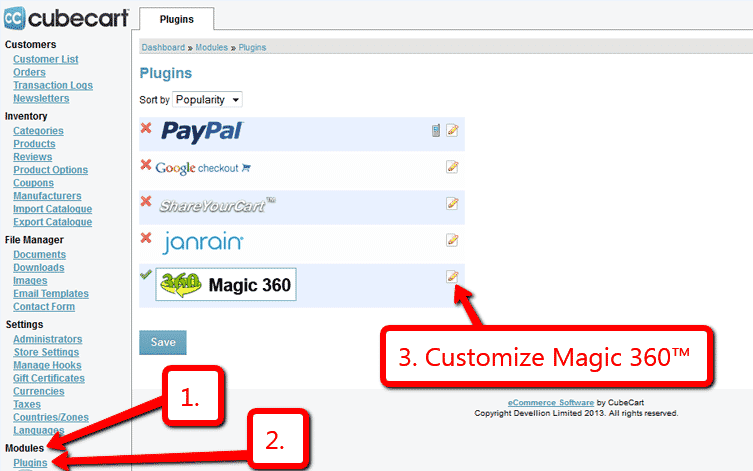
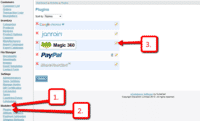 Go to Admin panel > Modules > Plugins > Magic 360 > Edit.
 -
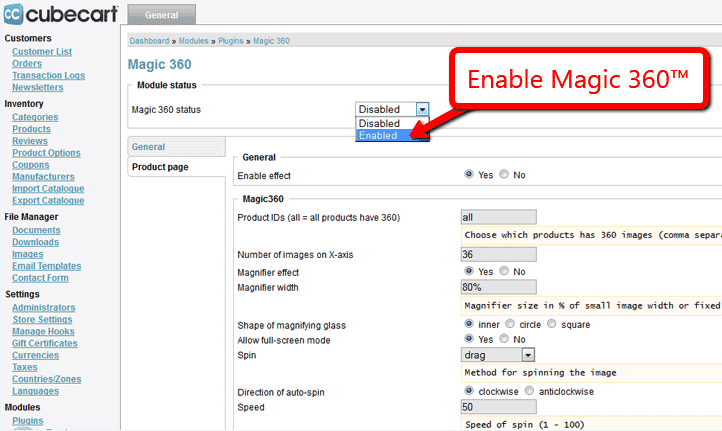
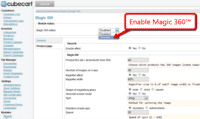 Remain on Magic 360 settings page and enable module.
 -
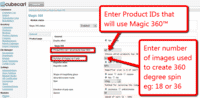 Still on the Magic 360™ settings page, choose which products should have the Magic 360 effect by modifying following parameters:
- Product IDs - Choose which products have 360 images, comma separated e.g. 1,4,5,12,14 (all = all products)
- Number of images on X-axis - Number of images in the spin set e.g. 18 or 36 (0 = disabled)
- The demo version is now installed!
- To setup a 360 spin, upload your set of 360 images to your product in your CubeCart admin.
-
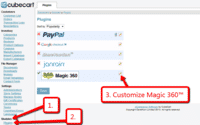 Customize the Magic 360 plugin through Modules > Plugins > Magic 360 > Edit menu in your CubeCart admin panel.
 - Buy Magic 360
To upgrade your free and fully functional trial version of Magic 360 (which removes the "Trial version" text), buy Magic 360 and overwrite following file with the same one from your licensed version:
CubeCart 5/6:
modules/plugins/Magic360/core/magic360.js
CubeCart 3/4:
modules/magictoolbox/Magic360/core/magic360.js


Uninstallation
Thanks for trying Magic 360 on your CubeCart site! What did you hope Magic 360 could do? How can we improve it? Let us know, we're always improving our tools based on customer feedback.
- Go to: Admin panel > Modules > Plugins > Magic 360 > Edit > 'Magic 360 status' option > Select 'Disabled' to disable module.
- Go to http://www.yoursite.url/magic360/ in your browser and click 'Uninstall' (replace yoursite.url with your domain name).
- Delete the magic360 folder from the root of your CubeCart website (on your server).
- Magic 360 is now uninstalled.
FAQ
What is a 360 product viewer?
A 360 product viewer takes a set of 360 degree images and merges them together on a web page. This creates an interactive spin which visitors can move left and right to see every angle of the item. (If your 360 photography was also taken on Rows, your 360 spin will move up and down too.)
Customer reviews
Liem
Submit your review
Your review has been received and will be posted soon.
Other CubeCart plugins
Try our other great image effects!
 Magic Zoom
 Magic Zoom Plus
 Magic Thumb
 Magic Slideshow
 Magic Scroll
Boost your sales by showing your products in glorious 360 degree views.
This extension was purpose-built for CubeCart. In just a few minutes, you can show 360 spins on your website. Let your customers see your products from every angel.
The extension uses JavaScript to create the spin effect, with a set of photographs spaced at equal degrees. You can customise the speed, borders, effects, blurring, autostart and other options. The CubeCart 360 degree extension makes it easy to install and customize and if you need help, contact us.
Works on every device, including iPhone, iPad, iTouch, Android and all major browsers including Internet Explorer, Firefox, Chrome, Safari and Opera.
To create the 360 degree view of the product, you need a set of 18 or 36 photographs. The photos should be shot on a turntable, with bright lighting against a white background. If you don't have photos, tell us what your products are and we can get quotations for professional 360 product photography for you. Each product typically costs between $40 and $100 for photography (or you can shoot your products yourself).
Credit: thanks to Karl Martini, for the photos of the running shoe. His twin-axis photography technique shows products in rotating vertically and horizontally. It can be an excellent choice for displaying your products instead of the more traditional 360 degree (single row) spin.