
extensions
6 of the best OXID extensions for images!
OXID eShop is an open source e-commerce platform with a modular design, allowing it to be expanded with ease. Improve your store with a well-supported set of extensions.
Our 6 magnificent image tools make products really stand out, with an experience that motivates shoppers to buy. Try them all below.
     | |
Magic Zoom Plus for OXID
Stunning full-screen image and hover zoom.
- Easy to use image gestures on mobile devices.
- Friendly and fast support team, always ready to help your store.
Verified by OXID:
Read reviews of Magic Zoom Plus on the official marketplace for OXID for CE and EE, PE extensions.
Rating 
- OXID eShop 4.x - 6.x
98% of shoppers say its their favourite zoom
Product details page
Category page
Manual install elsewhere
Responsive
Fast loading
SEO friendly
Supports video
Easy to customise
Switchable thumbnails
Friendly support
One-off payment
jQuery compatible
Regularly updated
Lazy loading
Optimised for mobile
- Download Magic Zoom Plus for OXID (free and fully functional demo version).
- Unzip the file on your computer and FTP the magiczoomplus folder to the root of your OXID website (on your server), keeping the file and folder structure intact.
- Go to http://www.yoursite.url/magiczoomplus/ in your browser > click 'Install' (replace yoursite.url with your domain name).
- If you use the OXID v4.6.0 or above, activate the module via the Extensions > Modules menu in the admin area. (If you use an earlier version of OXID, you don't need to activate the module).
- Change the Magic Zoom Plus settings as you wish via the admin area: Master Settings > Magic Zoom Plus Settings menu.
- That's it!
-
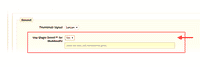 Activate Magic Scroll™ to enjoy organised thumbnails on your product page: Master Settings > Magic Zoom Plus Settings > Use Magic Scroll for thumbnails > Select 'Yes' > Save changes.
 - Buy Magic Zoom Plus To upgrade your free and fully functional trial version of Magic Zoom Plus (which removes the "Trial version" text), buy Magic Zoom Plus and overwrite following file with the same one from your licensed version:
modules/magiczoomplus/resources/magiczoomplus.js
Multiple images
Swapping between many images is already a standard feature in Magic Zoom Plus. But if you have lots of images, the page can look complicated.
Make your thumbnails look slick and organised with Magic Scroll for OXID. It neatly contains the images adds arrows to slide between them. Example:









- Simply activate Magic Scroll on the Magic Zoom Plus options page.
- To remove the "Please upgrade" text, buy a license and overwrite the /modules/magictoolbox/core/resources/magicscroll.js file with that from your licensed version.
Thanks for trying Magic Zoom Plus on your OXID site! What did you hope Magic Zoom Plus could do? How can we improve it? Let us know, we're always improving our tools based on customer feedback.
- Deactivate Magic Zoom Plus via the Extensions > Modules menu in the admin area.
- Go to http://your.site.url/magiczoomplus/ in your browser and click 'Uninstall' (replace yoursite.url with your domain name).
- Delete the magiczoomplus folder from your OXID directory (on your server).
- Magic Zoom Plus is now uninstalled.


Magic Zoom Plus for OXID
    | |
Magic Zoom for OXID
Feels blissful to use (on any device).
- One payment and unrestricted use forever
- Improve your store's SEO, with image names and ALT text.
Verified by OXID:
Read reviews of Magic Zoom on the official marketplace for OXID for CE and EE, PE extensions.
Rating
- OXID eShop 4.x - 6.x
93% of users say it boosted their sales
Product details page
Category page
Manual install elsewhere
Responsive
Fast loading
SEO friendly
Supports video
Easy to customise
Switchable thumbnails
Friendly support
One-off payment
Regularly updated
jQuery compatible
On-demand loading
Optimised for mobile
- Download Magic Zoom for OXID (free and fully functional demo version).
- Unzip the file on your computer and FTP the magiczoom folder to the root of your OXID website (on your server), keeping the file and folder structure intact.
- Go to http://www.yoursite.url/magiczoom/ in your browser > click 'Install' (replace yoursite.url with your domain name).
- If you use the OXID v4.6.0 or above, activate the module via the Extensions > Modules menu in the admin area. (If you use an earlier version of OXID, you don't need to activate the module).
- Change the Magic Zoom settings as you wish via the admin area: Master Settings > Magic Zoom Settings menu.
- That's it!
- Activate Magic Scroll™ to enjoy organised thumbnails on your product page: Master Settings > Magic Zoom Settings > Use Magic Scroll for thumbnails > Select 'Yes' > Save changes.
- Buy Magic Zoom To upgrade your free and fully functional trial version of Magic Zoom (which removes the "Trial version" text), buy Magic Zoom and overwrite following file with the same one from your licensed version:
modules/magiczoom/resources/magiczoom.js
Multiple images
Swapping between many images is already a standard feature in Magic Zoom. But if you have lots of images, the page can look complicated.
Make your thumbnails look slick and organised with Magic Scroll for OXID. It neatly contains the images adds arrows to slide between them. Example:
- Simply activate Magic Scroll on the Magic Zoom options page.
- To remove the "Please upgrade" text, buy a license and overwrite the /modules/magictoolbox/core/resources/magicscroll.js file with that from your licensed version.
Thanks for trying Magic Zoom on your OXID site! What did you hope Magic Zoom could do? How can we improve it? Let us know, we're always improving our tools based on customer feedback.
- Deactivate Magic Zoom via the Extensions > Modules menu in the admin area.
- Go to http://your.site.url/magiczoom/ in your browser and click 'Uninstall' (replace yoursite.url with your domain name).
- Delete the magiczoom folder from your OXID directory (on your server).
- Magic Zoom is now uninstalled.

Magic Zoom for OXID
 Zara 2014
 Zara 2014
 Zara 2014
 Zara 2014
 Zara 2014
 Zara 2014
 Zara 2014
 Zara 2014
 Zara 2015
 Zara 2015
 Zara 2015
 Zara 2015
 Zara 2015
 Zara 2015
 Zara 2015
 Zara 2015
 Zara 2015
 Zara 2015
Magic Scroll for OXID
Grab customers attention - scroll unlimited images.
- Combine it with any of our zoom tools.
- Outstanding mobile experience - swipe and tap to control.
Verified by OXID:
Read reviews of Magic Scroll on the official marketplace for OXID for CE and EE, PE extensions.
- OXID eShop 4.x - 6.x
91% of shoppers prefer it to static images
Product details page
Home page
Manual install elsewhere
Scrollable images, HTML or videos
Combine with other Magic viewers
Highly customisable
All kinds of uses
jQuery compatible
Regularly updated
One-time payment
Responsive
- Download Magic Scroll for OXID (free and fully functional demo version).
- Unzip the file on your computer and FTP the magicscroll folder to the root of your OXID website (on your server), keeping the file and folder structure intact.
- Go to http://www.yoursite.url/magicscroll/ in your browser > click 'Install' (replace yoursite.url with your domain name).
- If you use the OXID v4.6.0 or above, activate the module via the Extensions > Modules menu in the admin area. (If you use an earlier version of OXID, you don't need to activate the module).
- Change the Magic Scroll settings as you wish via the admin area: Master Settings > Magic Scroll Settings menu.
- That's it!
- Buy Magic Scroll To upgrade your free and fully functional trial version of Magic Scroll (which removes the "Trial version" text), buy Magic Scroll and overwrite following file with the same one from your licensed version:
modules/magicscroll/resources/magicscroll.js
Multiple images
Swapping between the main product image and thumbnail images is a standard feature of our OXID image zoom tools (Magic Zoom Plus, Magic Zoom & Magic Thumb). But what happens when you have lots of images for the same product? An easy way to keep thumbnail images contained is to use Magic Scroll.
Magic Scroll allows customers to scroll through each product image using arrows. It's the perfect way to keep any product page layout looking slick.
The example below shows Magic Zoom Plus combined with Magic Scroll:
To achieve this look, simply:
- Install and buy Magic Zoom Plus for OXID.
- Activate Magic Scroll option on the Magic Zoom Plus settings page in OXID.
- To remove the Magic Scroll trial version message, buy discounted license from Magic Zoom Plus order page:
a) Log in to your Magic Toolbox Account.
b) Click 'Download/View' button next to your Magic Zoom Plus order.
c) Click orange button: Purchase Magic Scroll 35% discount (pay £18.85 instead of £29).
d) Follow payment process. - Download magicscroll.js file from your license and upload to /modules/magictoolbox/core/resources/magicscroll.js on your server.
- Clear browser cache. The 'Trial version' message will disappear.
Home page carousel
Add an amazing carousel to your homepage in just a couple of clicks:
-
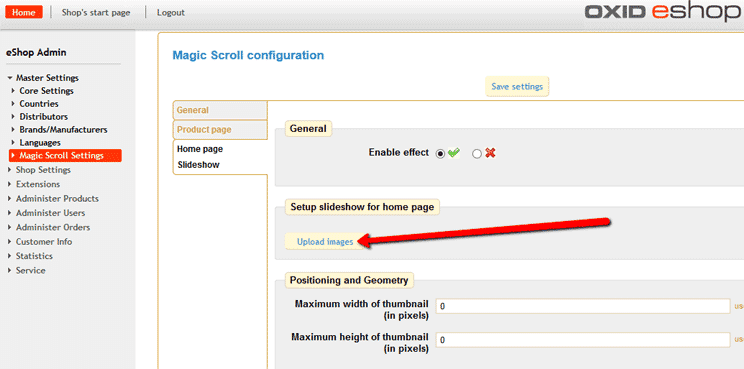
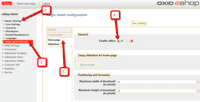 Enable Home page Slideshow section via [Master Settings > Magic Scroll settings > Home page Slideshow].
 -
 Select Upload images and browse your computer for your set of carousel images.
 - Your carousel is now working!
- There are over 30 customizations available. Have fun, try them all!

Thanks for trying Magic Scroll on your OXID site! What did you hope Magic Scroll could do? How can we improve it? Let us know, we're always improving our tools based on customer feedback.
- Deactivate Magic Scroll via the Extensions > Modules menu in the admin area.
- Go to http://your.site.url/magicscroll/ in your browser and click 'Uninstall' (replace yoursite.url with your domain name).
- Delete the magicscroll folder from your OXID directory (on your server).
- Magic Scroll is now uninstalled.
FAQ
Can I change background colour of carousel?
Yes! By default, the Carousel & Cover-Flow modes use a grey/black background colour. You can change the Hex Colour to anything you want. With over 16,000 hex colours available, you'll be spoilt for choice. Simply add the CSS code you need to the Magic Scroll CSS file.
Carousel background
.MagicScroll[data-mode="carousel"] {
    background-color: <your-colour>;
}
Cover-flow background
.MagicScroll[data-mode="cover-flow"] {
    background-color: <your-colour>;
}


Magic Scroll for OXID

Magic 360 for OXID
Shoppers love to view products in 360° before they buy.
- Full-screen button opens up a gorgeous high resolution spin.
- Adjust the speed, direction, duration, autostart, hover/drag.
Verified by OXID:
Read reviews of Magic 360 on the official marketplace for OXID for CE and EE, PE extensions.
- OXID eShop 4.x - 6.x
98% of shoppers say it influenced their purchase
Product details page
Manual install elsewhere
360 spins (1 row)
3D spins (many rows)
Swipe gestures
SEO friendly
Responsive
Zoom on click
Regularly updated
jQuery compatible
One-off payment
Friendly support
- Download Magic 360 for OXID (free and fully functional demo version).
- Unzip the file on your computer and FTP the magic360 folder to the root of your OXID website (on your server), keeping the file and folder structure intact.
- Go to http://www.yoursite.url/magic360/ in your browser > click 'Install' (replace yoursite.url with your domain name).
- If you use the OXID v4.6.0 or above, activate the module via the Extensions > Modules menu in the admin area. (If you use an earlier version of OXID, you don't need to activate the module).
- Change the Magic 360 settings as you wish via the admin area: Master Settings > Magic 360 Settings menu.
- That's it!
- Buy Magic 360 To upgrade your free and fully functional trial version of Magic 360 (which removes the "Trial version" text), buy Magic 360 and overwrite following file with the same one from your licensed version:
modules/magic360/resources/magic360.js
Setup a spin
-
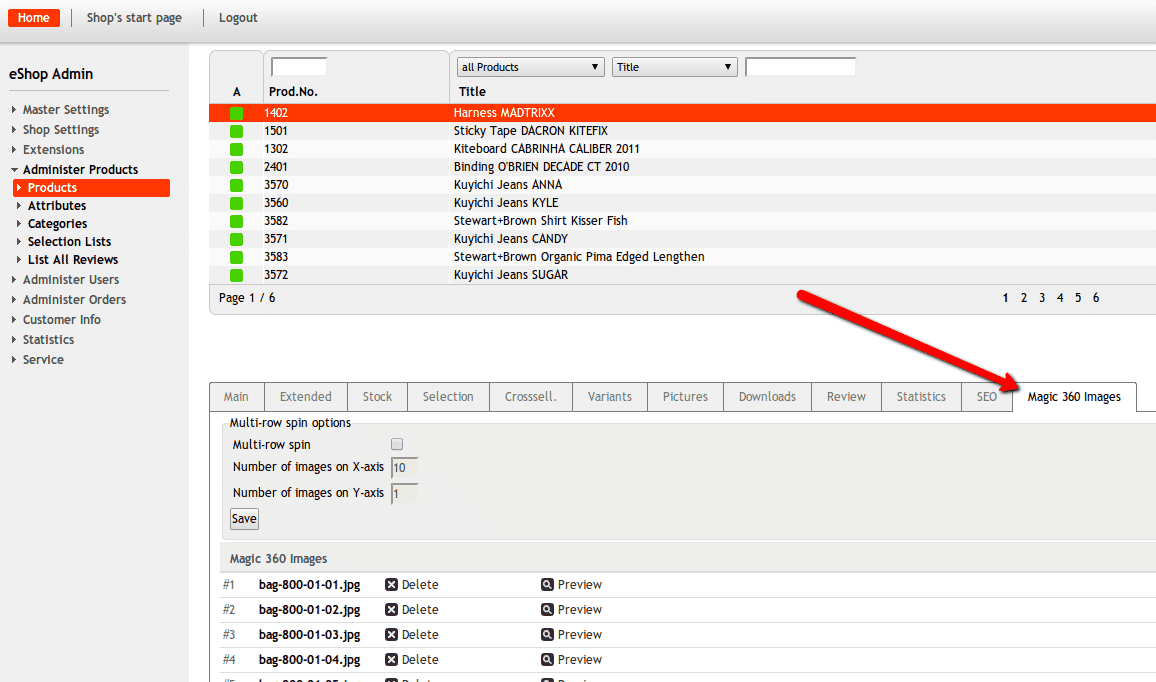
 To setup a 360 spin, upload your set of 360 images to your product in the Magic 360 Images tab.
Multiple images




To spin some images and zoom others (like the example above), you can install both Magic 360 and Magic Zoom Plus.
- Install the OXID extension for Magic 360.
- Install the OXID extension for Magic Zoom Plus.
- Create a new product or open an existing one.
- Upload your zoom images via the 'Pictures' tab. Upload your 360 spin images via the 'Magic 360 images' tab.
Thanks for trying Magic 360 on your OXID site! What did you hope Magic 360 could do? How can we improve it? Let us know, we're always improving our tools based on customer feedback.
- Deactivate Magic 360 via the Extensions > Modules menu in the admin area.
- Go to http://your.site.url/magic360/ in your browser and click 'Uninstall' (replace yoursite.url with your domain name).
- Delete the magic360 folder from your OXID directory (on your server).
- Magic 360 is now uninstalled.
FAQ
What is a 360 product viewer?
A 360 product viewer takes a set of 360 degree images and merges them together on a web page. This creates an interactive spin which visitors can move left and right to see every angle of the item. (If your 360 photography was also taken on Rows, your 360 spin will move up and down too.)

Magic 360 for OXID










Magic Slideshow for OXID
Stunning slideshow effects for your store.
- Homepage slideshows and product slideshows are easy.
- Create professional image slideshows in under 5 minutes.
Verified by OXID:
Read reviews of Magic Slideshow on the official marketplace for OXID for CE and EE, PE extensions.
- OXID eShop 4.x - 6.x
88% say it brings the home page to life
Product details page
Home page
Manual install elsewhere
9 popular effects
Image thumbnails
Easy to customise
Clickable bullets
Fast loading
Responsive
Pure JavaScript & CSS
jQuery compatible
Regularly updated
One-off payment
SEO friendly
- Download Magic Slideshow for OXID (free and fully functional demo version).
- Unzip the file on your computer and FTP the magicslideshow folder to the root of your OXID website (on your server), keeping the file and folder structure intact.
- Go to http://www.yoursite.url/magicslideshow/ in your browser > click 'Install' (replace yoursite.url with your domain name).
- If you use the OXID v4.6.0 or above, activate the module via the Extensions > Modules menu in the admin area. (If you use an earlier version of OXID, you don't need to activate the module).
- Change the Magic Slideshow settings as you wish via the admin area: Master Settings > Magic Slideshow Settings menu.
- That's it!
- Buy Magic Slideshow To upgrade your free and fully functional trial version of Magic Slideshow (which removes the "Trial version" text), buy Magic Slideshow and overwrite following file with the same one from your licensed version:
modules/magicslideshow/resources/magicslideshow.js
Home page slideshow
Add an amazing slideshow to your homepage in just a couple of clicks:
-
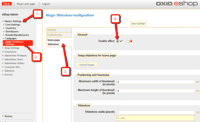 Enable Home page Slideshow section via [Master Settings > Magic Slideshow settings > Home page Slideshow].
 -
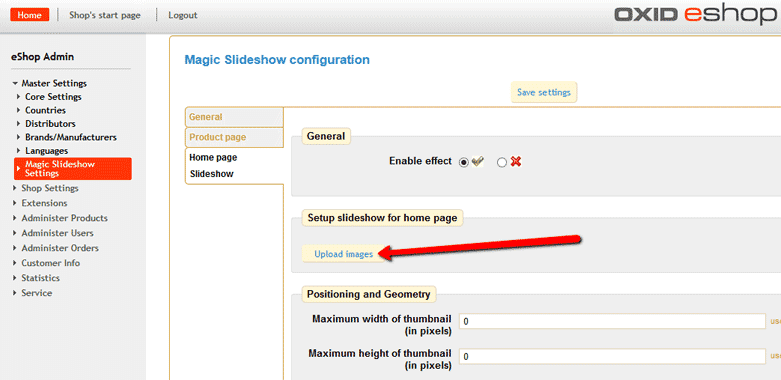
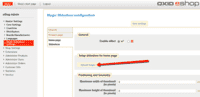 Select Upload images and browse your computer for your set of slideshow images.
 -
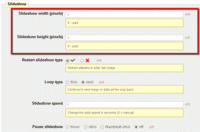 Slideshow will automatically resize to all available size of the container. To set a specific slideshow size, change Slideshow width (pixels) and Slideshow height (pixels) options.
 - Your home page slideshow is now working!

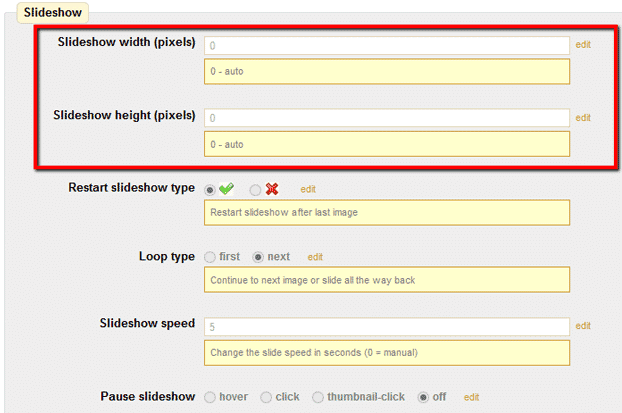
Thanks for trying Magic Slideshow on your OXID site! What did you hope Magic Slideshow could do? How can we improve it? Let us know, we're always improving our tools based on customer feedback.
- Deactivate Magic Slideshow via the Extensions > Modules menu in the admin area.
- Go to http://your.site.url/magicslideshow/ in your browser and click 'Uninstall' (replace yoursite.url with your domain name).
- Delete the magicslideshow folder from your OXID directory (on your server).
- Magic Slideshow is now uninstalled.


Magic Slideshow for OXID
    | |
Magic Thumb for OXID
A choice of expand effects, to bring sophistication to your website.
- Trigger the enlarge effect on click or mouseover.
- Click left and right between enlarged images (keyboard navigation too).
Verified by OXID:
Read reviews of Magic Thumb on the official marketplace for OXID for CE and EE, PE extensions.
- OXID eShop 4.x - 6.x
92% of users say its the best image lightbox
Product details page
Category page
Manual install elsewhere
Responsive
Fast loading
SEO friendly
Lazy loading
Supports video
Friendly support
One-off payment
Regularly updated
jQuery compatible
Swappable thumbnails
- Download Magic Thumb for OXID (free and fully functional demo version).
- Unzip the file on your computer and FTP the magicthumb folder to the root of your OXID website (on your server), keeping the file and folder structure intact.
- Go to http://www.yoursite.url/magicthumb/ in your browser > click 'Install' (replace yoursite.url with your domain name).
- If you use the OXID v4.6.0 or above, activate the module via the Extensions > Modules menu in the admin area. (If you use an earlier version of OXID, you don't need to activate the module).
- Change the Magic Thumb settings as you wish via the admin area: Master Settings > Magic Thumb Settings menu.
- That's it!
- Activate Magic Scroll™ to enjoy organised thumbnails on your product page: Master Settings > Magic Thumb Settings > Use Magic Scroll for thumbnails > Select 'Yes' > Save changes.
- Buy Magic Thumb To upgrade your free and fully functional trial version of Magic Thumb (which removes the "Trial version" text), buy Magic Thumb and overwrite following file with the same one from your licensed version:
modules/magicthumb/resources/magicthumb.js
Multiple images
Swapping between many images is already a standard feature in Magic Thumb. But if you have lots of images, the page can look complicated.
Make your thumbnails look slick and organised with Magic Scroll for OXID. It neatly contains the images adds arrows to slide between them. Example:
- Simply activate Magic Scroll on the Magic Thumb options page.
- To remove the "Please upgrade" text, buy a license and overwrite the /modules/magictoolbox/core/resources/magicscroll.js file with that from your licensed version.
Thanks for trying Magic Thumb on your OXID site! What did you hope Magic Thumb could do? How can we improve it? Let us know, we're always improving our tools based on customer feedback.
- Deactivate Magic Thumb via the Extensions > Modules menu in the admin area.
- Go to http://your.site.url/magicthumb/ in your browser and click 'Uninstall' (replace yoursite.url with your domain name).
- Delete the magicthumb folder from your OXID directory (on your server).
- Magic Thumb is now uninstalled.


Magic Thumb for OXID
About
These instructions are for OXID. Use them to add effects to your website including image zoom on hover/mouseover; image lightbox (enlarge image to full screen); and image magnifiers.
Changelog
- v4.3.18
Minor bug fixed.
April 25, 2022
- v4.3.17
Fixed issue when product has no images. 4.3.15 (2019-04-2) OXID 6 support added.
November 17, 2020
- v4.3.14
Removed 'Caption source' option.
June 7, 2018
- v4.3.13
Added support for new Magic Thumb 3.0
March 22, 2017
- v4.3.12
Added support for new OXID v4.10.2 template (Magic Slideshow, Magic Scroll).
December 26, 2016
- v4.3.10
Address module settings page issue in OXID v4.10.x
August 4, 2016
- v4.3
Added support for Magic Scroll v2. Added support for Magic Slideshow v3. Added support for Magic Zoom Plus v5.
March 31, 2015
- v4.2
Added support for Magic Slideshow v2.
December 12, 2013
- v4.1
Added slideshow feature on home page (Magic Slideshow, Magic Scroll).
October 13, 2013
- v4.0
Added Magic 360 Flash support. Added Magic 360 support. Added Magic Scroll support. Added Magic Slideshow support. Configuration improvements. Now supports custom options for different pages. Now supports OXID eShop native modules system. Code rewrite.
March 7, 2013
- v3.1
Added support for OXID 4.6.0 Added 'resize-images' param. Added support for OXID v4.5.x (v4.5.1 and above). * Fixed some minor bugs.
May 11, 2012
- v3.0
Added MagicScroll for selectors. Added templates. Add web interface for editing module options in INI file. Support OXID v4.5. Support variants and dynamic products.
June 1, 2011
- v2.3
Added support for OXID v4.4.8.
March 31, 2011
- v2.2
Fixed some issues with count of zoom and pics images. Fixed wrong path to the last pic image (OXID bug). Fixed issue when tool doesn't initialize if first image not exists.
October 27, 2010
- v2.1
Added support for external product images.
June 22, 2010
- v2.0
Added option for link to product page. Added support for effects on category page. Ability to choose your effect on category and product pages.
June 11, 2010
- v1.9
Changes in caption-source parameter to allow multiple sources.
June 8, 2010
- v1.8
Restore the 'disable-zoom' and 'disable-expand' options for MagicZoomPlus.
May 25, 2010
- v1.7
Fixed unreproducable problem with '/home' in getShopBasePath(). * Disabled imagemagick by default.
April 29, 2010
- v1.6
MagicToolboxMakeThumb class replaced with MagicToolboxImageHelper class. Added watermark support. Code cleanup.
April 15, 2010
- v1.5
Added support for OXID v4.3.x.
April 7, 2010
- v1.4
Fixed some titles not showing in effects.
December 16, 2009
- v1.3
Fixed incorrect image path when 'magictoolbox_cache' directory is not writeable.
November 25, 2009
- v1.2
Added out of date check for thumbnails cache.
November 23, 2009
- v1.1
Added 'Upgrade from ZIP' option to installer.
October 28, 2009
- v1.0
OXID eShop module created.
October 15, 2009