
extensions
Create stunning effects in xt:Commerce
xt:Commerce is a popular open-source shopping cart for quickly creating ecommerce sites.
Extend your xt:Commerce store with 3 gorgeous image zoom tools to instantly facelift your shop.
     | |
Magic Zoom Plus for xt:Commerce
Perfectly fits your style, with 60 easy options.
- Responsive - images scale up/down to fit users screen.
- Customizable - tweak the position, size, zoom effects + much more.
Verified by xt:Commerce:
Read reviews of Magic Zoom Plus on the official marketplace for xt:Commerce addons.
Rating 
- xt:Commerce 6
- xt:Commerce 5
- xt:Commerce 4 Multishop
- xt:Commerce 4 PROFESSIONAL
- xt:Commerce 4 START!
- xt:Commerce 3.x
98% of shoppers say its their favourite zoom
Product details page
Category page
Manufactures page
Manual install elsewhere
Responsive
Fast loading
SEO friendly
Supports video
Easy to customise
Switchable thumbnails
Friendly support
One-off payment
jQuery compatible
Regularly updated
Lazy loading
Optimised for mobile
xt:Commerce 4 (Veyton)
- Download Magic Zoom Plus plugin for xt:Commerce 4/5 (free and fully functional demo version).
- Unzip the file on your computer and FTP the magiczoomplus folder to your plugins directory (on your xt:Commerce 4/5 server), keeping the file and folder structure intact.
-
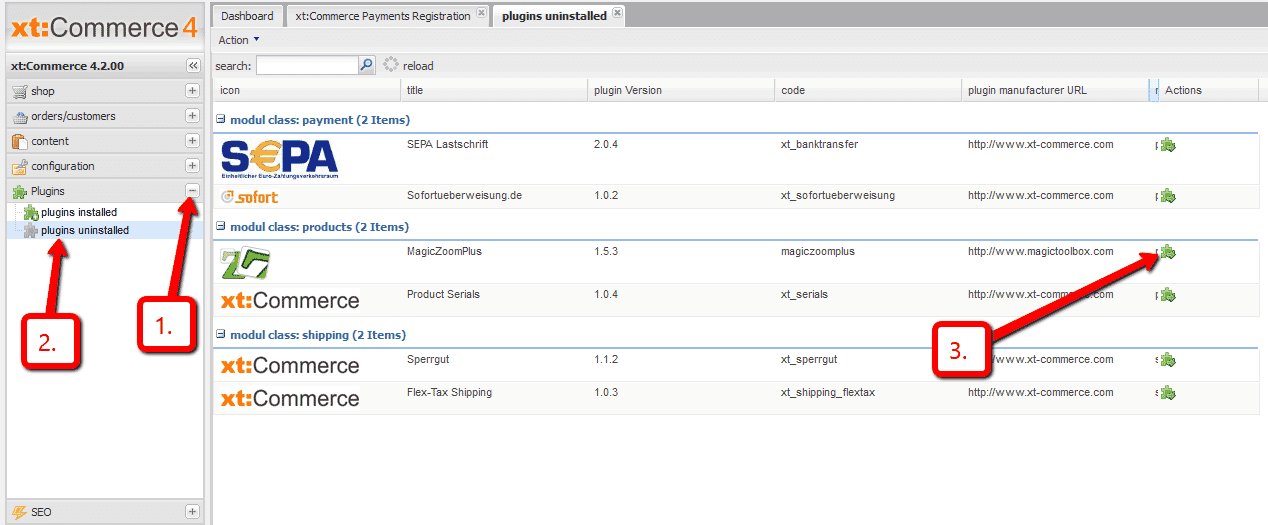
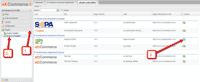 In your xt:Commerce 4/5 admin, go to Plugins > plugins uninstalled > Locate Magic Zoom Plus > click the Run icon.
 -
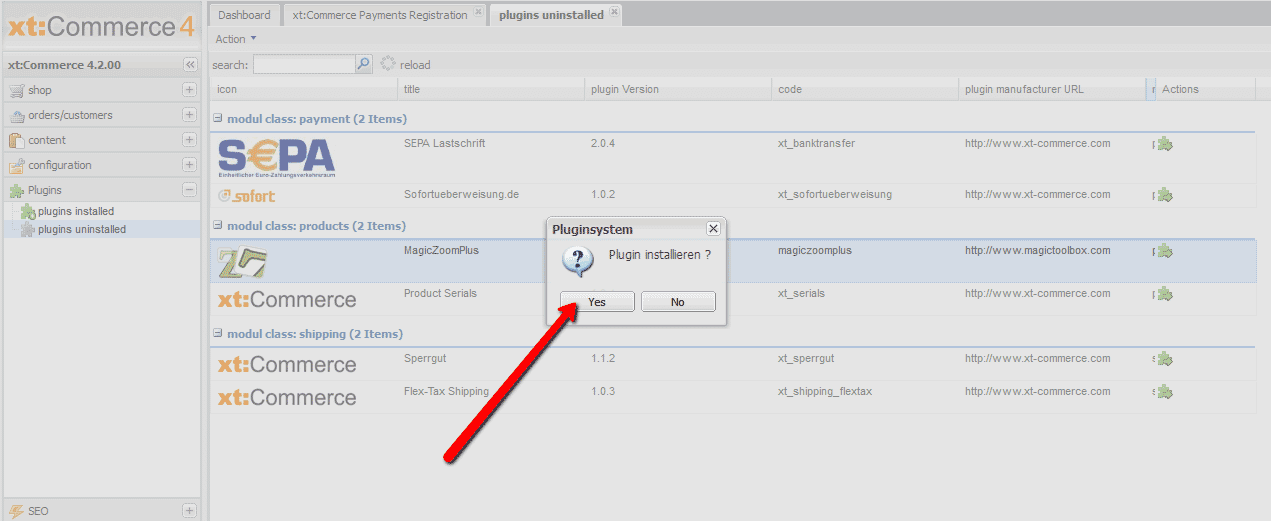
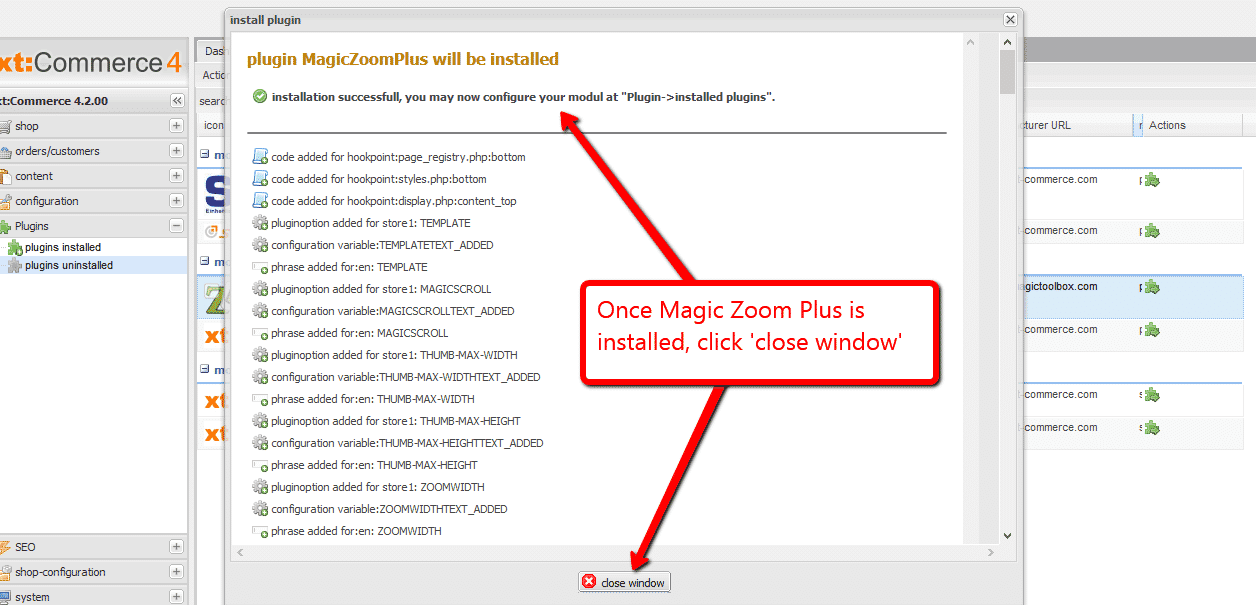
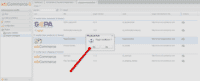 Pop up box will appear 'Plugin installieren' > Select 'Yes'.
 -
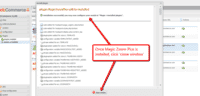 Once Magic Zoom Plus installed message appears, click 'close window'.
 -
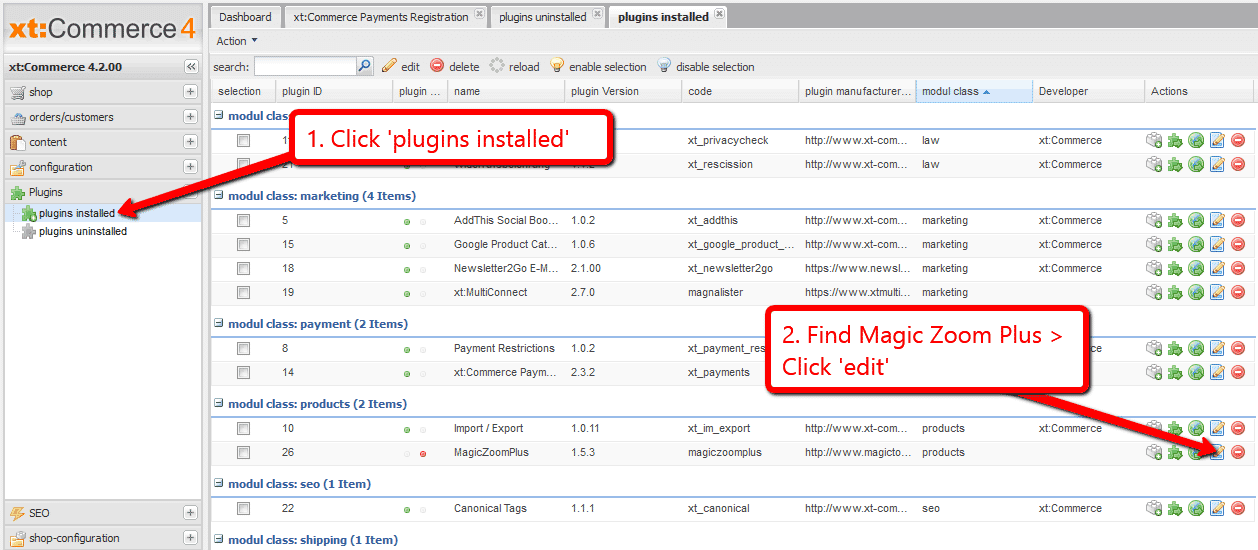
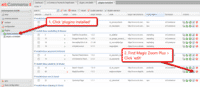 Go to Plugins > plugins installed > Find Magic Zoom Plus > Click 'Edit'. (If you already have 'plugins installed' tab open, close the tab and reopen to see Magic Zoom Plus listed).
 -
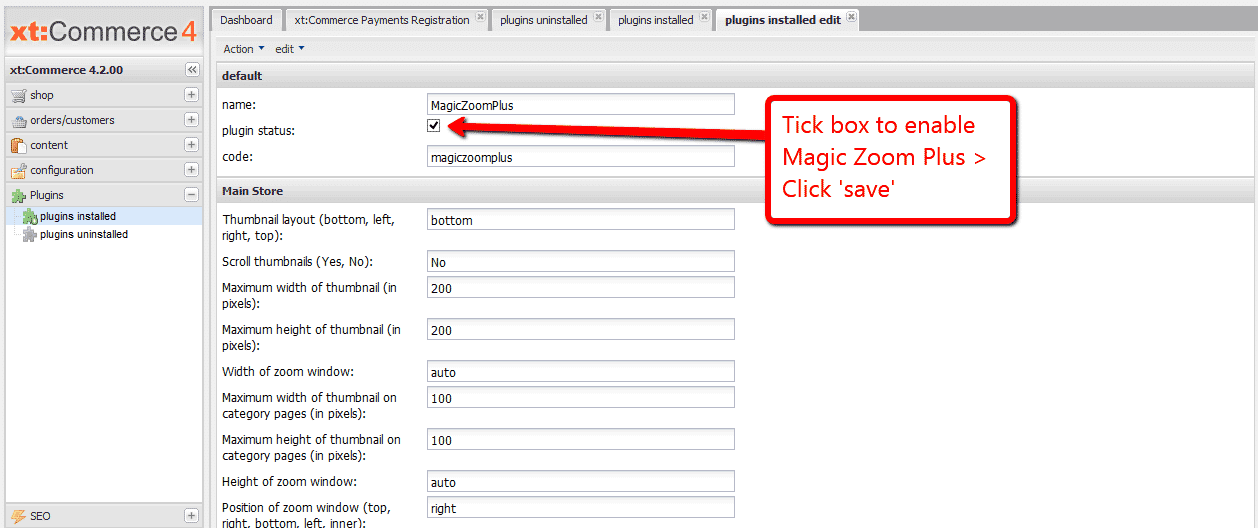
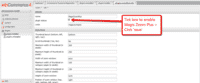 To enable Magic Zoom Plus go to: 'plugin status' > 'Tick' box > Scroll down page and click 'save'.
 - The demo version is now installed!
- Change Magic Zoom Plus settings through the Plugins > plugins installed > Magic Zoom Plus > 'Edit' menu in your xt:Commerce 4/5 admin panel.
-
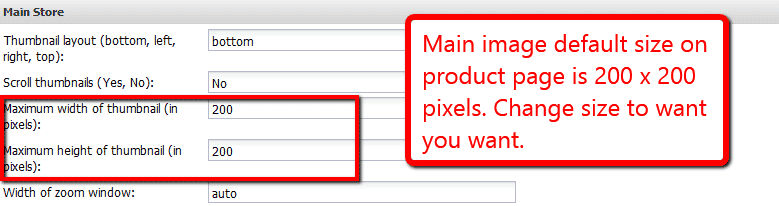
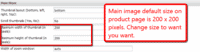 Main image default size on product page is 200 x 200 pixels. Change 'Maximum width of thumbnail (in pixels)' and 'Maximum height of thumbnail (in pixels)' settings to the size you wish.
 -
 Activate Magic Scroll to enjoy organised thumbnails on your product page: Plugins > plugins installed > Magic Zoom Plus > Click 'Edit' > Scroll thumbnails > Enter 'Yes' > Save changes.
 - Buy Magic Zoom Plus To upgrade your free and fully functional trial version of Magic Zoom Plus (which removes the "Trial version" text), buy Magic Zoom Plus and overwrite following file with the same one from your licensed version:
plugins/magiczoomplus/magiczoomplus.js

xt:Commerce 3
- Download the xt:Commerce module for Magic Zoom Plus (free and fully functional demo version).
- Unzip it and upload the magiczoomplus folder to the root of your xt:Commerce website.
- Go to http://your.site.url/magiczoomplus/ in your browser and follow the instructions.
- The demo version is now installed!
- Buy Magic Zoom Plus To upgrade your free and fully functional trial version of Magic Zoom Plus (which removes the "Trial version" text), buy Magic Zoom Plus and overwrite following file with the same one from your licensed version:
includes/modules/magictoolbox/core/magiczoomplus.js
Multiple images
Swapping between many images is already a standard feature in Magic Zoom Plus. But if you have lots of images, the page can look complicated.
Make your thumbnails look slick and organised with Magic Scroll for xt:Commerce. It neatly contains the images adds arrows to slide between them. Example:









- Simply activate Magic Scroll on the Magic Zoom Plus options page.
- To remove the "Please upgrade" text, buy a license and overwrite the plugins/magiczoomplus/magicscroll.js file with that from your licensed version.
Thanks for trying Magic Zoom Plus on your xt:Commerce site! What did you hope Magic Zoom Plus could do? How can we improve it? Let us know, we're always improving our tools based on customer feedback.
xt:Commerce 4 (Veyton)
- Disable Magic Zoom Plus via: 'plugin status' > 'Untick' box > Scroll down page and click 'save'.
- Go to Plugins > plugins installed > Find Magic Zoom Plus > Click 'Uninstall' and follow instructions.
- Delete the magiczoomplus folder from your plugins directory (on your xt:Commerce 4/5 server).
- Magic Zoom Plus is now uninstalled.
xt:Commerce 3
- Go to http://your.site.url/magiczoomplus/ in your browser and click 'Uninstall' (replace yoursite.url with your domain name).
- Delete the magiczoomplus folder from the root of your xt:Commerce website.
- Magic Zoom Plus is now uninstalled.


Magic Zoom Plus for xt:Commerce
    | |
Magic Zoom for xt:Commerce
Guaranteed to increase your conversions - or your money back.
- Perfect tool for showing product images in detail
- Add it to your website in under 3 minutes!
Verified by xt:Commerce:
Read reviews of Magic Zoom on the official marketplace for xt:Commerce addons.
Rating 
- xt:Commerce 6
- xt:Commerce 5
- xt:Commerce 4 Multishop
- xt:Commerce 4 PROFESSIONAL
- xt:Commerce 4 START!
- xt:Commerce 3.x
93% of users say it boosted their sales
Product details page
Category page
Manufactures page
Manual install elsewhere
Responsive
Fast loading
SEO friendly
Supports video
Easy to customise
Switchable thumbnails
Friendly support
One-off payment
Regularly updated
jQuery compatible
On-demand loading
Optimised for mobile
xt:Commerce 4 (Veyton)
- Download Magic Zoom plugin for xt:Commerce 4/5 (free and fully functional demo version).
- Unzip the file on your computer and FTP the magiczoom folder to your plugins directory (on your xt:Commerce 4/5 server), keeping the file and folder structure intact.
-
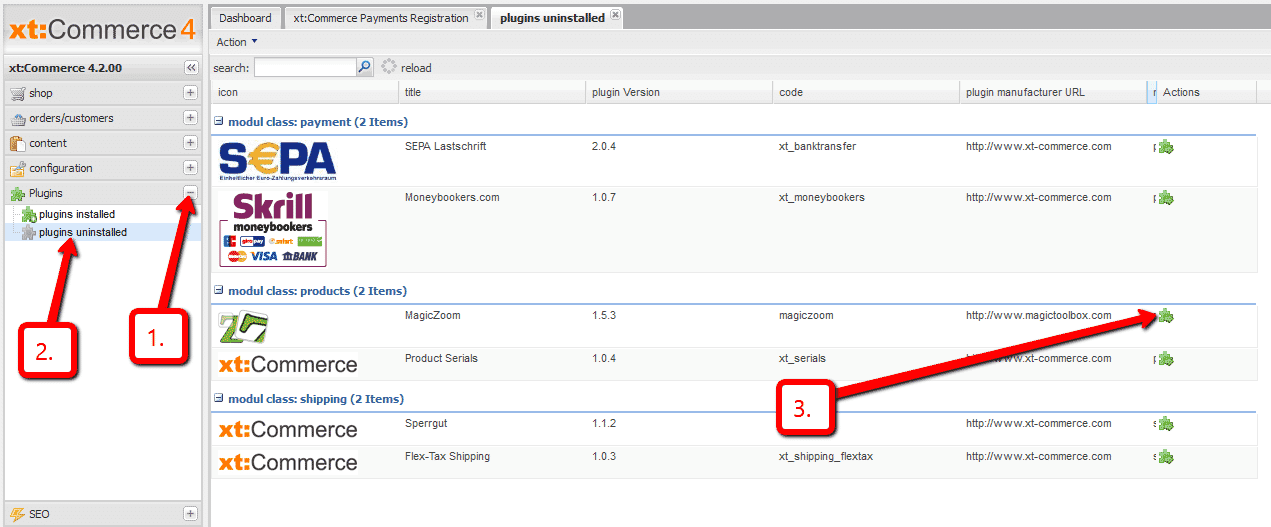
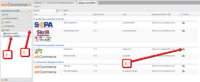 In your xt:Commerce 4/5 admin, go to Plugins > plugins uninstalled > Locate Magic Zoom > click the Run icon.
 -
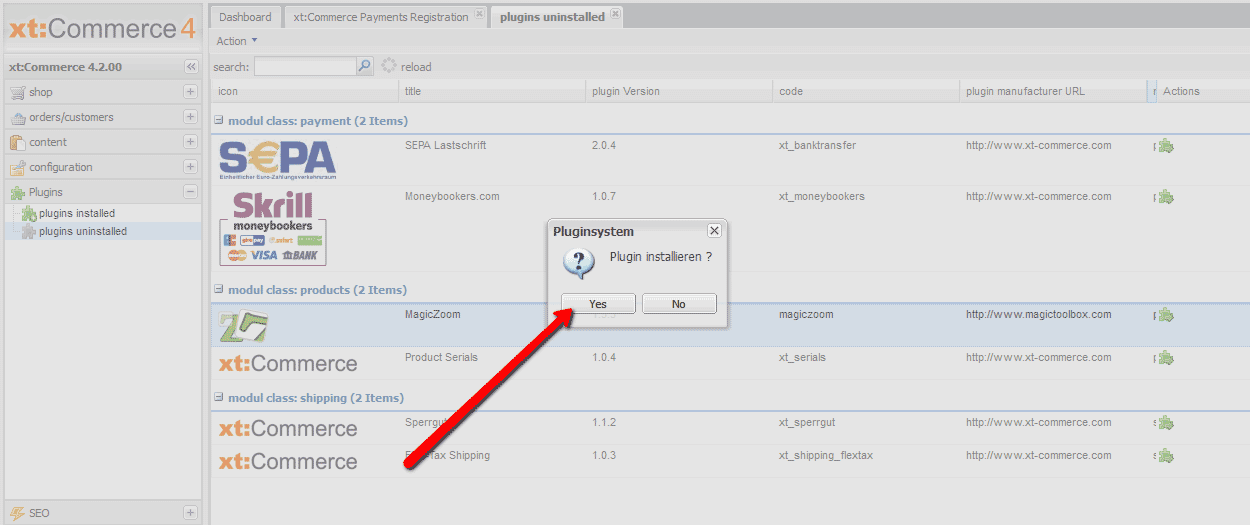
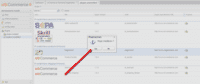 Pop up box will appear 'Plugin installieren' > Select 'Yes'.
 -
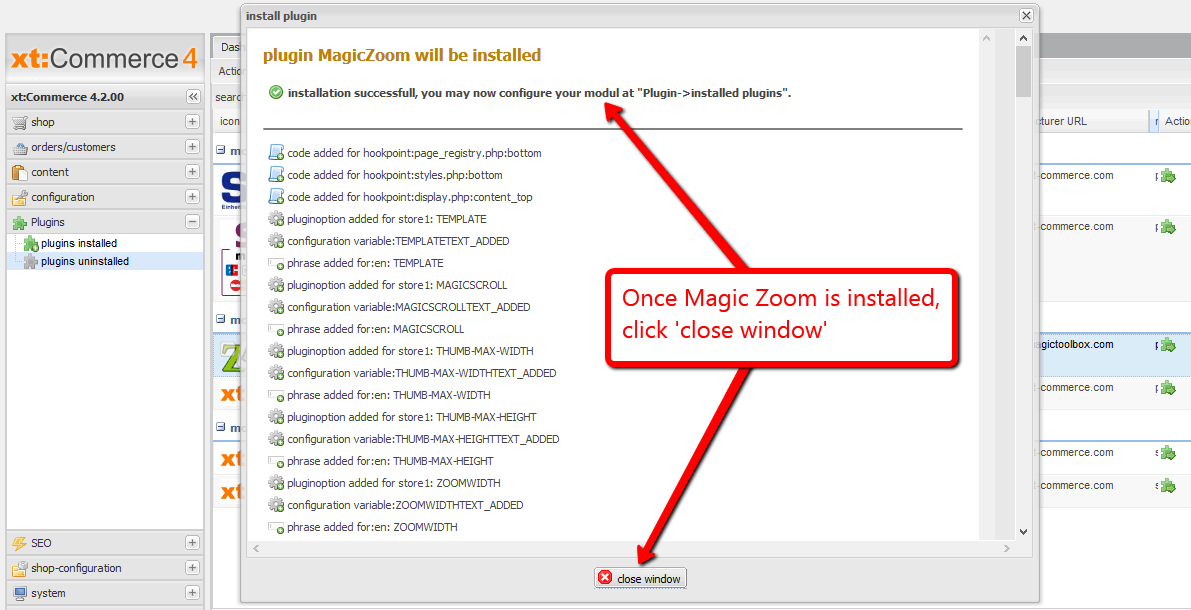
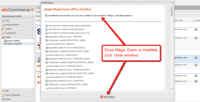 Once Magic Zoom installed message appears, click 'close window'.
 -
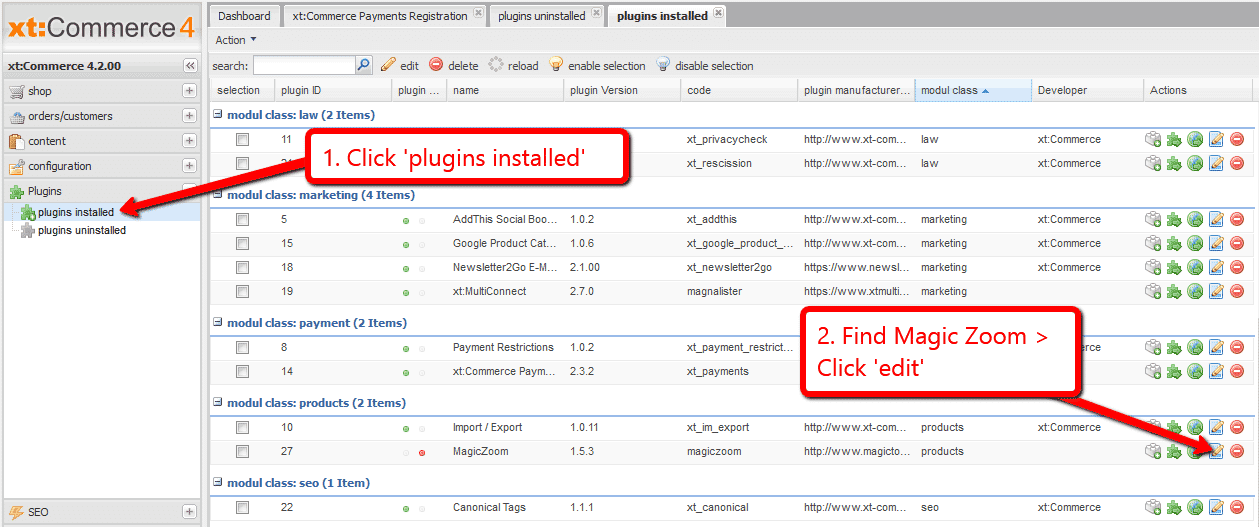
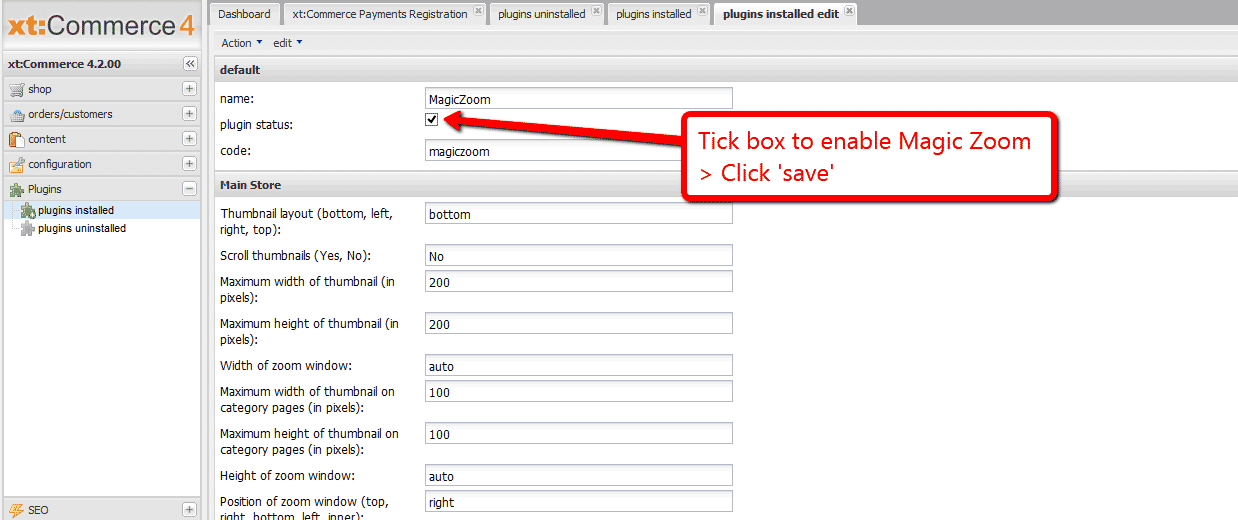
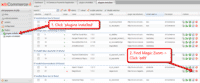 Go to Plugins > plugins installed > Find Magic Zoom > Click 'Edit'. (If you already have 'plugins installed' tab open, close the tab and reopen to see Magic Zoom listed).
 -
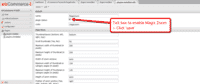 To enable Magic Zoom go to: 'plugin status' > 'Tick' box > Scroll down page and click 'save'.
 - The demo version is now installed!
- Change Magic Zoom settings through the Plugins > plugins installed > Magic Zoom > 'Edit' menu in your xt:Commerce 4/5 admin panel.
- Main image default size on product page is 200 x 200 pixels. Change 'Maximum width of thumbnail (in pixels)' and 'Maximum height of thumbnail (in pixels)' settings to the size you wish.
- Activate Magic Scroll to enjoy organised thumbnails on your product page: Plugins > plugins installed > Magic Zoom > Click 'Edit' > Scroll thumbnails > Enter 'Yes' > Save changes.
- Buy Magic Zoom To upgrade your free and fully functional trial version of Magic Zoom (which removes the "Trial version" text), buy Magic Zoom and overwrite following file with the same one from your licensed version:
plugins/magiczoom/magiczoom.js
xt:Commerce 3
- Download the xt:Commerce module for Magic Zoom (free and fully functional demo version).
- Unzip it and upload the magiczoom folder to the root of your xt:Commerce website.
- Go to http://your.site.url/magiczoom/ in your browser and follow the instructions.
- The demo version is now installed!
- Buy Magic Zoom To upgrade your free and fully functional trial version of Magic Zoom (which removes the "Trial version" text), buy Magic Zoom and overwrite following file with the same one from your licensed version:
includes/modules/magictoolbox/core/magiczoom.js
Multiple images
Swapping between many images is already a standard feature in Magic Zoom. But if you have lots of images, the page can look complicated.
Make your thumbnails look slick and organised with Magic Scroll for xt:Commerce. It neatly contains the images adds arrows to slide between them. Example:
- Simply activate Magic Scroll on the Magic Zoom options page.
- To remove the "Please upgrade" text, buy a license and overwrite the plugins/magiczoomplus/magicscroll.js file with that from your licensed version.
Thanks for trying Magic Zoom on your xt:Commerce site! What did you hope Magic Zoom could do? How can we improve it? Let us know, we're always improving our tools based on customer feedback.
xt:Commerce 4 (Veyton)
- Disable Magic Zoom via: 'plugin status' > 'Untick' box > Scroll down page and click 'save'.
- Go to Plugins > plugins installed > Find Magic Zoom > Click 'Uninstall' and follow instructions.
- Delete the magiczoom folder from your plugins directory (on your xt:Commerce 4/5 server).
- Magic Zoom is now uninstalled.
xt:Commerce 3
- Go to http://your.site.url/magiczoom/ in your browser and click 'Uninstall' (replace yoursite.url with your domain name).
- Delete the magiczoom folder from the root of your xt:Commerce website.
- Magic Zoom is now uninstalled.



Magic Zoom for xt:Commerce
    | |
Magic Thumb for xt:Commerce
30 adjustable options to make it look perfect.
- Intuitive swipe gestures will delight your customers
- Graceful image lightboxes to engage your customers.
Verified by xt:Commerce:
Read reviews of Magic Thumb on the official marketplace for xt:Commerce addons.
- xt:Commerce 6
- xt:Commerce 5
- xt:Commerce 4 Multishop
- xt:Commerce 4 PROFESSIONAL
- xt:Commerce 4 START!
- xt:Commerce 3.x
92% of users say its the best image lightbox
Product details page
Category page
Manufactures page
Manual install elsewhere
Responsive
Fast loading
SEO friendly
Lazy loading
Supports video
Friendly support
One-off payment
Regularly updated
jQuery compatible
Swappable thumbnails
xt:Commerce 4 (Veyton)
- Download Magic Thumb plugin for xt:Commerce 4/5 (free and fully functional demo version).
- Unzip the file on your computer and FTP the magicthumb folder to your plugins directory (on your xt:Commerce 4/5 server), keeping the file and folder structure intact.
-
 In your xt:Commerce 4/5 admin, go to Plugins > plugins uninstalled > Locate Magic Thumb > click the Run icon.
 -
 Pop up box will appear 'Plugin installieren' > Select 'Yes'.
 -
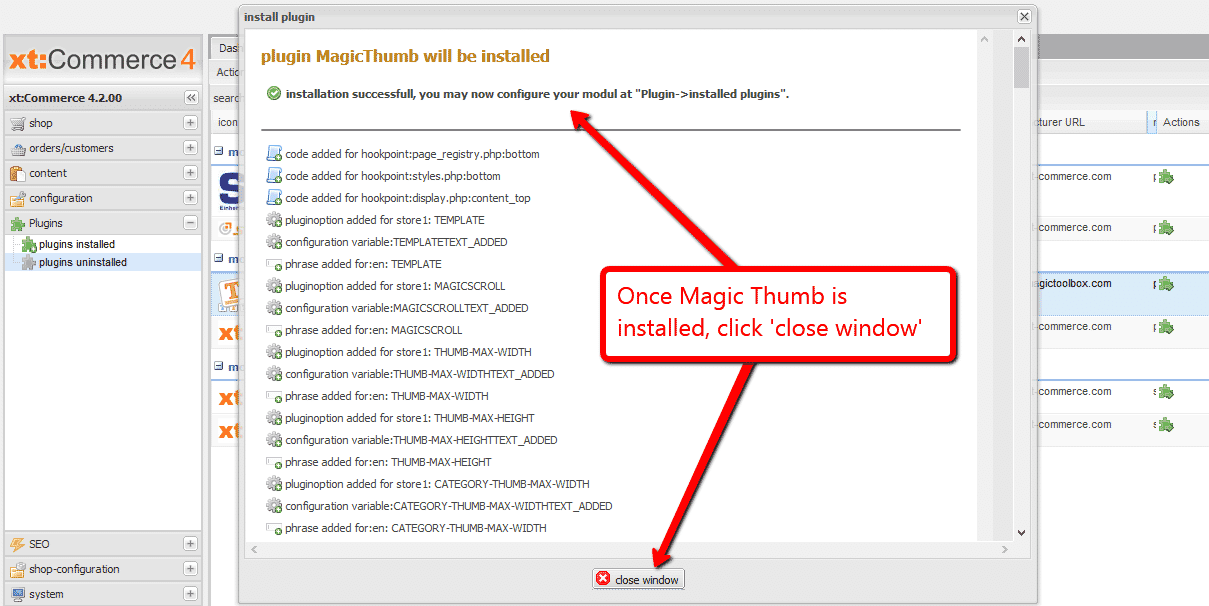
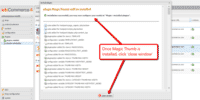 Once Magic Thumb installed message appears, click 'close window'.
 -
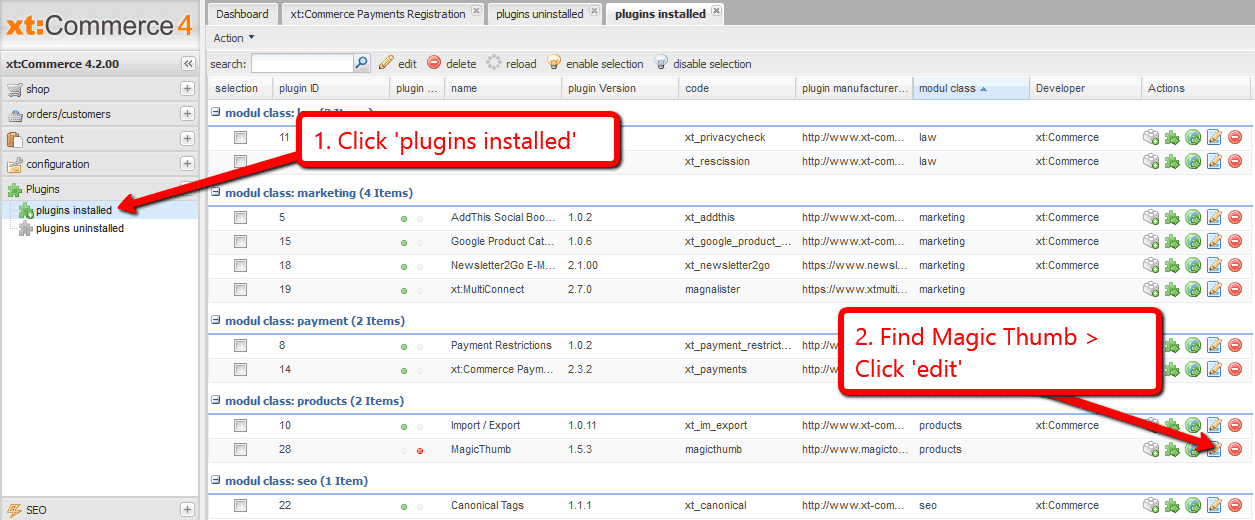
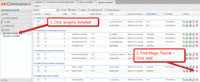 Go to Plugins > plugins installed > Find Magic Thumb > Click 'Edit'. (If you already have 'plugins installed' tab open, close the tab and reopen to see Magic Thumb listed).
 -
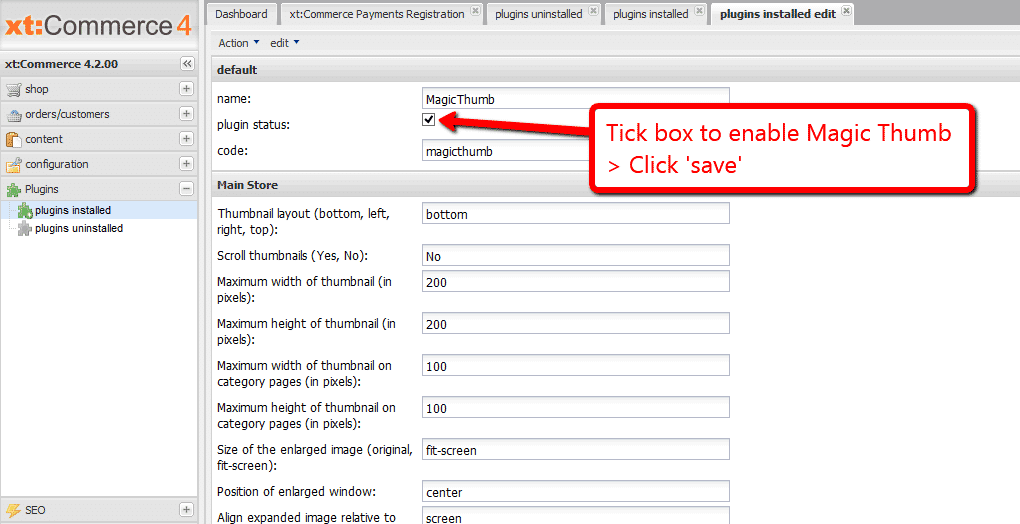
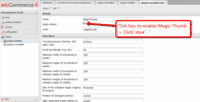 To enable Magic Thumb go to: 'plugin status' > 'Tick' box > Scroll down page and click 'save'.
 - The demo version is now installed!
- Change Magic Thumb settings through the Plugins > plugins installed > Magic Thumb > 'Edit' menu in your xt:Commerce 4/5 admin panel.
- Main image default size on product page is 200 x 200 pixels. Change 'Maximum width of thumbnail (in pixels)' and 'Maximum height of thumbnail (in pixels)' settings to the size you wish.
- Activate Magic Scroll to enjoy organised thumbnails on your product page: Plugins > plugins installed > Magic Thumb > Click 'Edit' > Scroll thumbnails > Enter 'Yes' > Save changes.
- Buy Magic Thumb To upgrade your free and fully functional trial version of Magic Thumb (which removes the "Trial version" text), buy Magic Thumb and overwrite following file with the same one from your licensed version:
plugins/magicthumb/magicthumb.js
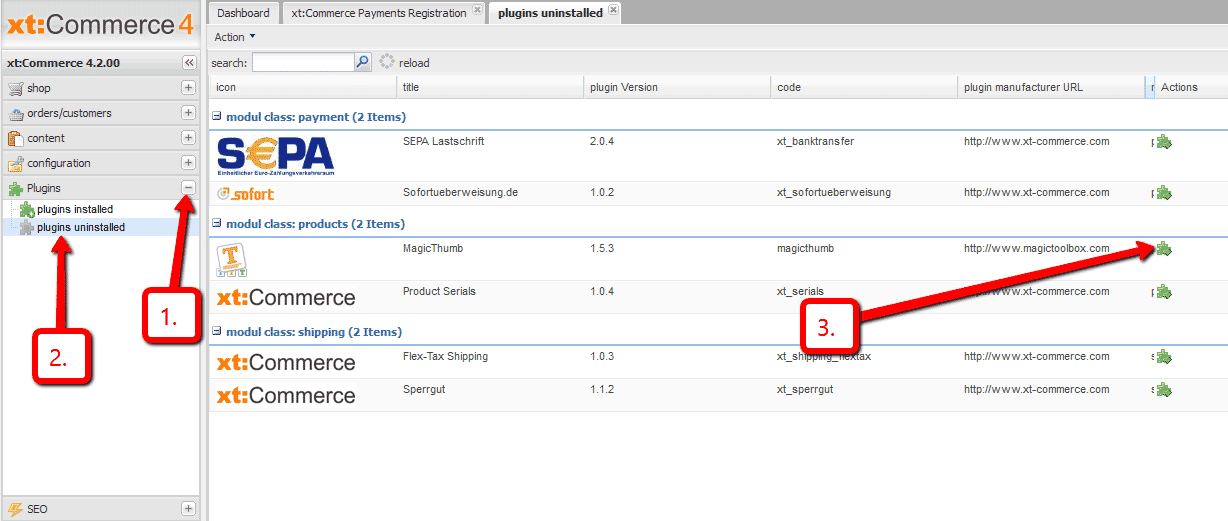

xt:Commerce 3
- Download the xt:Commerce module for Magic Thumb (free and fully functional demo version).
- Unzip it and upload the magicthumb folder to the root of your xt:Commerce website.
- Go to http://your.site.url/magicthumb/ in your browser and follow the instructions.
- The demo version is now installed!
- Buy Magic Thumb To upgrade your free and fully functional trial version of Magic Thumb (which removes the "Trial version" text), buy Magic Thumb and overwrite following file with the same one from your licensed version:
includes/modules/magictoolbox/core/magicthumb.js
Multiple images
Swapping between many images is already a standard feature in Magic Thumb. But if you have lots of images, the page can look complicated.
Make your thumbnails look slick and organised with Magic Scroll for xt:Commerce. It neatly contains the images adds arrows to slide between them. Example:
- Simply activate Magic Scroll on the Magic Thumb options page.
- To remove the "Please upgrade" text, buy a license and overwrite the plugins/magiczoomplus/magicscroll.js file with that from your licensed version.
Thanks for trying Magic Thumb on your xt:Commerce site! What did you hope Magic Thumb could do? How can we improve it? Let us know, we're always improving our tools based on customer feedback.
xt:Commerce 4 (Veyton)
- Disable Magic Thumb via: 'plugin status' > 'Untick' box > Scroll down page and click 'save'.
- Go to Plugins > plugins installed > Find Magic Thumb > Click 'Uninstall' and follow instructions.
- Delete the magicthumb folder from your plugins directory (on your xt:Commerce 4/5 server).
- Magic Thumb is now uninstalled.
xt:Commerce 3
- Go to http://your.site.url/magicthumb/ in your browser and click 'Uninstall' (replace yoursite.url with your domain name).
- Delete the magicthumb folder from the root of your xt:Commerce website.
- Magic Thumb is now uninstalled.


Magic Thumb for xt:Commerce
About
These instructions are for xt:Commerce. Thanks to Lauren Brewer for writing these instructions. Use them to add effects to your website including image zoom on hover/mouseover; image lightbox (enlarge image to full screen); and image magnifiers.
Changelog
- v3.4.4
Removed 'Caption source' option.
June 7, 2018
- v3.4
Added support for Magic Zoom Plus v5.
September 3, 2015
- v3.3
Fixed issue with not working 'Caption source' option.
May 31, 2011
- v3.2
Add web interface for editing module options in INI file.
May 23, 2011
- v3.1
Fixes issue when not all selectors are shown
February 25, 2011
- v3.0
Added installer.
June 15, 2010
- v2.16
Changes in caption-source parameter to allow multiple sources.
June 8, 2010
- v2.15
Removed deprecated styles (white-space: nowrap; text-align: center;) from containers.
March 3, 2010
- v2.14
Fixed module not working with some templates.
February 23, 2010
- v2.13
Fixed ID for additional images when 'use-selectors' is set to No in Magic Thumb.
February 10, 2010
- v2.12
Added 'thumbnails-size' and 'selectors-size' parameters.
January 26, 2010
- v2.11
Added parameters to switch effects on pages for Magic Zoom Plus.
December 16, 2009
- v2.10
Added support for category image on category page.
November 12, 2009
- v2.9
Added support for non-default category page templates.
November 9, 2009
- v2.8
Added category page support.
November 5, 2009
- v2.7
Minor bug fixed.
October 22, 2009
- v2.6
Remove main thumbnail from selectors for Magic Thumb (only when 'use_selectors' set to 'No').
September 24, 2009
- v2.5
Fixed references to the JavaScript and CSS files.
August 18, 2009
- v2.4
Added support for product reviews info page.
March 17, 2009
- v2.3
Added CHANGELOG.
March 17, 2009