
SOME OF THE WORLD’S MOST RESPECTED BRANDS TRUST MAGIC TOOLBOX

    | |
Do your customers consider your store to be attractive and convenient?
Believe in Magic. Get Magic Zoom now.
- Choose from internal or external zoom.
- Show videos next to your images - it's easy and fast.
The most powerful OpenCart image zoom available
Supported Versions
- OpenCart 3.x
- OpenCart 2.x
- OpenCart 1.5.x
Works on these pages
One small detail about your product may be exactly what a customer is looking for. Show every product detail to visitors with a simple image zoom tool for OpenCart sites.
This nifty feature for OpenCart will amaze your customers with impressive, detailed images on hover. The classic Magic Zoom extension is used by thousands of successful retailers across the world.
By examining your products, shoppers immediately gain trust in your store trustworthiness. It'll be perfect for your store, with 4 gorgeous image zoom effects - internal zoom, external zoom, quick-preview and image magnifier.
We guarantee you will adore this product image zoom tool and its regular updates - if it isn't what you need, just request a full refund from our 30-day moneyback guarantee.
Verified by OpenCart:
Read reviews of Magic Zoom on the official marketplace for OpenCart extensions.
Be better
Most online store owners know that beautiful big product images improve conversions - use this advantage to keep your store profitable and growing. Magic Zoom is the perfect solution for this - reveal all your goods' benefits with high-quality zoomable images. All OpenCart versions supported - 1.5.x, 2.x, 3.x.Flexible look & feel
Either use the default settings or tweak the options to achieve the precise experience you're seeking. This OpenCart image zoom addon is highly customisable - choose the zoom style, size, hover effects, enlarge effects, colours and styling.Easy to use
1 minute to install, then rapidly make it look exactly how you want. All the favourite zoom effects are included: internal zoom, external zoom or a round magnifier. Your OpenCart theme is almost certainly supported - if not, our friendly support team will make it work within 24 hours.
Fast to load (and use)
We've been refining Magic Zoom for 9 years. It's no fluke that Magic Zoom and Magic Zoom Plus are OpenCart's highest rated image plugins. Crafted using pure JavaScript (no jQuery or other frameworks), it is unprecedentedly fast and reliable.SEO-friendly
All image URLs are SEO-friendly, so Google will index and list your images in search results - helping you gain new visitors. Try the premium version - Magic Zoom Plus - to go even better. It's the best image zoom tool for OpenCart, by far.




- 1 site
- Unlimited usage on 1 website
- Perfect for webstore owners
£29
One-off payment- 5 sites
- Unlimited usage on 5 sites
- Perfect for freelancers
£95
One-off payment- 10 sites
- Unlimited usage on 10 sites
- Perfect for small agencies
£175
One-off payment- Unlimited
- Unlimited use on unlimited sites
- For big agencies and enterprise
£399
One-off payment "I've been using magictoolbox code almost from the beginning. It is well done, imaginative, and compact. I've tried plenty of other image handlers but none are as good a value as these and I highly recommend them."
Wayne Eskridge, lightingshowroom.com
We've got you covered
Money back guarantee
30-day money back guarantee if you are not 100% satisfied.
Free Support
30 minutes free technical support for all customers. You can buy extra support if you need.
Instant Download
Download your product immediately after payment. Pay by credit card, PayPal or bank transfer.
Free updates
Enjoy 12 months of free updates. After that, new versions are available at 80% discount.
Customer reviews
Boris
Hamood Atef
Vasco Carreira, greenboots.pt
Submit your review
Your review has been received and will be posted soon.
Other OpenCart modules
Try our other great image effects!
 Magic Zoom Plus
 Magic Thumb
 Magic Slideshow
 Magic Scroll
 Magic 360
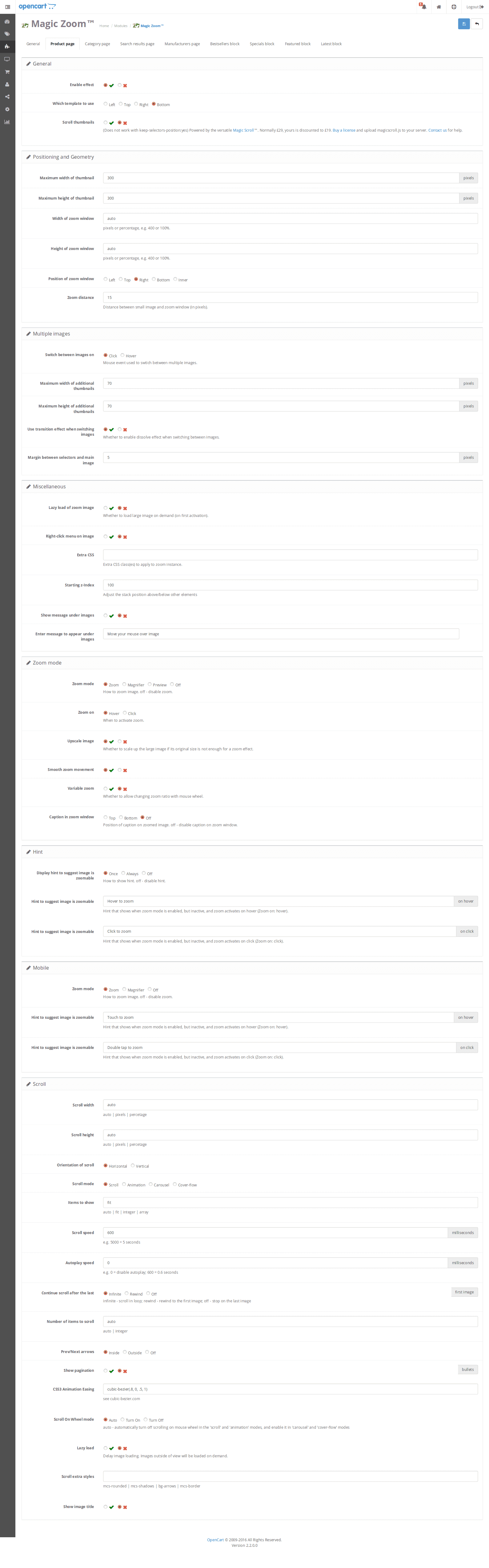
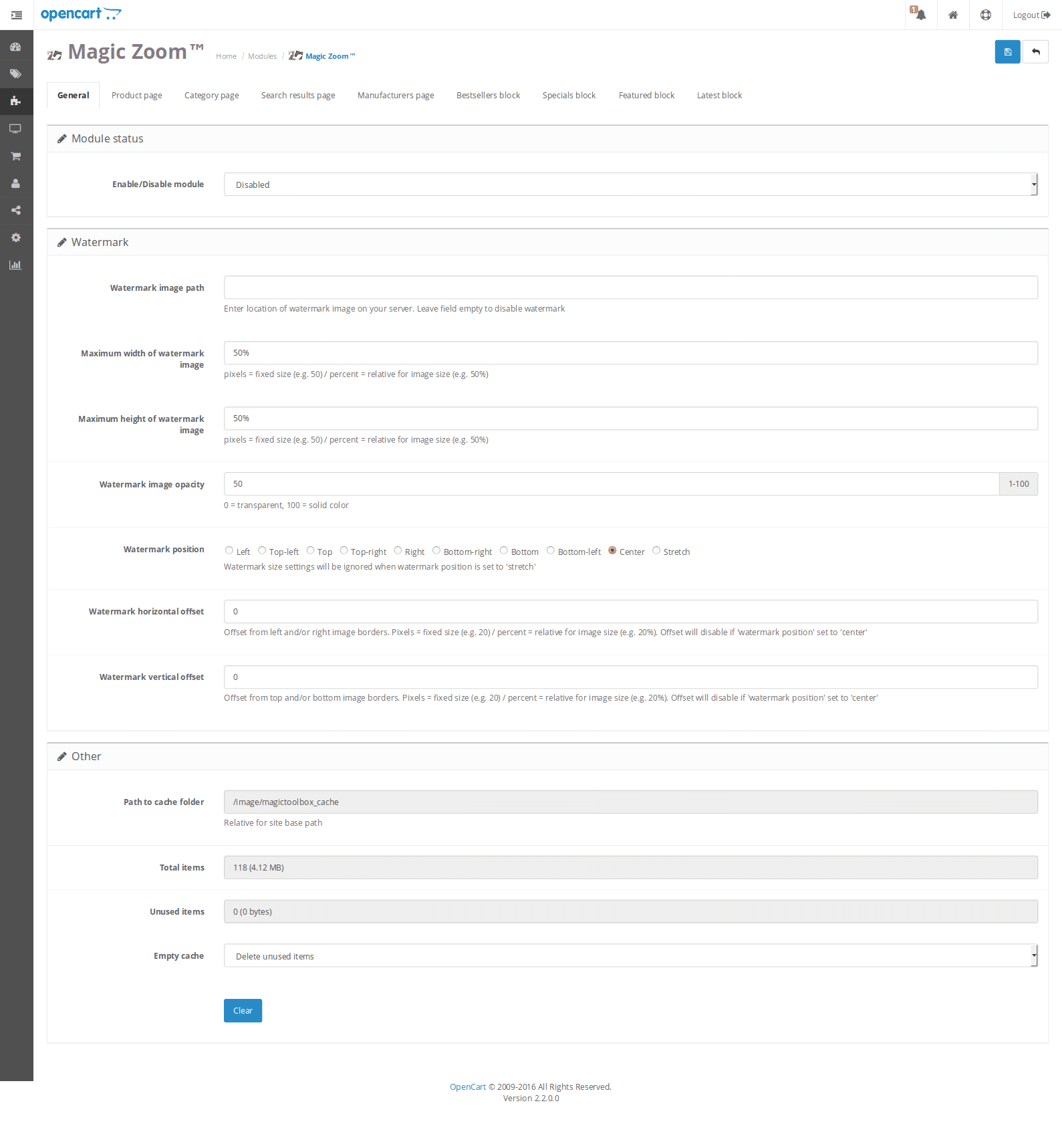
Screenshots
Installation
- Download Magic Zoom for OpenCart (free and fully functional demo version).
- Unzip the file on your computer and FTP the magiczoom folder to your OpenCart directory (on your server), keeping the file and folder structure intact.
-
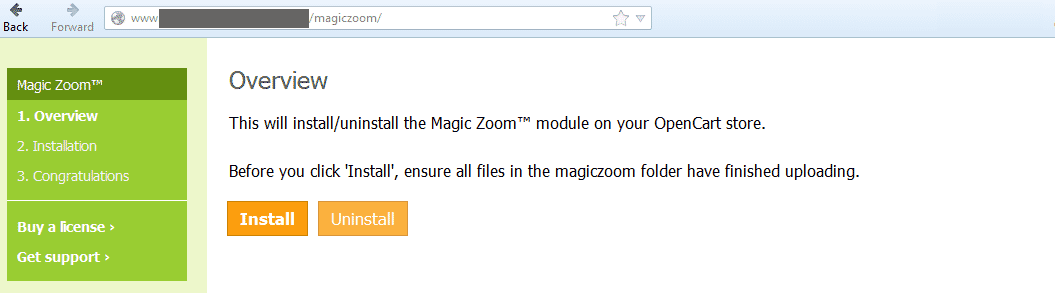
 Go to http://www.yoursite.url/magiczoom/ in your browser > click 'Install' (replace yoursite.url with your domain name.
 -
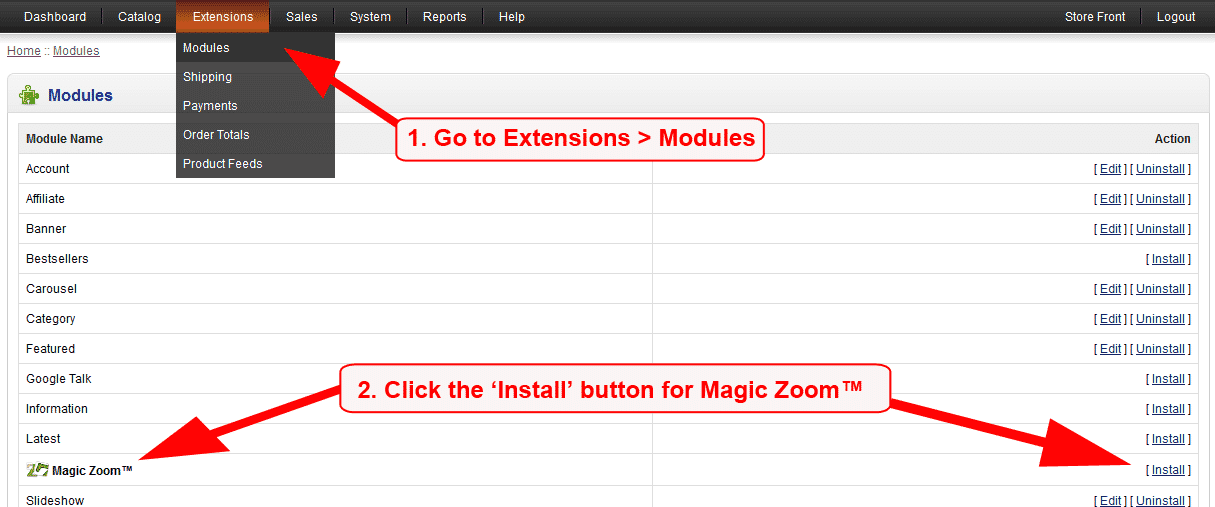
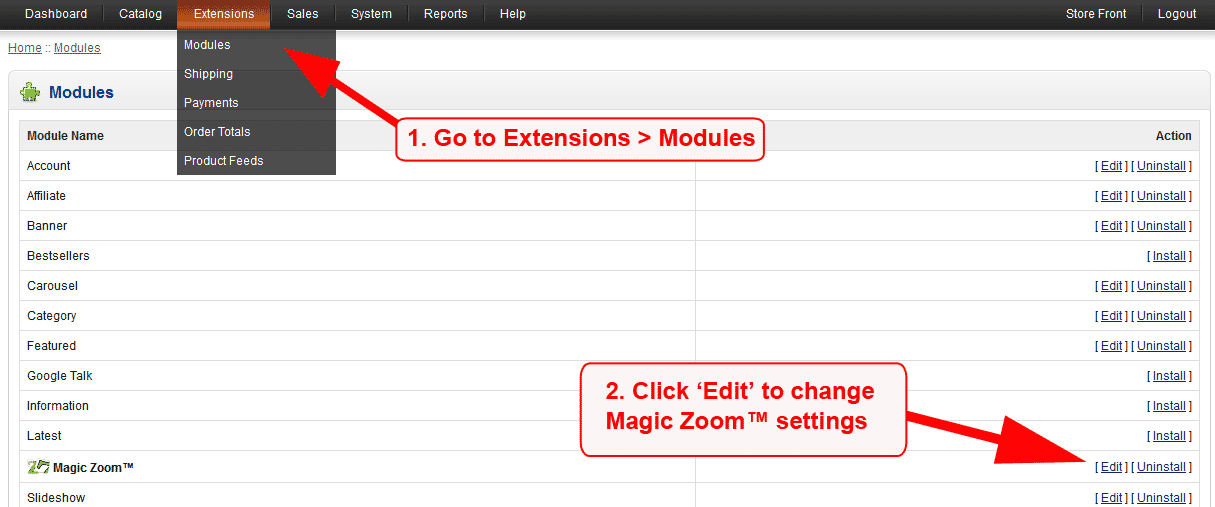
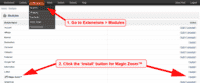 Go to [Admin panel > Extensions > Modules] and install module.
 -
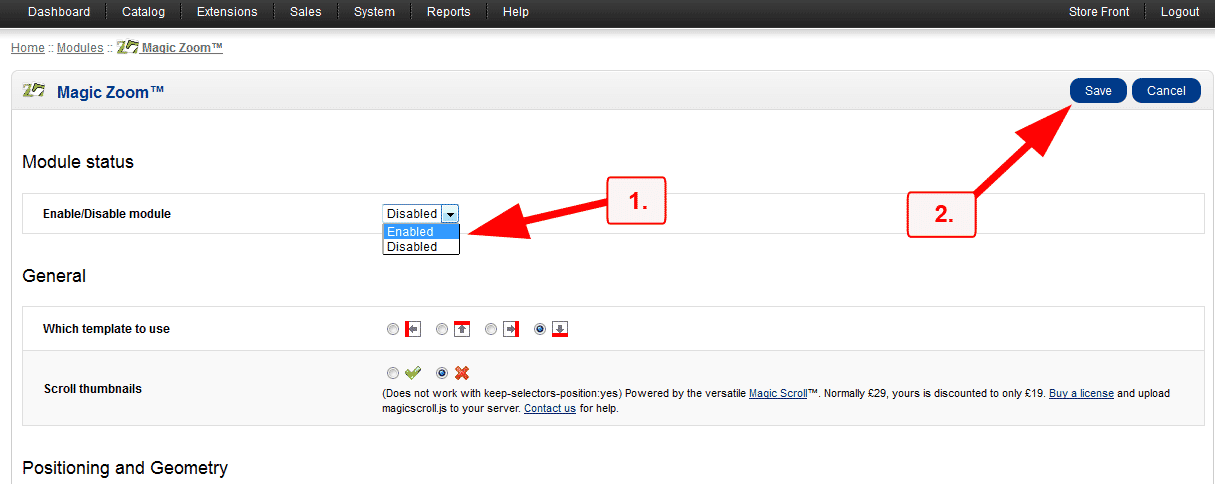
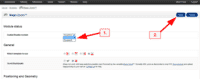 Remain on [Admin panel > Extensions > Modules] and click 'Edit' by the Magic Zoom listing and enable module.
 - If you are using OpenCart 2.x go to [Admin panel > Modifications] and click 'Refresh' button.
- Magic Zoom is now installed!
-
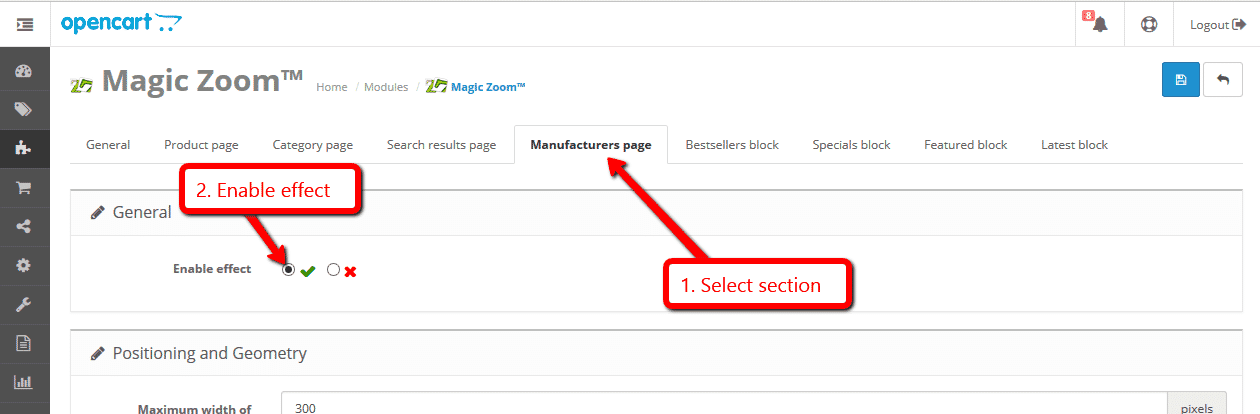
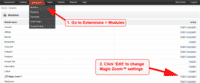 Customize the Magic Zoom module through the [Extensions > Modules > Edit] menu in your OpenCart admin panel.
 -
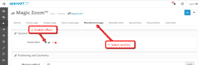 Magic Zoom can be enabled on any page or section you choose.
 -
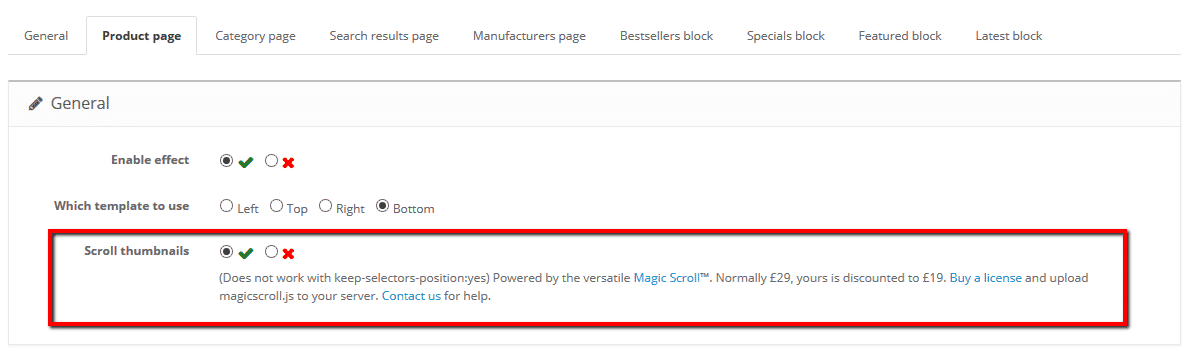
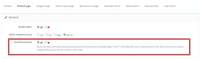 Activate Magic Scroll to enjoy organised thumbnails on your product page: Extensions > Modules > Magic Zoom > Edit > 'Product page' tab > 'General' section > Scroll thumbnails > Select 'Yes' > Save changes.
 -
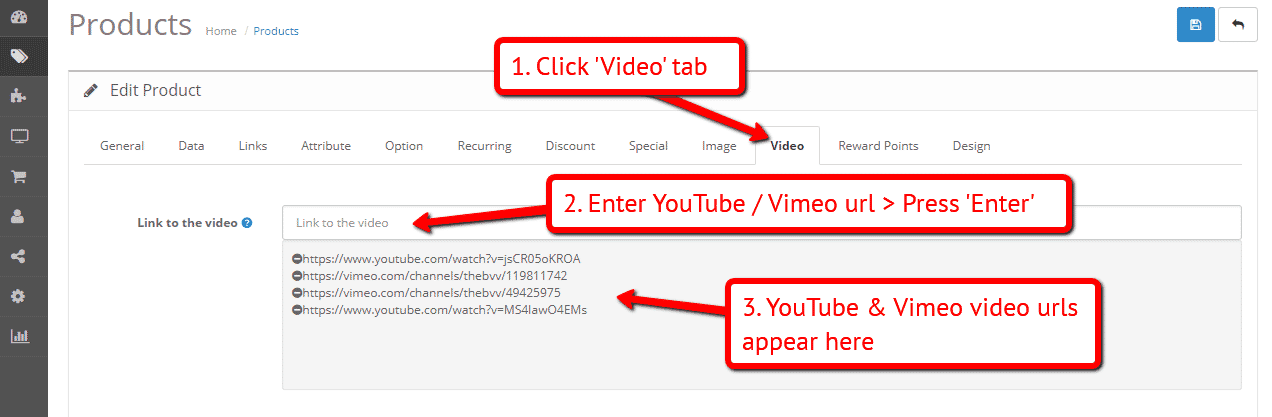
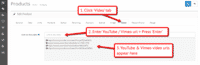 A popular feature (OC2 & OC3) is to display product images & video.
Open an existing product or create a new one > Click 'Video' tab > Enter YouTube or Vimeo video url(s) > Press 'Enter' > Save change. - Buy Magic Zoom To upgrade your free and fully functional trial version of Magic Zoom (which removes the "Trial version" text), buy Magic Zoom and overwrite following file with the same one from your licensed version:
catalog/view/javascript/magiczoom.js
If you run OpenCart inside Joomla using AceShop, please integrate Magic Zoom using the instructions below.
- Download Magic Zoom for OpenCart (free and fully functional demo version).
- Unzip the file on your computer and FTP the admin and catalog folders to the components/com_aceshop/opencart/ folder (on your server).
- Go to [Admin panel > Components > AceShop > Dashboard > Extensions > Modules] and install module.
- Go to [Admin panel > Components > AceShop > Dashboard > Extensions > Extension Installer] and install magiczoom.ocmod.xml file.
- Go back to [Admin panel > Components > AceShop > Dashboard > Extensions > Modules] and click 'Edit' by the Magic Zoom listing and enable module.
- Magic Zoom is now installed!
- Customize the Magic Zoom module through the [Admin panel > Components > AceShop > Dashboard > Extensions > Modules > Edit] menu in your Joomla admin panel.
- Buy Magic Zoom To upgrade your free and fully functional trial version of Magic Zoom (which removes the "Trial version" text), buy Magic Zoom and overwrite following file with the same one from your licensed version:
components/com_aceshop/opencart/catalog/view/javascript/magiczoom.js
If you run OpenCart inside Joomla using MijoShop, please integrate Magic Zoom using the instructions below.
- Download Magic Zoom for OpenCart (free and fully functional demo version).
- Unzip the file on your computer and FTP the admin and catalog folders to the components/com_mijoshop/opencart/ folder (on your server).
- Go to [Admin panel > Components > MijoShop > Dashboard > Extensions > Modules] and install module.
- Go to [Admin panel > Components > MijoShop > Dashboard > Extensions > Extension Installer] and install magiczoom.ocmod.xml file.
- Go back to [Admin panel > Components > MijoShop > Dashboard > Extensions > Modules] and click 'Edit' by the Magic Zoom listing and enable module.
- Magic Zoom is now installed!
- Customize the Magic Zoom module through the [Admin panel > Components > MijoShop > Dashboard > Extensions > Modules > Edit] menu in your Joomla admin panel.
- Buy Magic Zoom To upgrade your free and fully functional trial version of Magic Zoom (which removes the "Trial version" text), buy Magic Zoom and overwrite following file with the same one from your licensed version:
components/com_mijoshop/opencart/catalog/view/javascript/magiczoom.js
If you run OpenCart inside Joomla using jCart, please integrate Magic Zoom using the instructions below.
- Download Magic Zoom for OpenCart (free and fully functional demo version).
- Unzip the file on your computer and FTP the admin, catalog and system folders to the components/com_jcart/ folder (on your server).
- Go to [Admin panel > Components > jCart > Modules] and install module.
- Go back to [Admin panel > Components > jCart > Modules] and click 'Edit' by the Magic Zoom listing and enable module.
- Magic Zoom is now installed!
- Customize the Magic Zoom module through the [Admin panel > Components > jCart > Modules > Edit] menu in your Joomla admin panel.
- Buy Magic Zoom To upgrade your free and fully functional trial version of Magic Zoom (which removes the "Trial version" text), buy Magic Zoom and overwrite following file with the same one from your licensed version:
components/com_jcart/catalog/view/javascript/magiczoom.js
Video instructions
Multiple images
Swapping between many images is already a standard feature in Magic Zoom. But if you have lots of images, the page can look complicated.
Make your thumbnails look slick and organised with Magic Scroll for OpenCart. It neatly contains the images adds arrows to slide between them. Example:









- Simply activate Magic Scroll on the Magic Zoom options page.
- To remove the "Please upgrade" text, buy a license and overwrite the /catalog/view/javascript/magicscroll.js file with that from your licensed version.
Combine zoom & video (OC2 & OC3)
OpenCart 2.x and 3.x users now receive 2 tools in 1: image zoom & video!
Product videos offer potential customers a clear demonstration of any product. Conveying an incredible amount of information very quickly. Videos are proven to increase likelihood to buy, spend longer on your site and spend more per order.
It's time to stand out from the competition and turn potential customers into actual customers.




- Make sure Magic Zoom is installed on your OpenCart store.
- Open an existing product or create a new one.
- Click 'Video' tab > Enter YouTube or Vimeo video url(s) > Press 'Enter' > Save change.
 Refresh web page > Product video(s) appear as thumbnails on product page.
- That's it!

Combine zoom & spin (OC2 & OC3)




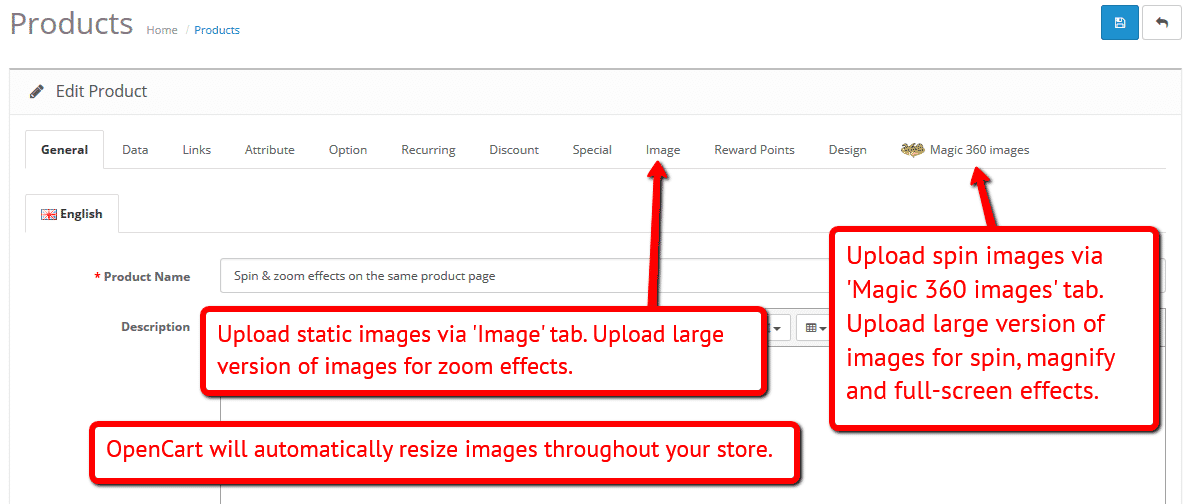
To zoom some images and spin others on your product page (like the example above) on your OpenCart 2.x or OpenCart 3.x store, you can install both Magic Zoom and Magic 360.
- Install the OpenCart extension for Magic Zoom.
- Install the OpenCart extension for Magic 360.
- Create a new product or open an existing one.
- Upload your zoom and enlarge images via the 'Images' section. Upload your 360 spin images via the 'Magic 360 images' section (screenshot -
 ).
).
Zoom in CMS area
Turn any static image into a zoomable image on your OpenCart CMS pages!
- Go to the module options page: [Admin panel > Extensions > Magic Zoom].
- Go to 'General' tab > 'Miscellaneous' section > 'Include headers on all pages' option > Click 'tick' > Save settings.
- Go to 'Catalog > Information'.
- Open existing page or create a new page.
- Scroll down to 'Description' section > Click 'Code View' button.
Add zooming to any image on your CMS page by referencing the small and large images. Reference your small image with <img> and link it to your big image using the CSS class of "MagicZoom". Your code will look something like this:
<a href="big.jpg" class="MagicZoom"><img src="small.jpg"></a>
- Save changes.
- Customize your image zooms exactly how you want them to look with Magic Zoom's detailed HTML instructions.
Product attributes


















Do your products come in different colours or styles?
Magic Zoom supports the Product Options Image PRO extension.
Attributes are configured on a per-product basis. Each option can have multiple images assigned. Our demo example uses 4 images for each attribute.
Whether you choose "Select", "Radio" and "Checkbox" - product attributes is a perfect way to show customers your product range.
Uninstallation
Thanks for trying Magic Zoom on your OpenCart site! What did you hope Magic Zoom could do? How can we improve it? Let us know, we're always improving our tools based on customer feedback.
- Go to [Admin panel > Extensions > Modules] and Uninstall module.
- Go to http://yoursite.url/magiczoom/ in your browser and click 'Uninstall' (replace yoursite.url with your domain name).
- If you are using OpenCart 2.x go to [Admin panel > Modifications] and click 'Refresh' button.
- Delete the magiczoom folder from your OpenCart directory (on your server).
- Magic Zoom is now uninstalled.
If you run OpenCart inside Joomla using AceShop, please uninstall Magic Zoom using the instructions below.
- Go to [Admin panel > Components > AceShop > Dashboard > Extensions > Modules] and click 'Edit' by the Magic Zoom listing and disable module.
- Remain on [Admin panel > Components > AceShop > Dashboard > Extensions > Modules] and uninstall module.
- Magic Zoom is now uninstalled!
If you run OpenCart inside Joomla using MijoShop, please uninstall Magic Zoom using the instructions below.
- Go to [Admin panel > Components > MijoShop > Dashboard > Extensions > Modules] and click 'Edit' by the Magic Zoom listing and disable module.
- Remain on [Admin panel > Components > MijoShop > Dashboard > Extensions > Modules] and uninstall module.
- Magic Zoom is now uninstalled!
FAQ
Does Magic Zoom OpenCart support product options?
Using a product options extension is a great way to show customers your full range of products (eg colours, sizes).
Magic Zoom has built-in support for Ka-Station Product Variants, Product Option Colour & Size Combination and Product Option Image Ultimate 3.
If you're using a different product options extension, get in touch and we'll check if Magic Zoom supports it.
Does Magic Zoom support retina screens?
Yes! Retina images are served for all your products. Your OpenCart customers will enjoy the high-def quality.