
Relied upon by WordPress website owners, has been the professional choice since 2009 for pioneering deep zoom effects.
This official WordPress plugin makes it easy to apply these effects to your pages. Even better - the plugin gives you auto-caching, image resizing and SEO optimization as part of the dedicated WordPress features.
With free new versions regularly released, your images will always look gorgeous with .
Features you'll love
Screenshots
Installation
- Download the plugin for WordPress (no longer available to new customers)
-
 Upload it via your WordPress admin area.
Or unzip the file on your computer and upload the folder via FTP to /wp-content/plugins/, keeping the file and folder structure intact. - Activate the plugin in the 'Plugins' menu of WordPress.
-
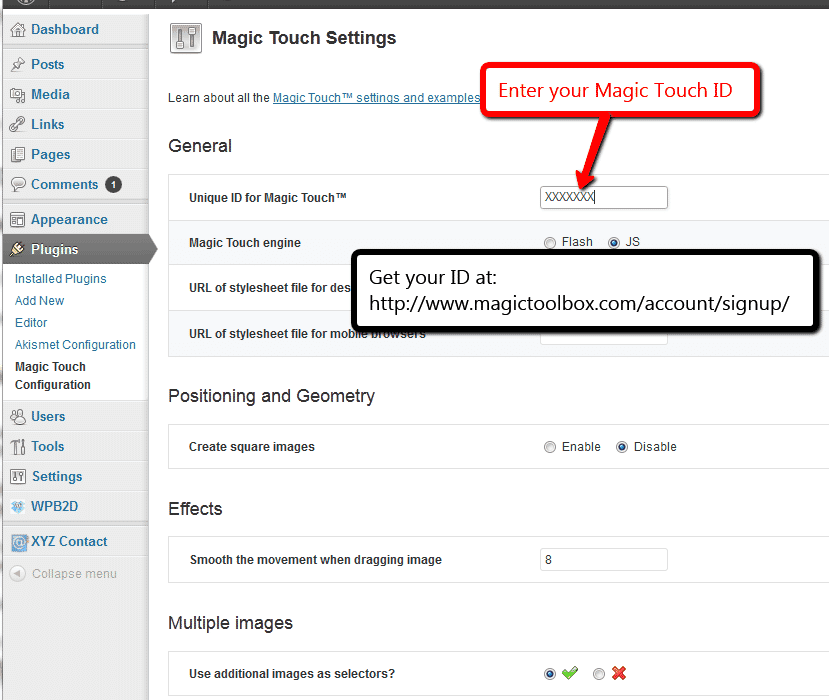
 Go to the "Magic Touch™ Configuration" page, enter your Magic Touch™ key and click "Save settings". To get your ID, login to your Magic Touch™ account.

Installation video
This WordPress plugin is perfect for displaying huge photos on your website. No matter how big the image is, Magic Touch™ will zoom the image fast.
The first ever view of your image triggers a unique, one-off process. Hundreds of small image tiles are created and once ready, all future images load very fast.
Video: how it works
Watch the video to discover how it works!
Uninstallation
Thanks for trying on your WordPress site! What did you hope could do? How can we improve it? Let us know, we're always improving our tools based on customer feedback.
- Delete code from your content.
- Go to the Plugins menu of WordPress > ' for WordPress' plugin > Click 'Deactivate'.
- Once page has refreshed, go back to ' for WordPress' plugin > Click 'Delete' > Click 'Yes, delete these files'.
- is now uninstalled.
Customer reviews
Submit your review
Your review has been received and will be posted soon.
Other WordPress plugins
Try our other great image effects!
 Magic Zoom
 Magic Zoom Plus
 Magic Thumb
 Magic Slideshow
 Magic Scroll
 Magic 360
This WordPress plugin is perfect for displaying huge photos on your website. No matter how big the image is, Magic Touch™ will zoom the image fast.
The first ever view of your image triggers a unique, one-off process. Hundreds of small image tiles are created and once ready, all future images load very fast.