
 Zara 2014
 Zara 2014
 Zara 2014
 Zara 2014
 Zara 2014
 Zara 2014
 Zara 2014
 Zara 2014
 Zara 2015
 Zara 2015
 Zara 2015
 Zara 2015
 Zara 2015
 Zara 2015
 Zara 2015
 Zara 2015
 Zara 2015
 Zara 2015
Scroll content on any Joomla web page with this 4-in-1 Joomla carousel extension. Whether it's text, images or HTML content, your sliders will look incredible on any device thanks to Magic Scroll's responsive design.
Why 4-in-1? This JavaScript scroller offers 4 effects to rotate your content - scroll, 3D carousel, cover-flow and animate. You've probably seen the 'cover-flow' effect in iTunes. Try all of them on the examples page.
Homepage slideshows are quick to configure. Make it look exactly how you want, with up to 30 easy customizations. Try this JavaScript carousel today. Your Joomla website will thank you!
Key features
All versions supported
This magnificent image carousel is compatible with all Joomla versions: from 1.5 to 3.x. We've been improving it for 8 years already, to make it fully compatible. If it doesn't work instantly, please contact our support team for a quick solution.
Easy installation
5 minutes to add Magic Scroll and you'll be enjoying beautiful image carousels on your website. Buy it now, safe in the knowledge of a 30-day moneyback guarantee. Alternatively, try the trial version.
Custom carousels
It's easy to create unique carousels on different pages (or several carousels on one page). Customise them with 16 adjustable options. Contact us if you need any help.Faster loading
Magic Scroll caches images so your users aren't delayed as they navigate your site.Screenshots

Installation
- Download the Magic Scroll component for Joomla content (free and fully functional demo version).
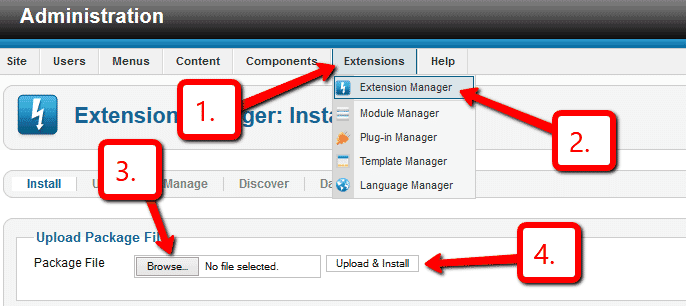
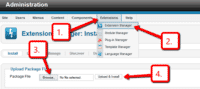 Upload it via your Joomla admin panel Extensions > Extension Manager > Browse File > Click 'Upload & Install'. Component will automatically enable.
Open article or any other content area where you want to show scroller. Add a DIV with class of MagicScroll and put your images inside the div e.g.
 <div class="MagicScroll">
  <a href="/page-1/"><img src="example1.jpg"></a>
  <a href="/page-2/"><img src="example2.jpg"></a>
  <a href="/page-3/"><img src="example3.jpg"></a>
  <a href="/page-4/"><img src="example4.jpg"></a>
  <a href="/page-5/"><img src="example5.jpg"></a>
  <a href="/page-6/"><img src="example6.jpg"></a>
 </div>
- Troubleshooting: If scroller does not appear on web page, go to
Components > Magic Scroll for Joomla > General tab > Miscellaneous > Item tag > Select 'A' option. - The Magic Scroll CSS and JS files will automatically be included in the page head.
- That's all!
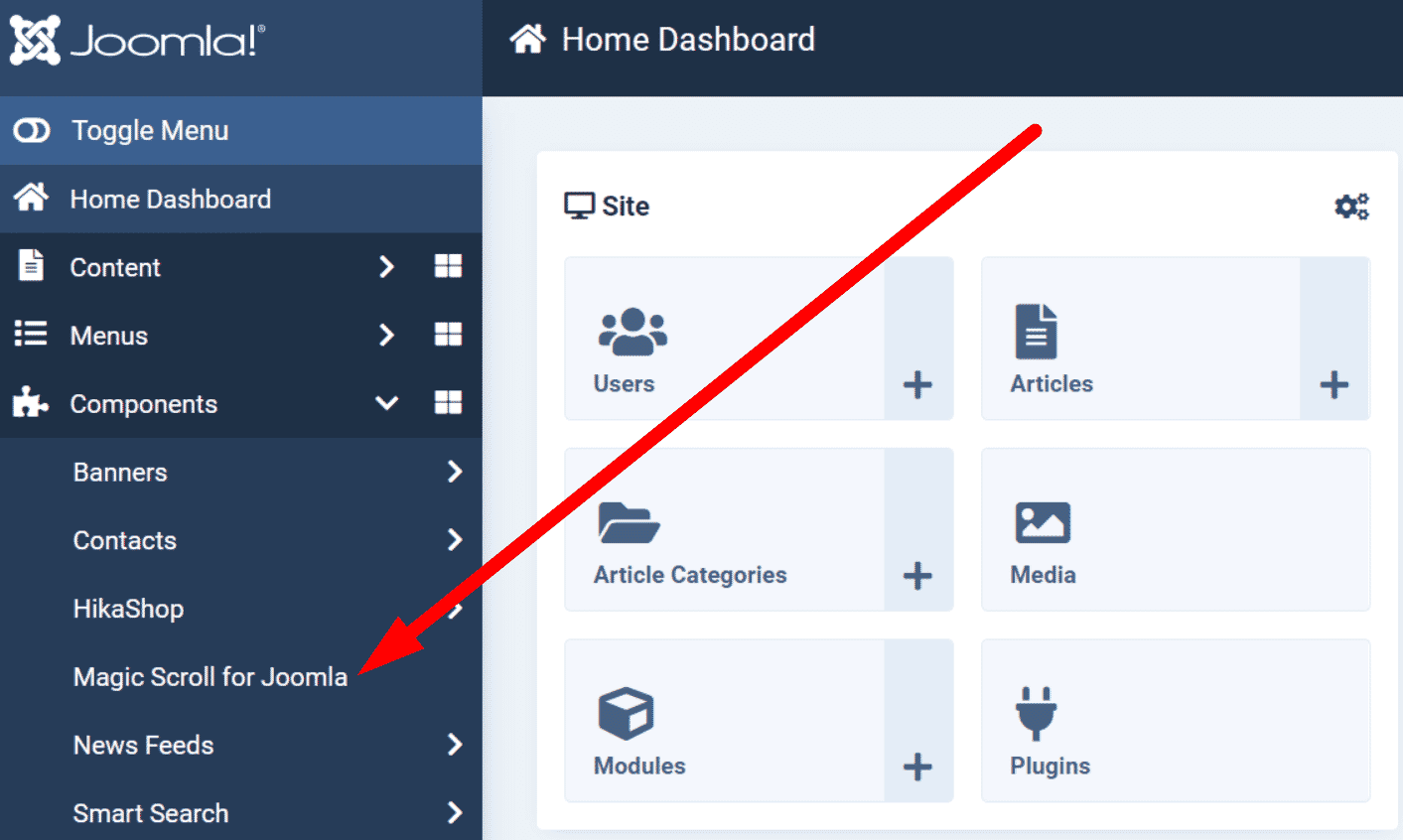
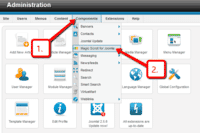 Customize Magic Scroll how you want. Go to Components > Magic Scroll for Joomla
- Buy Magic Scroll To upgrade your free and fully functional trial version of Magic Scroll (which removes the "Trial version" text), buy Magic Scroll and overwrite following file with the same one from your licensed version:
/media/plg_system_magicscroll/magicscroll.js

- Download the Magic Scroll component for Joomla content (free and fully functional demo version).
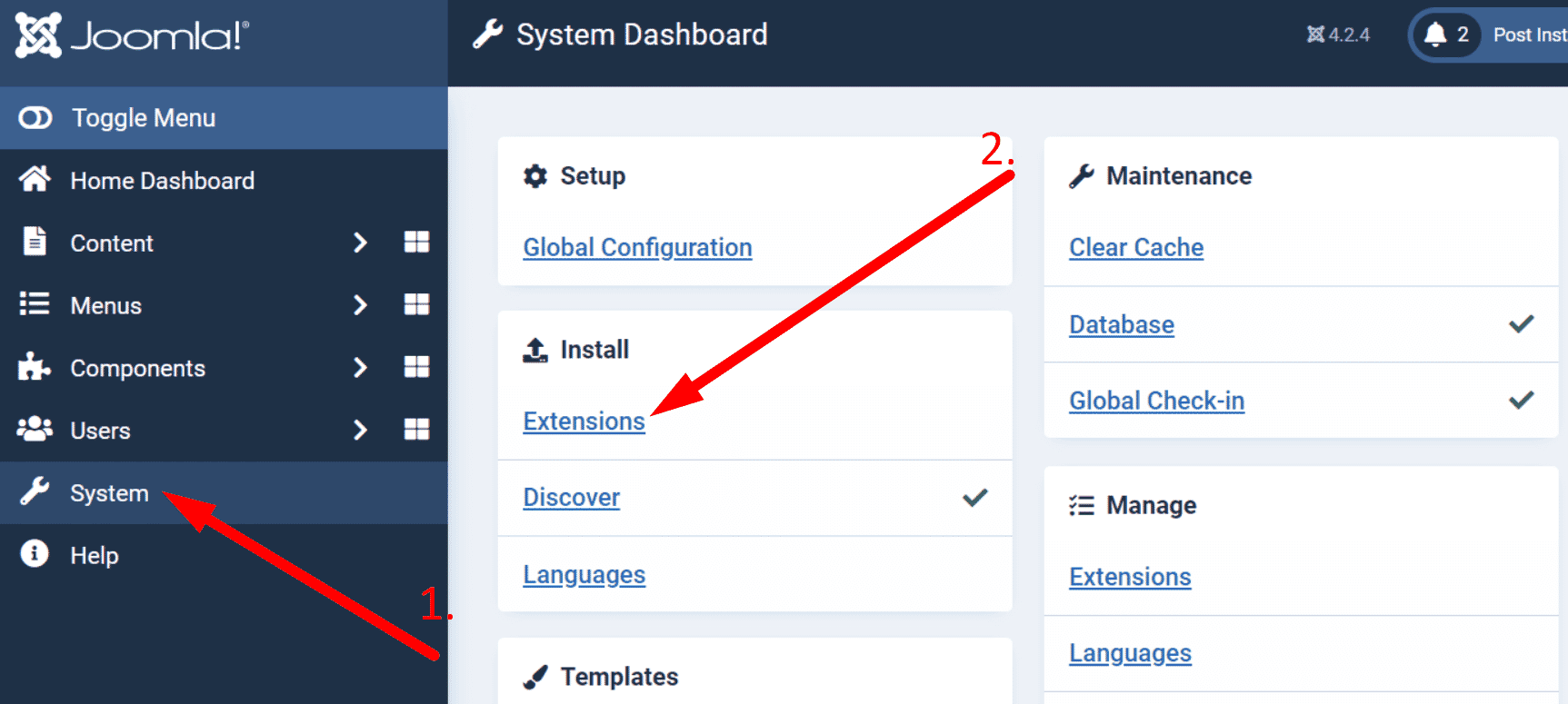
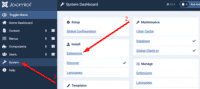 Upload it via your Joomla admin panel System > Install > Extensions > Browse File.
Open article or any other content area where you want to show scroller. Add a DIV with class of MagicScroll and put your images inside the div e.g.
 <div class="MagicScroll">
  <a href="/page-1/"><img src="example1.jpg"></a>
  <a href="/page-2/"><img src="example2.jpg"></a>
  <a href="/page-3/"><img src="example3.jpg"></a>
  <a href="/page-4/"><img src="example4.jpg"></a>
  <a href="/page-5/"><img src="example5.jpg"></a>
  <a href="/page-6/"><img src="example6.jpg"></a>
 </div>
- Troubleshooting: If scroller does not appear on web page, go to
Components > Magic Scroll for Joomla > General tab > Miscellaneous > Item tag > Select 'A' option. - The Magic Scroll CSS and JS files will automatically be included in the page head.
- That's all!
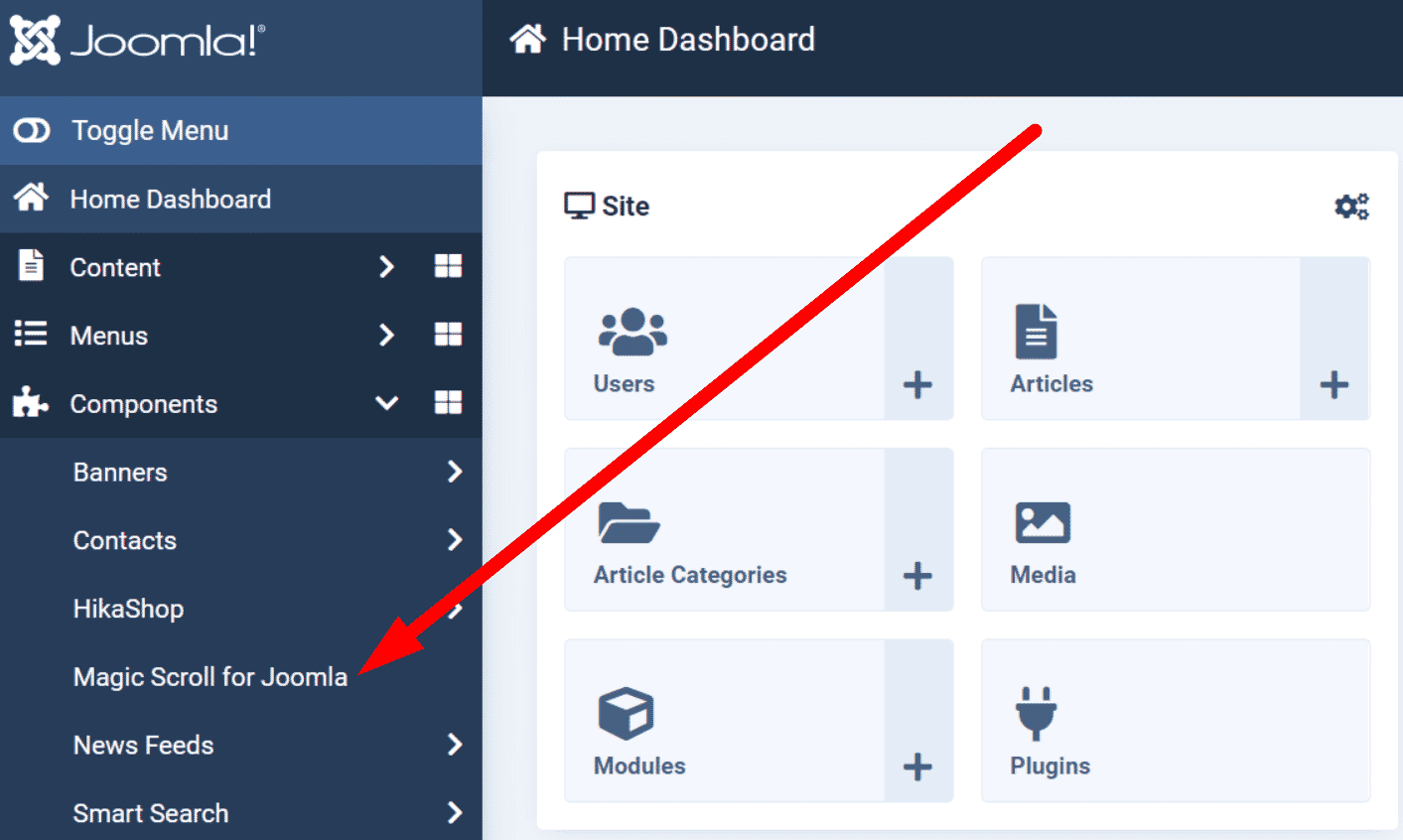
 Customize Magic Scroll how you want. Go to Components > Magic Scroll for Joomla.
- Buy Magic Scroll To upgrade your free and fully functional trial version of Magic Scroll (which removes the "Trial version" text), buy Magic Scroll and overwrite following file with the same one from your licensed version:
/media/plg_system_magicscroll/magicscroll.js
Home page scroller
To create a scroller on your home page:
 Go to Components > Magic Scroll for Joomla >. Select 'Home page slideshow' section.
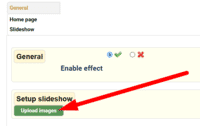 Select Upload images and browse your computer for your set of scroller images.
- The scroller will now display on your home page, before the main content area.
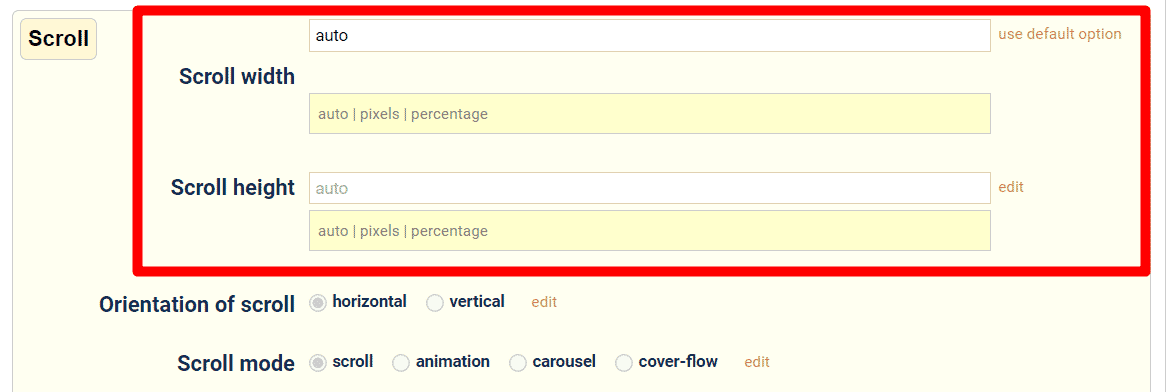
 Scroller will automatically resize to the size of your images. To set a specific scroller size, change Scroll width (pixels) and Scroll height (pixels) options.
- There are over 30 customizations available. Have fun, try them all!

Joomla scroller benefits
Before Joomla was released, updating ones own website was a chore, unless you were a HTML whizz. A web developer was often called on for even the smallest of changes.
That all changed with Joomla in 2005. This hugely popular CMS (Content Management System) gives users full control over their website content.
This open source CMS is used by all sorts of popular websites. From a museum like the Guggenheim, to dance, music, food, sport & much more. The options are endless.
Since January 2011, Joomla users have enjoyed our Joomla scroller module
Magic Scroll allows you to scroll images and other objects on any article, by simply downloading the Joomla carousel extension from our website and uploading it directly into your Joomla Admin panel. It brings life to web pages which would otherwise have looked static.
Responsive design
Back in 2011, the phrase 'responsive design' was still not mainstream. Some developers were using terms like flexible, elastic, fluid & liquid to describe website layouts, but not as many as you would think. Nowadays, responsive design is crucial, with the popularity of handheld devices and all sorts of screen sizes.
What does this have to do with Magic Scroll?
You'll be pleased to know that Magic Scroll is 100% responsive. Our JavaScript carousel was created to fit the screen size perfectly. Whether it's a mobile phone, android tablet or iPad, the Joomla scroller automatically scales up & down. No effort required on your part.
How Magic Scroll has changed
Originally Magic Scroll did what it said on the tin... it scrolled. But we never stop improving it. These days, you can choose from 4 ways to scroll your Joomla content. We call them rendering modes:
Scroll: The original scroll moves content from right/left or left/right. It is the default setting when the Joomla scroller module is installed.
Animation: Similar to the original scroll effect, but with a twist. The images fade on entrance & exit. A slide feel is used by default, but can easily be changed to a fun bounce effect by adding mcs-bounce to the class="MagicScroll" code so it becomes class="MagicScroll mcs-bounce".
Cover-flow: Have you ever looked at Apple iTunes and thought how cool their images move? You too can now have this effect thanks to the cover-flow option.
Carousel: Views images in a circular motion, offering a 3D perspective to your Joomla web page.
To change from the default Scroll option to either Animation, Cover-Flow or Carousel go to: Admin > Components > Magic Scroll for Joomla > Scroll mode > and select your preference. By making your choice on the Magic Scroll settings page, the chosen JavaScript scroller effect will be applied to all image scrollers throughout your website.
Display your Joomla scrollers as different modes on different pages
No problemo! You can control each JavaScript carousel separately using the simple Magic Scroll HTML code. As Step 3 of the Installation process shows, your initial Joomla scroller code will look like this:
<div class="MagicScroll">
  <a href="/page-1/"><img src="example1.jpg"></a>
  <a href="/page-2/"><img src="example2.jpg"></a>
  ...
</div>
By adding data-options= code to the <div> tag you can specify which effect that JavaScript scroller will have. Carousel is data-options="mode: carousel". Cover-flow is data-options="mode: cover-flow". And Animation is data-options="mode: animation". Don't forget to add mcs-bounce to the class if that's the effect you're looking for. So your code would be: <div class="MagicScroll mcs-bounce" data-options="mode: animation">. If we take the carousel option as our example, your HTML code will look like this:
<div class="MagicScroll" data-options="mode: carousel">
  <a href="/page-1/"><img src="example1.jpg"></a>
  <a href="/page-2/"><img src="example2.jpg"></a>
  ...
</div>
With nearly 40 customization options available, each JavaScript scroller on your Joomla website can look completely different from each other.
Create a homepage scroller
One last thing. We've discussed how this JavaScript carousel will look on your article pages, but it's also perfect for your homepage.
In February 2014 we added Homepage support to this Joomla carousel extension, to make your life easier. Controlled by its own Homepage settings page, simply upload the images you wish to appear on your Joomla home page; choose the effect your JavaScript scroller will appear & the height/size you want. Simple.
Whatever design you're seeking, this Joomla carousel extension offers fun, flexibility & simplicity. Perfect for any Joomla website.
Uninstallation
Thanks for trying Magic Scroll on your Joomla site! What did you hope Magic Scroll could do? How can we improve it? Let us know, we're always improving our tools based on customer feedback.
- Delete Magic Scroll code from your content.
- Go to: Extensions > Plugin Manager > Disable plugin.
- Go to: Extensions > Extension Manager > Manage > Add tick in box next to Magic Scroll for Joomla > Click 'Uninstall'.
- Magic Scroll is now uninstalled.
- Delete Magic Scroll code from your content.
- Go to: System > Manage > Extensions.
- Search 'Magic Scroll' > Add tick in box next to Magic Scroll for Joomla > Click 'Uninstall'.
- Magic Scroll is now uninstalled.
FAQ
Can I change background colour of carousel?
Yes! By default, the Carousel & Cover-Flow modes use a grey/black background colour. You can change the Hex Colour to anything you want. With over 16,000 hex colours available, you'll be spoilt for choice. Simply add the CSS code you need to the Magic Scroll CSS file.
Carousel background
.MagicScroll[data-mode="carousel"] {
    background-color: <your-colour>;
}
Cover-flow background
.MagicScroll[data-mode="cover-flow"] {
    background-color: <your-colour>;
}
Customer reviews
Submit your review
Your review has been received and will be posted soon.
Other Joomla components
Try our other great image effects!
 Magic Zoom
 Magic Zoom Plus
 Magic Thumb
 Magic 360
 Magic Slideshow
This Joomla slider extension is free to download and install. The module itself is released under GPL, while the JavaScript tool within the zip file, Magic Scroll, is available under a commercial license. This type of tool is also known as a carousel or slider. If you want to use it on VirtueMart, use the VirtueMart component instead.
This JavaScript carousel extension was created for Joomla. Use the script to easily slide multiple images or text anywhere on your page including 'bestsellers', 'recently viewed', 'newest' and other products blocks. Download the free component for your site. It works on all majot browsers, including on mobile devices such as iPad and iPhone.
The instructions above describe how to install this Joomla carousel. Contact us if you need any help.