
SOME OF THE WORLD’S MOST RESPECTED BRANDS TRUST MAGIC TOOLBOX


Enchant customers with 360° spins
Show the trustworthiness of your goods.
- You can put it anywhere in your store.
- Tweak it to perfection with over 30 options.
The most powerful Magento 360 degree view available
Supported Versions
- Enterprise: 2.4.x, 1.11.x - 1.14.x
- Community: 2.4.x, 1.4.x - 1.9.x
Works on these pages
This is the undisputed best Magento 360 viewer for showing your products in 360 degrees.
Magic 360 displays a series of images as a smooth 360 degree spin. Spin it left and right to see the entire product like in real life. It can also rotate images up/down to see under and over a product. The ultimate Magento 3D product viewer for maximising your sales conversions.
Click to zoom in to any frame of the spin or click the full-screen icon to open up a stunning big-screen view that shoppers adore. It looks superb on desktops and even more gorgeous on mobile devices, be it iOS, Android or any other.
Save yourself time and use our bulk upload tool. Perfect if you have lots of 360 product spins.
For the finishing touch, combine Magic 360 with Magic Zoom Plus. Together, you can show videos, zoomable images and 360 spins all in a fast and neat image gallery on your product page.
Verified by Magento:
Read reviews of Magic 360 on the official marketplace for Magento 1.x and Magento 2 extensions.
Rating 
Get more from your Magento site
Improve your website user experience and increase conversions. 360 degree views have increased conversions by 27%. Magic 360 is compatible with both Magento 1 & Magento 2 and always updated when new Magento versions are released.
Accelerate your pageload speed
Images wil be resized and optimised automatically by Magic 360. Then they're cached so speed up the download of your Magento website. Users with slow connections will be pleasantly surprised and you can accelerate it even more with lazy loading.Built with SEO in mind
Upload big beautiful images to delight your customers. Magic 360 will serve the most suitable size and use SEO-friendly URLs to help Google index your images and boost your SEO.
Responsive out of the box
Magic 360 is refined for all devices, from mobile phones to large desktops. 100% of users will enjoy real-life views with intuitive mouse/touch gestures. The JavaScript 360 viewer is compatible with jQuery (and not dependent on it).Secure your images
Don't let competitors use your hard-earned 360 photos on their website. Your spins can have a watermark appled, with your logo. Adjust the style, size and location to your desire.
"I've been using magictoolbox code almost from the beginning. It is well done, imaginative, and compact. I've tried plenty of other image handlers but none are as good a value as these and I highly recommend them."
Wayne Eskridge, lightingshowroom.com
We've got you covered
Money back guarantee
30-day money back guarantee if you are not 100% satisfied.
Free Support
30 minutes free technical support for all customers. You can buy extra support if you need.
Instant Download
Download your product immediately after payment. Pay by credit card, PayPal or bank transfer.
Free updates
Enjoy 12 months of free updates. After that, new versions are available at 80% discount.
Customer reviews
Since then, we have updated magento versions 3 times, and each time we have needed a compatibility fix, they have done it swiftly and reliably. Very much appreciated
Jamie Olney, temptationgifts.com
Muhammad Saeed Khan
Bach
Rajen Pattni
The team reacted so fast for 2 days they fix my problem.
Thanks guys perfect support!
Nikola Haralamov
Submit your review
Your review has been received and will be posted soon.
Other Magento extensions
Try our other great image effects!
 Magic Zoom
 Magic Zoom Plus
 Magic Thumb
 Magic Scroll
 Magic Slideshow
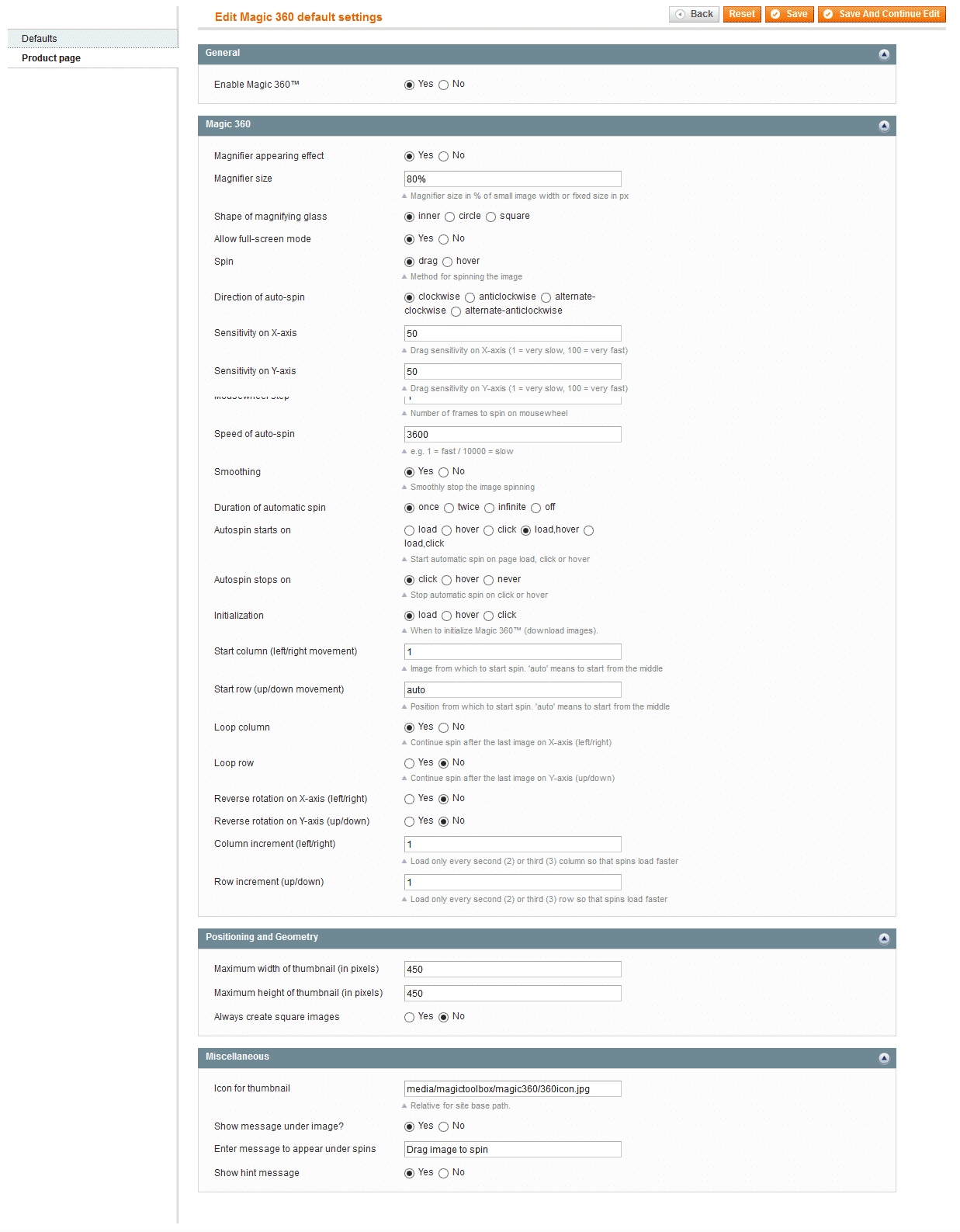
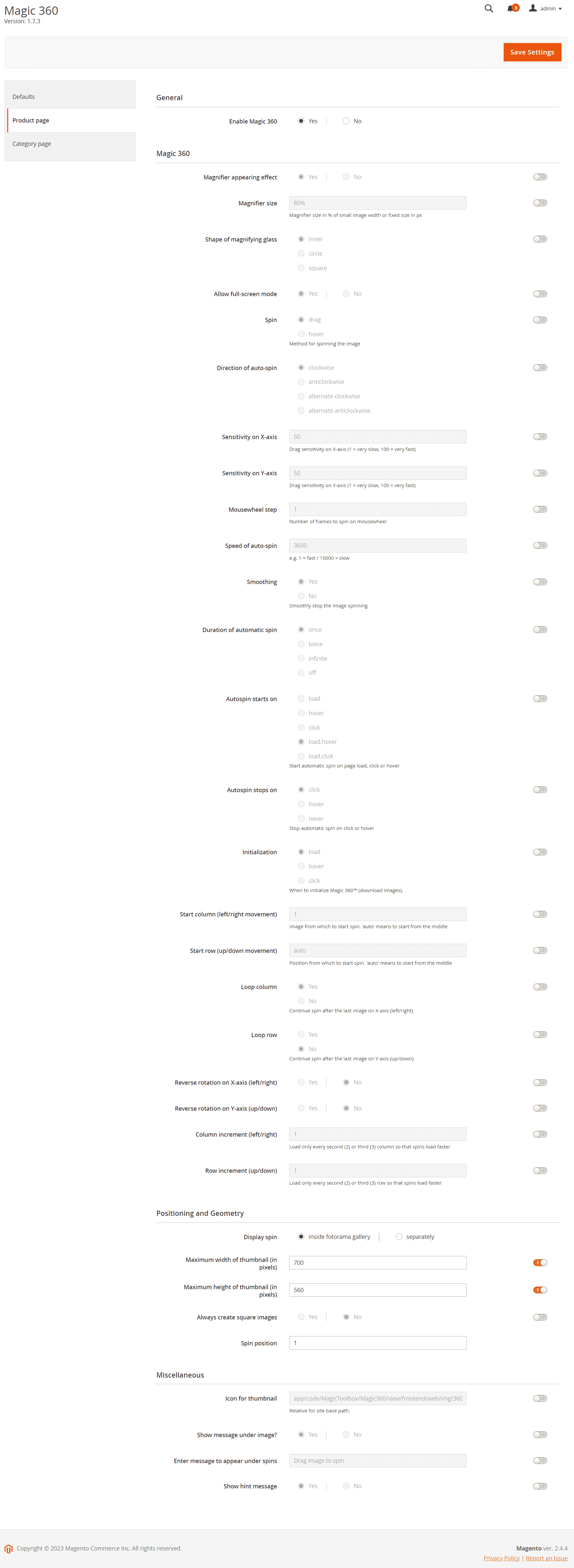
Screenshots

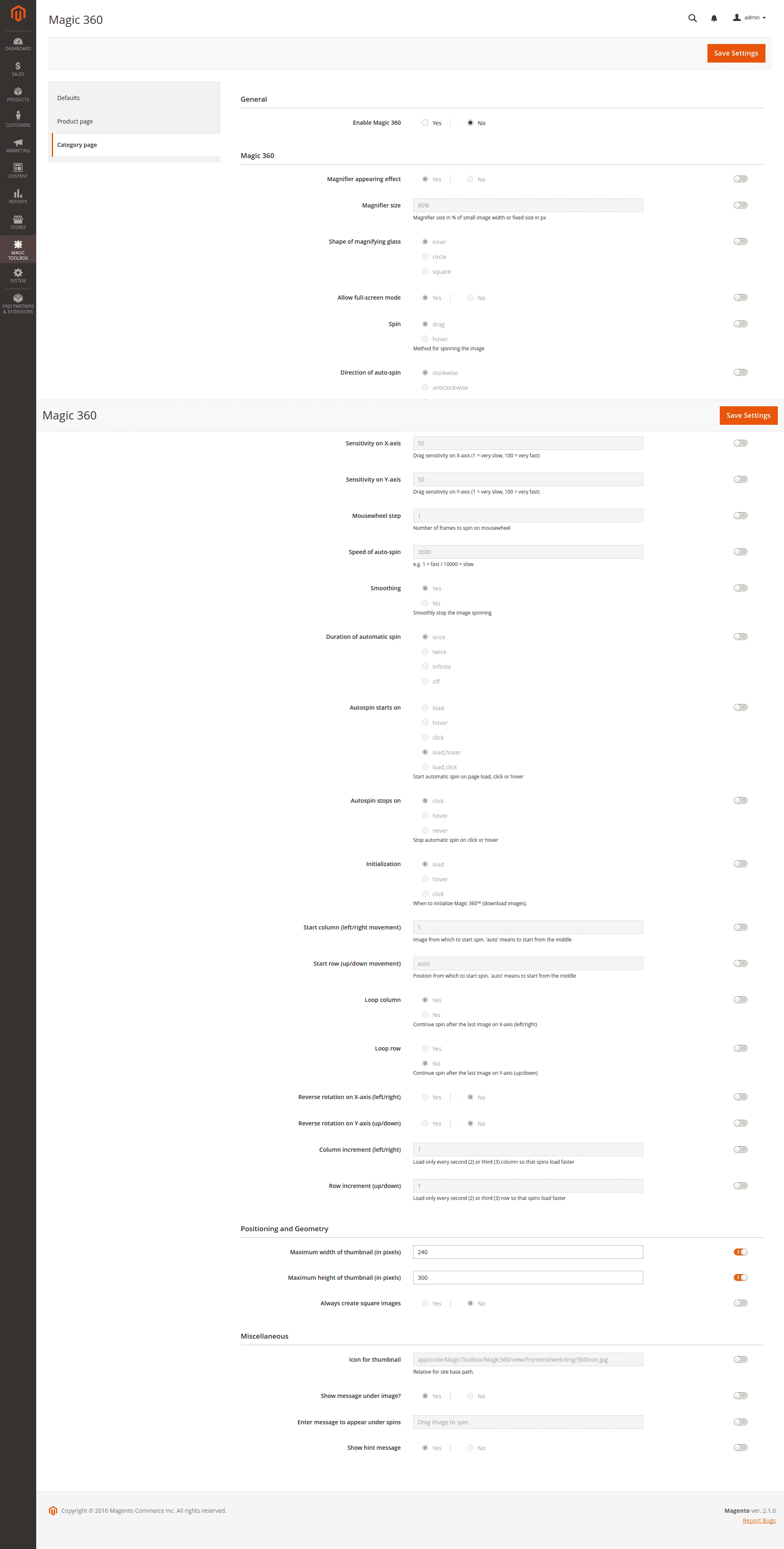
Installation
IMPORTANT: Magic 360 replaces the Magento image gallery when installed. This means only 360 spin displays on product page. Want to display 360 spin & static images? Install Magic Zoom Plus (video, zoom & enlarge) too.
Magic 360 supports Fotorama Gallery on any Magento 2 store. Display both static product images and 360 degree spin together, or display the 360 spin on a different part of the product page (screenshot - 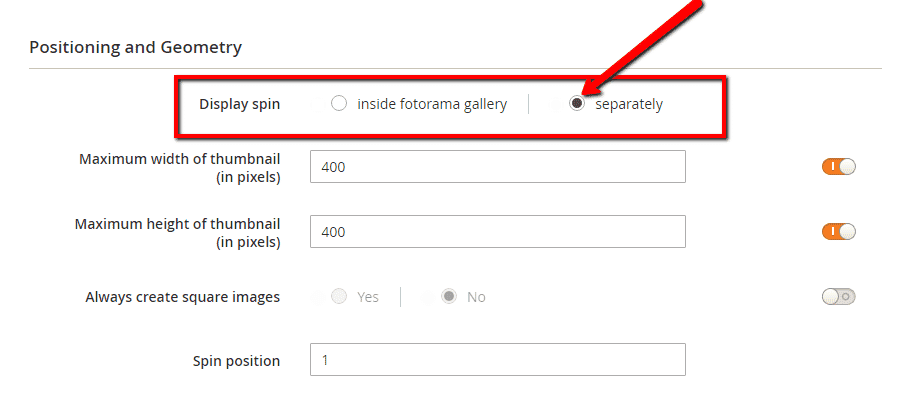 ).
).
Magento 1.x reached end-of-support on June 30, 2020. New features will not be added to our Magento 1 extensions after this time.
- Download Magic 360 for Magento (free and fully functional demo version).
- Unzip the file on your computer and FTP the magic360 folder to your Magento directory (on your server), keeping the file and folder structure intact.
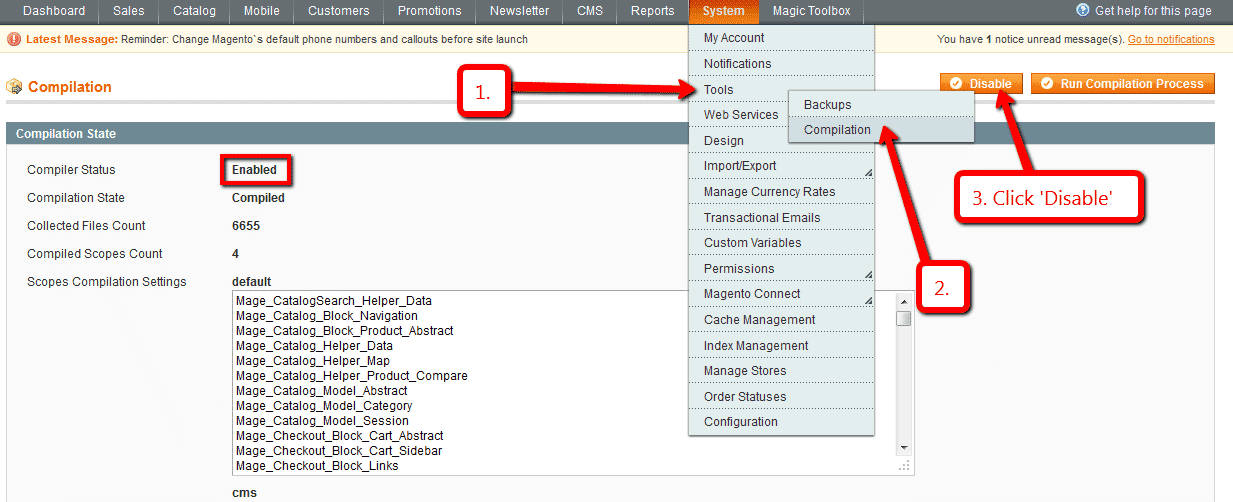
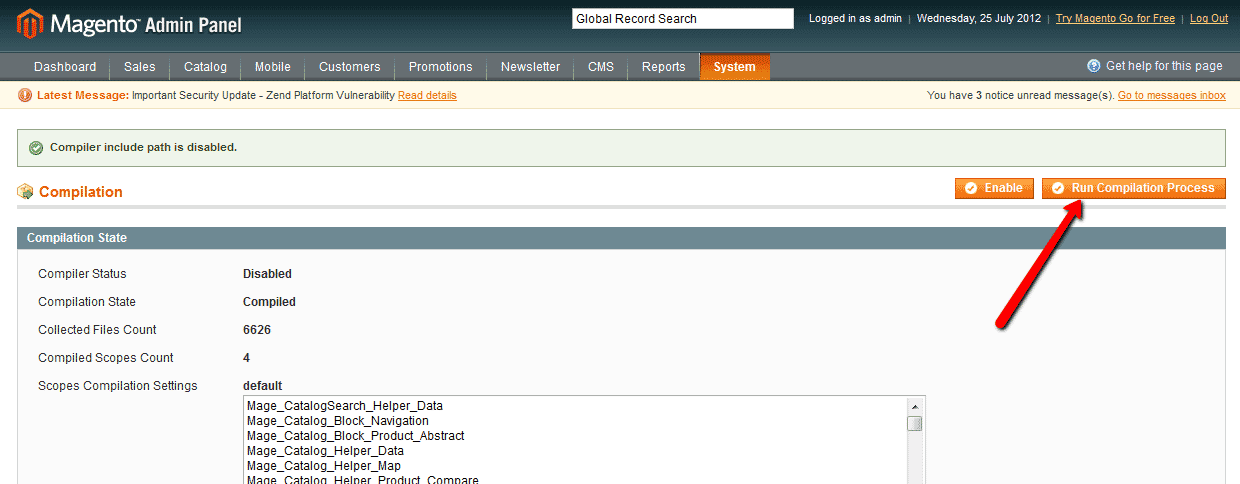
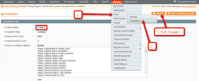 If you use Magento Compiler, disable it System > Tools > Compilation > Disable.
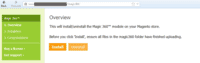 Go to http://www.yoursite.url/magic360/ in your browser > click 'Install' (replace yoursite.url with your domain name).
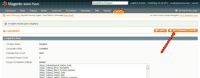 If you use Magento Compiler, click 'Run Compilation Process'.
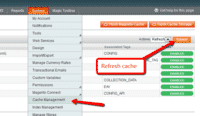 Go to System > Cache Management > Select All and refresh the cache.
- The demo version is now installed! To create a 360 spin, see detailed steps below.
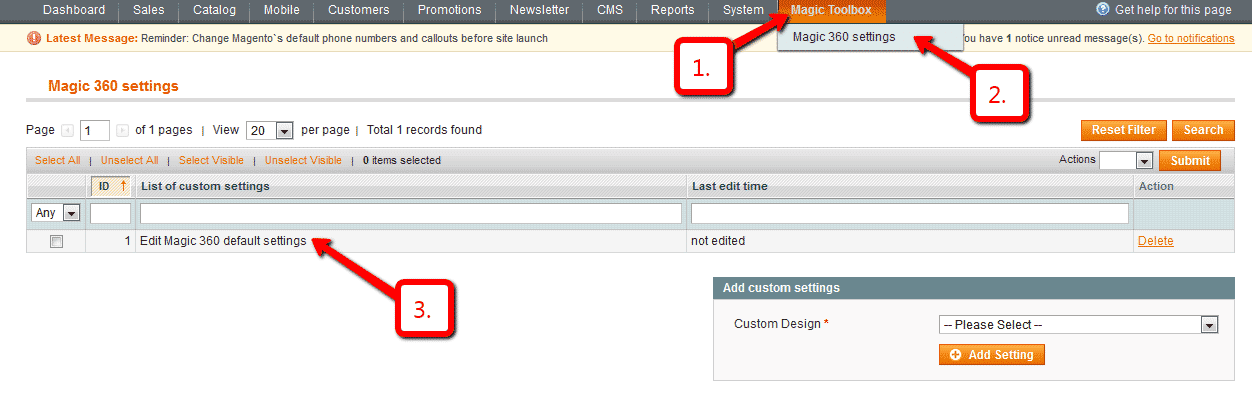
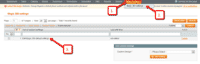 To customize your Magic 360 options (speed, autospin etc), go to Magic Toolbox > Magic 360 settings > Default settings in your Magento admin panel.
- Buy Magic 360 To upgrade your version of Magic 360 (which removes the "Trial version" text), buy Magic 360 and overwrite following file with the same one from your licensed version:
/skin/frontend/[your_interface]/[your_theme]/js/magic360.js


- Download Magic 360 for Magento 2 (free and fully functional demo version).
- Unzip the file on your computer and FTP the 'app' folder to your Magento directory (on your server), keeping the file and folder structure intact.
Activate module from command line:
#List all modules php -f bin/magento module:status #Enable Magic 360 module php -f bin/magento module:enable MagicToolbox_Magic360 --clear-static-content #Run database installation upgrades php -f bin/magento setup:upgrade #Remove previously compiled classes rm -rf var/generation #Compile (only needed in Production Mode) php -f bin/magento setup:di:compile #Deploy Static Content (only needed in Production Mode) php -f bin/magento setup:static-content:deploy- The demo version is now installed.
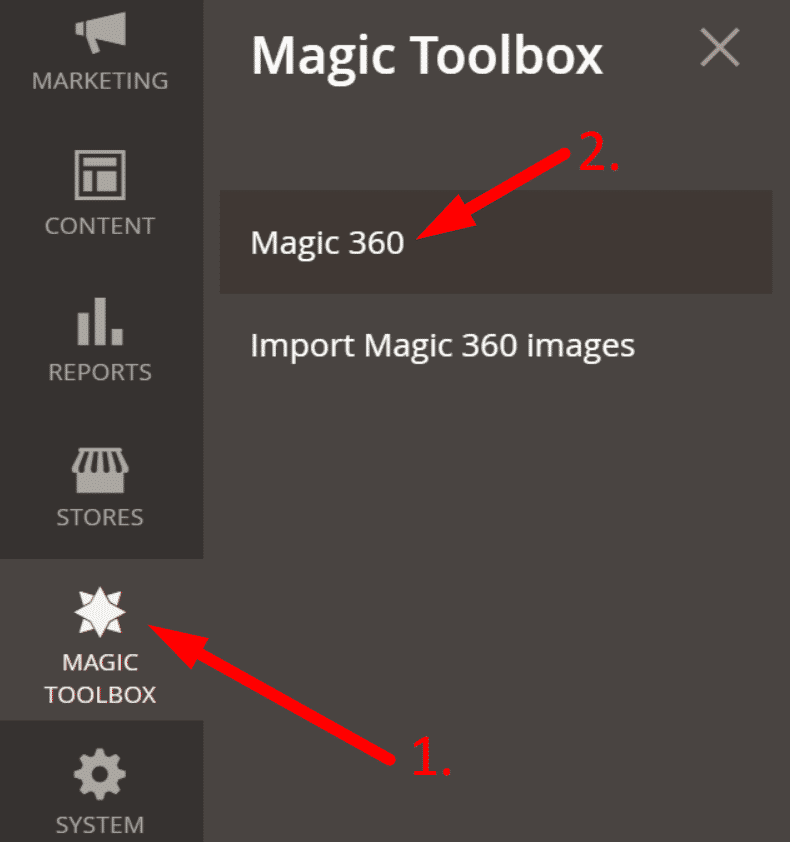
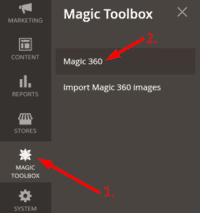 Customize Magic 360 settings to suit your needs - go to the [Magic Toolbox > Magic 360] menu in the Magento admin panel.
- If you need help, please send questions to our support team. Include your page URL and if you'd like us to make changes, a login to your Magento admin. We reply to every email as quickly as possible (Monday-Friday, 9am-5pm UTC).
- Buy Magic 360
To upgrade your version of Magic 360 (which removes the "Trial version" text), buy Magic 360 and overwrite following file with the same one from your licensed version:
app/code/MagicToolbox/Magic360/view/frontend/web/js/magic360.js
Video tutorial
To setup a 360 spin
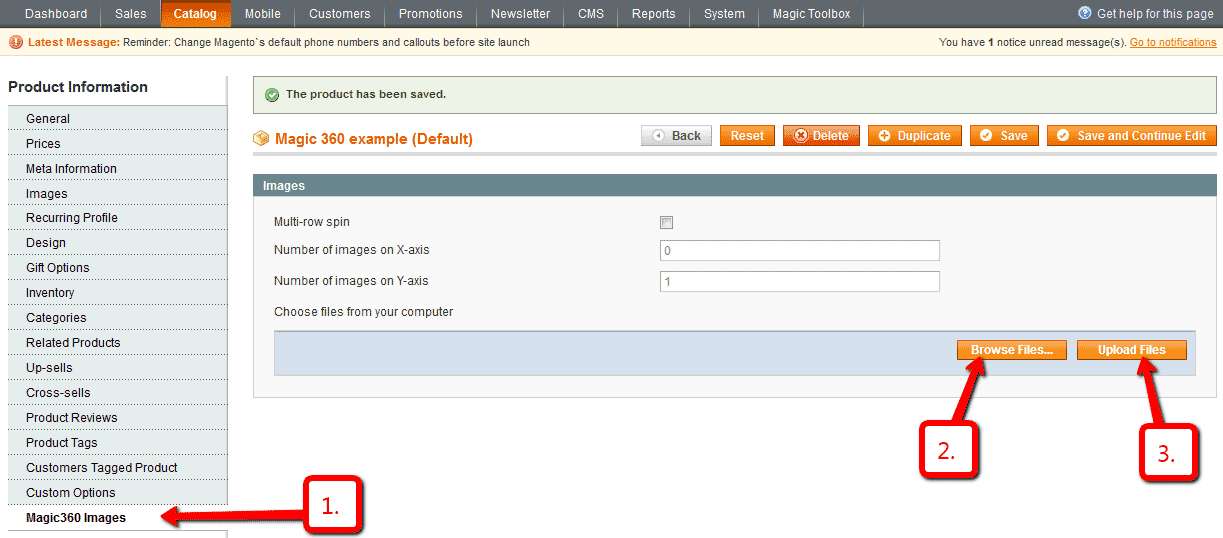
- Open the product which you'd like to spin and click Magic360 Images at the bottom of the left navigation (screenshot -
 ).
). - Browse your computer for your set of images and click Upload images (screenshot -
 ).
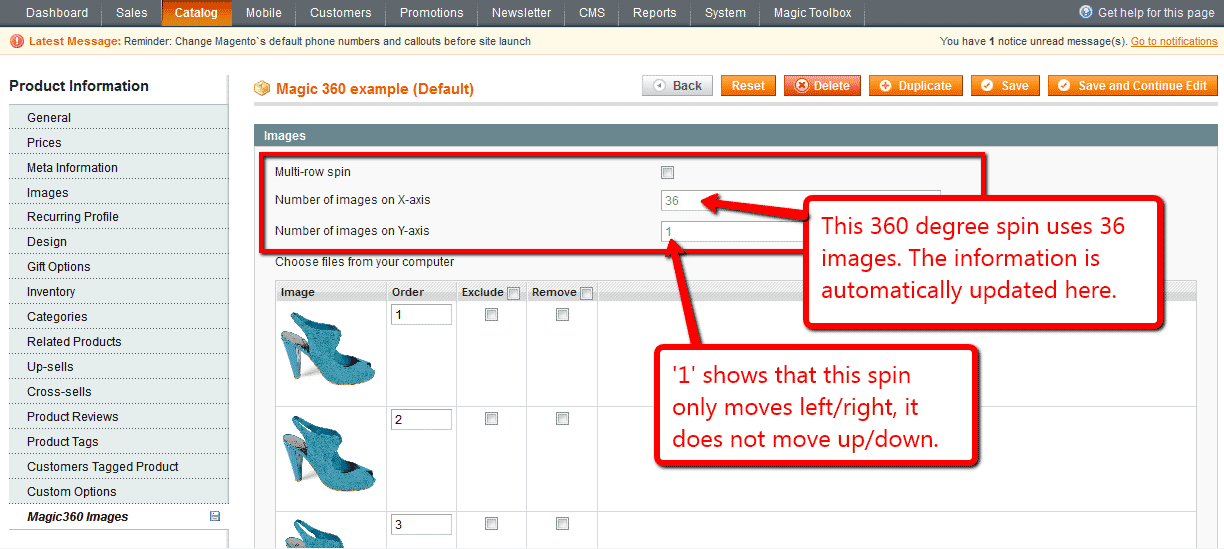
). - The 'Multi row spin' section at top of the page will automatically update. The 'Number of images on X-axis' shows how many images are in your spin. The 'Number of images on Y-axis' shows if your spin moves up/down. '1' means one row only (screenshot -
 ). If your spin has multiple rows, click 'Multi-row spin' (screenshot -
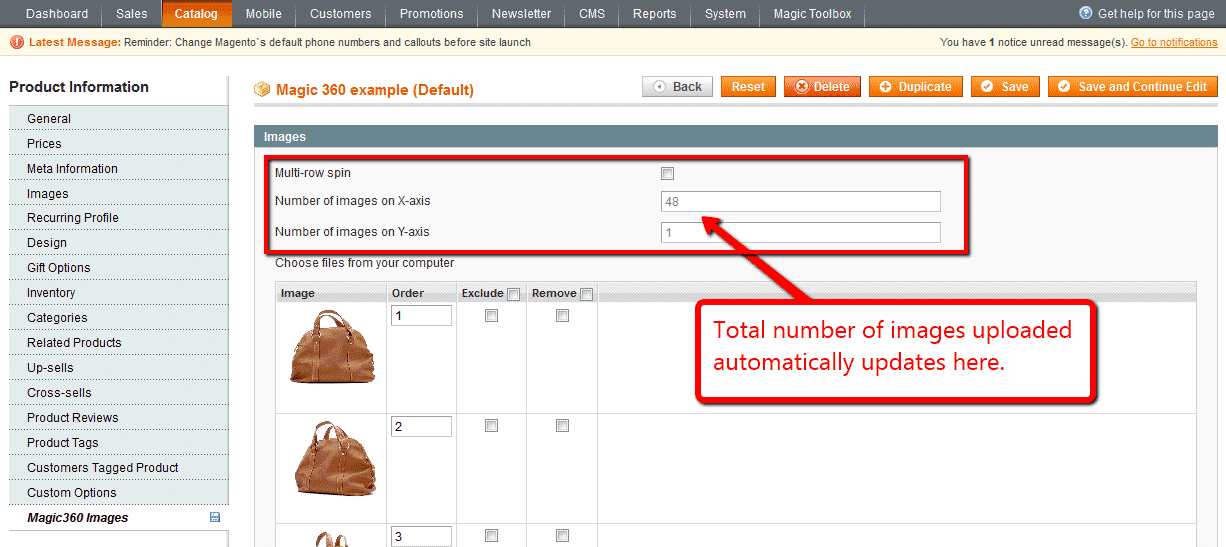
  ) and enter the number of columns and rows in Number of images on X-axis and Number of images on Y-axis (screenshot -
  ).
).

Multiple images


- Install the Magento module for Magic 360.
- Install the Magento module for Magic Zoom Plus.
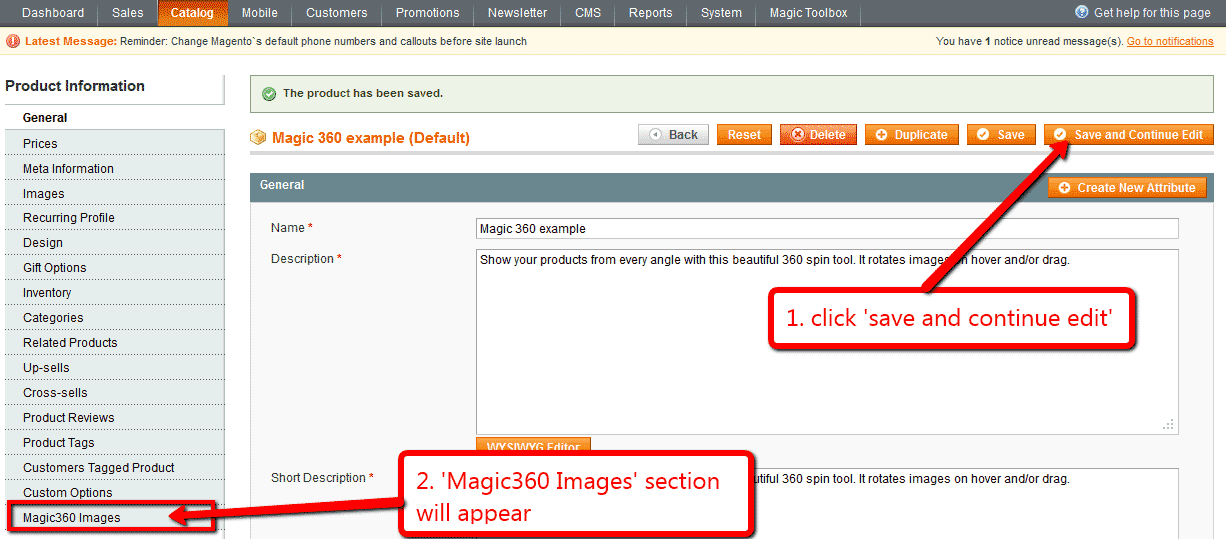
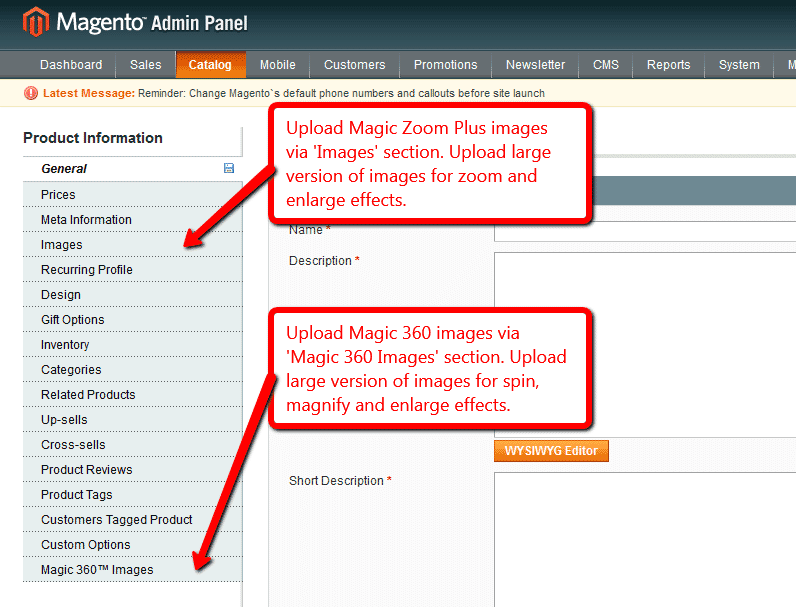
- Create product as normal. Click 'Save and Continue Edit'. A new section 'Magic360 Images' will appear at the bottom of the left hand navigation.
- Upload zoom images via 'Images' section. Upload 360 spin images via 'Magic360 Images' section (screenshot -
 ).
).
Multi-language
You can change the language of the message and loading text like so:- Find the locale folder for the language you wish to change e.g. /app/locale/en_US.
- Open the file Mage_Api.csv into the editor and insert these lines at the and of the file:
"Magic360_Message","Write your message here"
- Continue these steps for each locale you wish to change.
Bulk upload images
To upload many images to your Magento 1.x site, use one of the 2 scripts that comes inside the Magic 360 extension.
Upload your images to your Magento site using FTP. The location and folder structure must follow one of these two patterns:
https://yourdomain.com/magic360images/{product-SKU}/anyfilename1.jpg
https://yourdomain.com/magic360images/{product-SKU}/anyfilename2.jpg
https://yourdomain.com/magic360images/{product-SKU}/anyfilename3.jpg
etc.
or:
https://yourdomain.com/magic360images/{product-ID}/anyfilename1.jpg
https://yourdomain.com/magic360images/{product-ID}/anyfilename2.jpg
https://yourdomain.com/magic360images/{product-ID}/anyfilename3.jpg
etc.
The folder names must exactly match your product ID or SKU. The file names can be anything - images will be added to the spin in alphanumeric order.
- Download the latest version of Magic 360 for Magento.
- Unzip the extension.
Find these two bulk upload scripts:
bulk_360.php
bulk_360_id.phpUpload the scripts to the root of your Magento site e.g.
https://yourdomain.com/bulk_360.php
https://yourdomain.com/bulk_360_id.php
- Execute the script that matches your folder names. The bulk_360.php script is for folders named with the product SKU. The bulk_360_id.php script is for folders named with the product ID.
- The script will copy all the images into your Magento database. It can take about 1 second per 36 image spin.
- Once the script has finished, it will show you a report of all the images copied.
- You've finished! You might like to delete the images that you uploaded. You might also like to change the file name of the PHP script to avoid malicious usage. The same script can be used again next time you need to upload images.
Uploading multiple spins to your Magento 2 store at once is easy with the 'Import images to Magic 360' page.
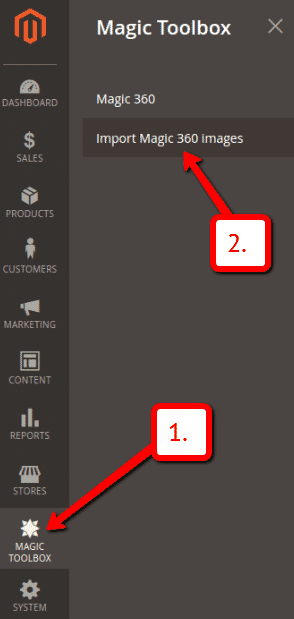
 Go to the [Magic Toolbox > Import Magic 360 images] menu in the Magento admin panel.
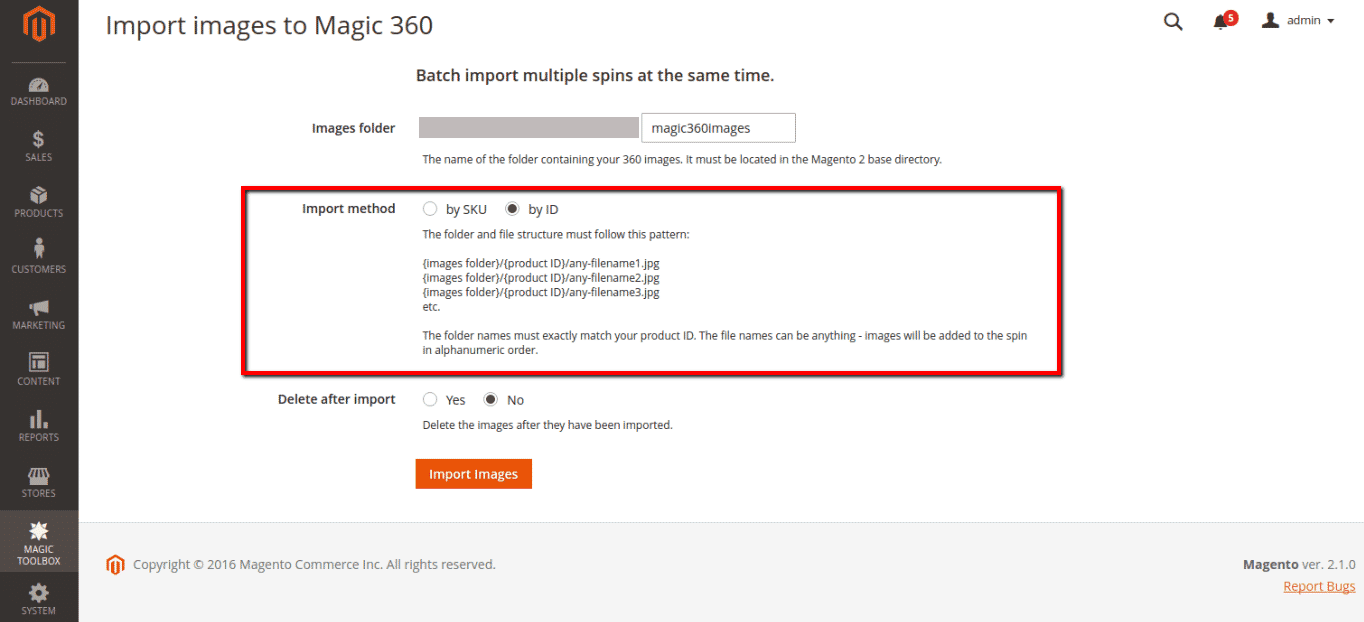
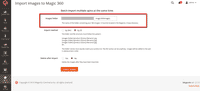 Enter the name of the folder which contains your 360 images. The folder must be located in the Magento 2 root directory.
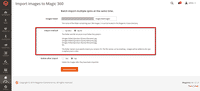 The folder names must exactly match your product ID or SKU. The spin file names can be anything - images will be added to the spin in alphanumeric order.
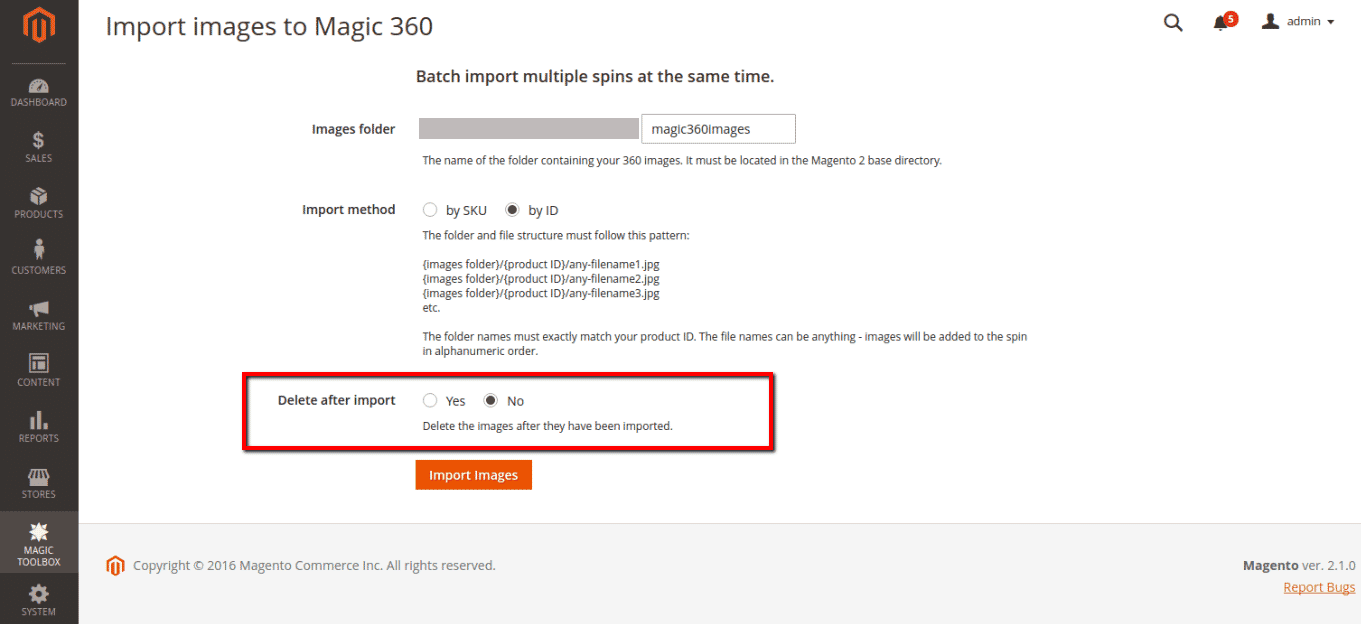
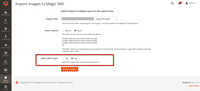 By default, 'Delete after import' is set to 'no'.
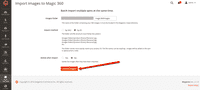 Click 'Import Images' button.
- That's it!


Upload 360 images
A single spin moves left/right. It's important your images are numbered in the order you want them to appear, eg: ring-01.jpg, ring-02.jpg, ring-03.jpg etc. The video below shows how easy it is to upload your 360 images to a product. If you have many spins to upload to your Magento store, check out the Bulk upload images steps.
Tip: Generally, 360 photography studios provide 36 high resolution JPEG images of each product to create a spin. This means each image must be taken at a 10 degree interval for the spin to feel smooth when viewed. You can take any number of photos (more or less), the crucial factor is that each frame is separated by the same number of degrees, making it feel consistent.
Upload 3D images
A 3D spin can move up/down and left/right. The example in the video uses 48 images in total. 12 images create the left/right spin, with 4 rows of each (up/down movement).
Tip: Photographing a 3D spin is accomplished by taking the first set of images at one level, then adjusting the camera position and taking the next set of images at a different level, and so on.
Spin in CMS area
Add 360 degree spin effects to any CMS page on your Magento 1.x store.
- Go to Magic Toolbox > Magic 360 settings > Default settings menu in your Magento admin panel.
- Go to 'Defaults' tab > General > Include headers on all pages > Select 'Yes' > Save settings.
- Go to 'CMS > Pages'.
- Open existing page or create a new page.
- Click 'Content' tab > Click 'HTML' button (a pop up box will appear).
Add a 360 spin to any CMS page by inserting an <img> tag for the first image in your spin. Wrap an <a> tag around it with a class of Magic360 and href of #. Specify the format of your file names using the filename parameter inside a data-options tag (this is described in detail on the Magic 360 integration page).
<a href="#" class="Magic360" data-options="filename:YOUR-IMAGE-NAME-{col}.jpg;"><img src="YOUR-IMAGE-NAME-01.jpg"></a>- Click 'Update' > Click 'Save page'.
- All HTML code for Magic 360 settings are described here.
Magento product spin benefits
Is your development agency a certified Magento expert?
Use a 360 degree image rotation to help your clients businesses attract more customers and grow their sales.
Whether your clients sell delicate items such as jewellery or bulky items like furniture, 360 product spins increase conversions because consumers can see what your client is selling from every angle. Creating a wonderful shopping experience for consumers whilst reducing returns, which saves your clients precious time.
Have 360 spins as a new service
As well as offering migration, design and development services, offer 360 spins to all your clients as a standard service too. Buy the Magic 360 Unlimited license for only £1199 and all your clients can display 360 degree spins on their Magento stores.
Spin images can be uploaded directly to the product or if your clients have a large number of spins, you can quickly upload all the spin images at once using the bulk upload script.
If you're a Magento Expert and also build Shopify stores and other eCommerce platform websites, all your clients will benefit from the Unlimited license because Magic 360 supports 20 different Platforms. You can also install Magic 360 on your own website as a demo to show customers how impressive a 360 degree spin is.
Why choose Magic 360?
Along with a 360 degree image rotation the 360 spin also has a magnify effect to zoom into a specific area of the spin, and a full-screen feature which is perfect for mobile devices.
Magic 360 is fully responsive, supports any number of images (commonly between 24 and 72 images are used - we recommend 36) and has customizable buttons & text so the look can fit perfectly with your clients store design.
360 photography
Often clients organize their 360 photography before thinking about how to display the spins on their eCommerce store. But if your client hasn't contacted a 360 photography studio, help them locate a studio in their area to make life a little easier. Search online for "360 photography studio” or use the Sirv Experts Directory to discover 360 photography studios and review their 360 spins before making contact.
While your clients wait for their 360 photography to be shot, download a set of demo spin images to test Magic 360 on their Magento store.
We provide free technical support
Think of us an extension to your agency! If you have any questions or issues, drop us an email and receive super fast support from our Technical team.
Uninstallation
Thanks for trying Magic 360 on your Magento site! What did you hope Magic 360 could do? How can we improve it? Let us know, we're always improving our tools based on customer feedback.
- If you use Magento Compiler, disable it System > Tools > Compilation > Disable.
- Go to System > Cache Management > Select All and disable the cache.
- Go to http://your.site.url/magic360/ in your browser and click 'Uninstall' (replace yoursite.url with your domain name).
- If you use Magento Compiler, click 'Run Compilation Process'.
- Go to System > Cache Management > Select All and refresh / enable the cache.
- Delete the magic360 folder from the root of your Magento directory (on your server).
- Magic 360 is now uninstalled.
Deactivate module from command line:
php -f bin/magento module:disable MagicToolbox_Magic360 --clear-static-content
- Delete folder with module from your Magento directory (on your server).
- Magic 360 is now uninstalled.
FAQ
Is Magic 360 compatible with Hyvä theme?
A small customization is required to make Magic 360 compatible with Hyvä on your Magento 2 store. Please send login details (FTP/SFTP & Admin area) and we will do this for you (free of charge).What is a 360 product viewer?
A 360 product viewer takes a set of 360 degree images and merges them together on a web page. This creates an interactive spin which visitors can move left and right to see every angle of the item. (If your 360 photography was also taken on Rows, your 360 spin will move up and down too.)Can I use Magic 360 on Category pages?
If you use Magento 2.x, you can easily add 360 spins to your Category page - just go to the Magic 360 settings page after you've installed the extension. If you use Magento 1.x, the Magic 360 extension doesn't have the Category page option but we can customise it on your website for £80. Contact us if you'd like to arrange that.Is Magic Zoom Plus included in the Magic 360 license or is it purchased separately?
Magic Zoom Plus should be purchased separately. You should use it if you want to combine both regular product images and spin on the same product details page. To receive 35% discount off Magic Zoom Plus, add Magic 360 to your Cart first and then add Magic Zoom Plus.Are there any known conflicts of your extension with other Magento extensions?
Magic 360 should be compatible with all extensions. You can download and try the free trial before purchasing. If you have any questions, please let us know.Is it possible to bulk import spin images from FTP to database?
Yes, we have a special PHP script for bulk import. Please follow the step-by-step instructions on this page.How do I place a 360 image on another page (other than product page)?
1. Go to Magic 360 settings page > Default tab.
2. Set the 'include headers' on all pages' > Yes.
3. Now you can insert 360 spins any where on your website using Magic 360 HTML code. Your code will look like this:<a href="#" class="Magic360" data-magic360-options="filename:ring-{col}.jpg;"><img src="ring-01.jpg" alt=""></a>All HTML code for Magic 360 settings are described here.